SECURITY CAMERA User Manual
WWW.RSRTENG.COM Page.17.
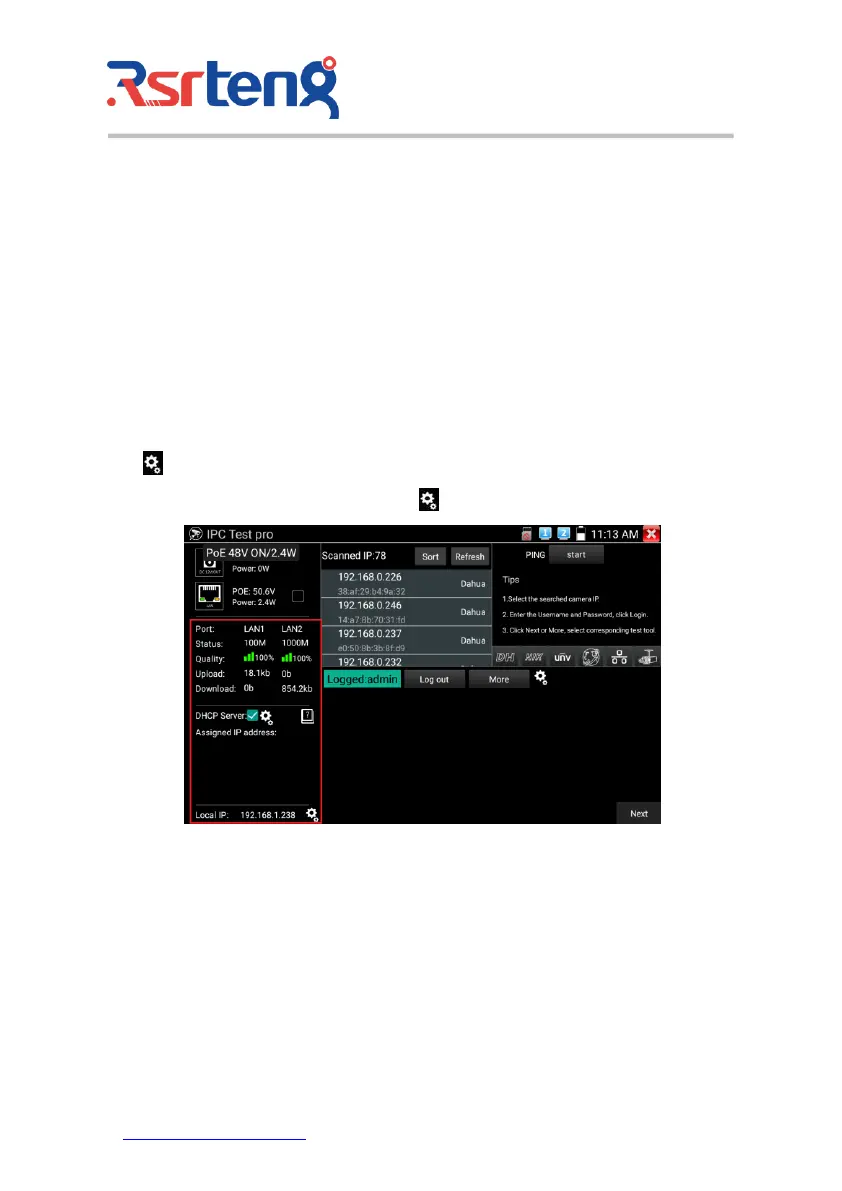
Networking information
Link status:10/100/1000M Auto adapt, display the current network rate of the connected device.
Signal quality: the transmission quality of the currently connected network, normal is 100%.
Upload/Download rate: Real-time upload and download rate of the LAN and PSE IN port of the
meter.
Practicability: connect the meter to the transmission channel between the hard disk or recorder and
the camera, detect the real-time bandwidth traffic of the network and the hard disk recorder.
Checking bandwidth problems caused network or video recorder loss problems etc.
DHCP server: after entering “IPC test pro” app, the DHCP Auto-turn on. Go “Assigned IP “-IP Info., click
icon “ “to enter “Network tool-DHCP .
Local IP: display IP address of the meter, click icon” to enter “System setting-IP setting”.
Camera information
Total number of searched IP address: Display the searched device IP address list. After entering the
APP, when the network is connected, it will automatically search for the IP of the cameras in the entire
network connected to the tester. Click "Sort" to sort by IP in ascending order. Click "Refresh" to search
the list again.
PING test: After selecting the IP address of the camera, click "Start" to perform a ping test.



 To Next Page