AUDIO DISTRIBUTION
15
www.rticontrol.com
Dashboard
Option Description
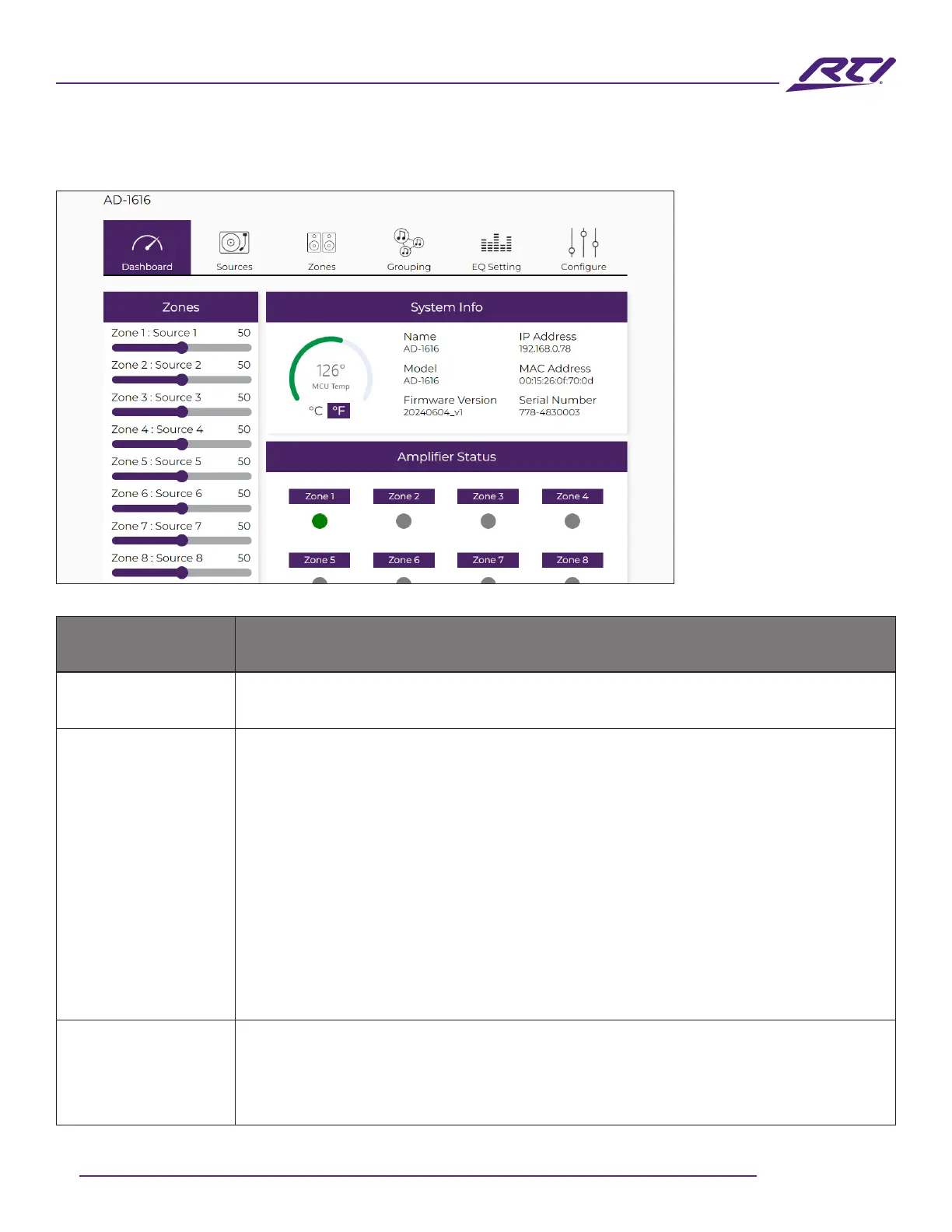
Zones
Displays all zones along with their assignable names and numeric volume levels
(0-100). The volume can be adjusted using the sliding bar.
System Info
The System Info section displays the following:
• Temperature: The color-coded radial gauge displays the current internal
temperature and indicates via color whether the matrix is operating within
acceptable (green) or unacceptable (red) limits.
Click on the C or F to change the unit to either Celsius or Fahrenheit.
• Name: Displays the name given to the matrix (modiable elsewhere in the GUI).
• Model: This is the model of the matrix.
• Firmware Version: Displays the current rmware version.
• IP Address: Displays the matrix’s IP address.
• MAC Address: Displays the matrix’s MAC address.
• Serial Number: Displays the matrix’s serial number.
Matrix Status
This section is designed to visually show the user when a particular zone(s) is in
operation.
• Zones in operation will display a green indicator.
• Zones that are not in operation will display a gray indicator.



 To Next Page