7
PREPARATION
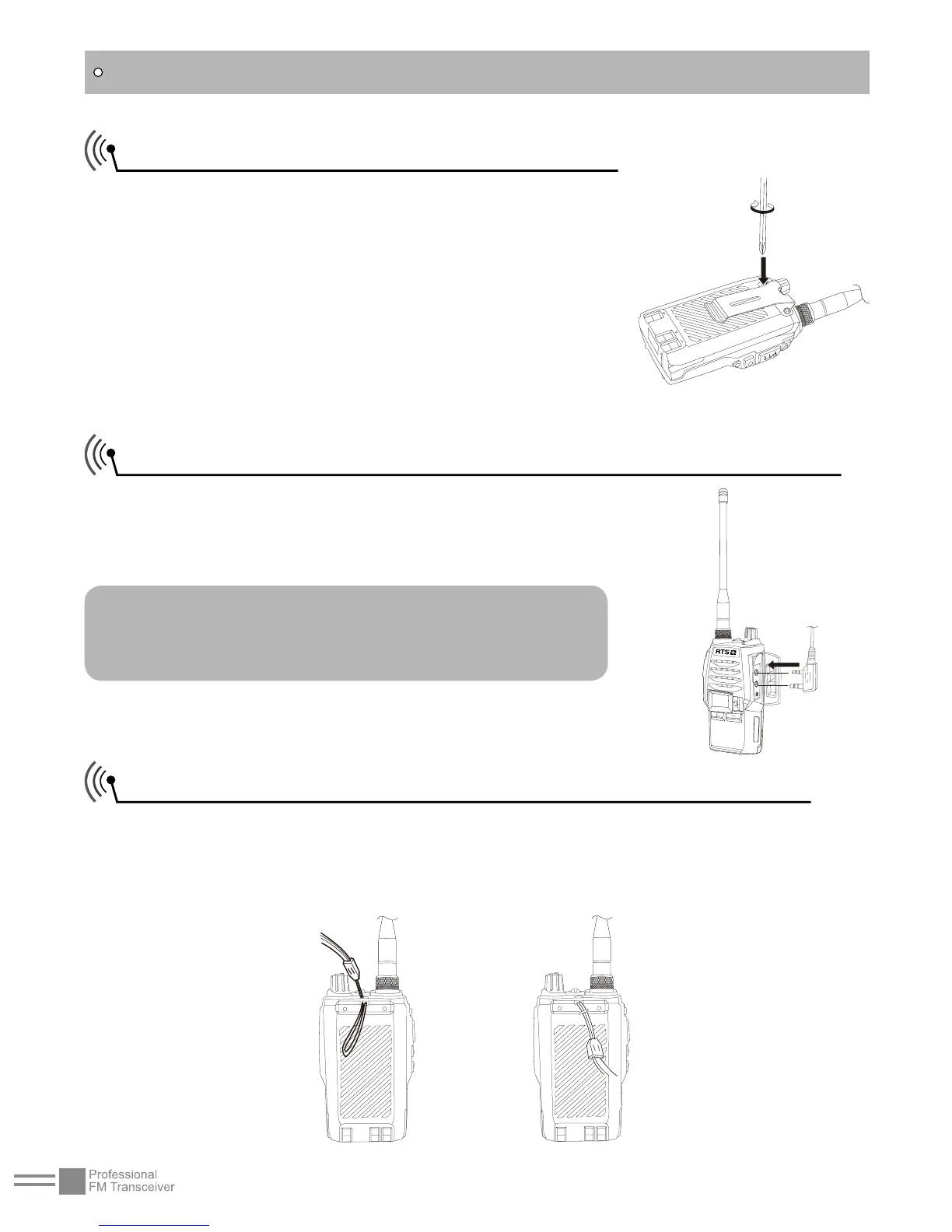
Installing / Removing the Belt Clip
■Installing the Belt Clip:
Place the belt clip to the corresponding
grooves on the back of the transceiver, and
then turn the screw clockwise.
■Removing the Belt Clip:
Anticlockwise turn the screws to remove
the belt clip.
Installing the Additional Speaker/ Microphone (Optional)
Unveil the MIC-SP jack cover and then
insert the Speaker/Microphone plug into
MIC-SP jack.
Note: The transceiver is not completely
waterproof while using the Speaker/
Microphone.
Installing/ Removing the Hand Strap (Optional)
Slide the loop of the hand strap through the eyelet on the upper
rear of the transceiver; then pull the entire hand strap through the
loop to secure the hands strap in place and lastly tighten the hands
strap.


 To Next Page