23
Navigating the Web Interface
Navigating the Web Interface
Navigating the Web Interface
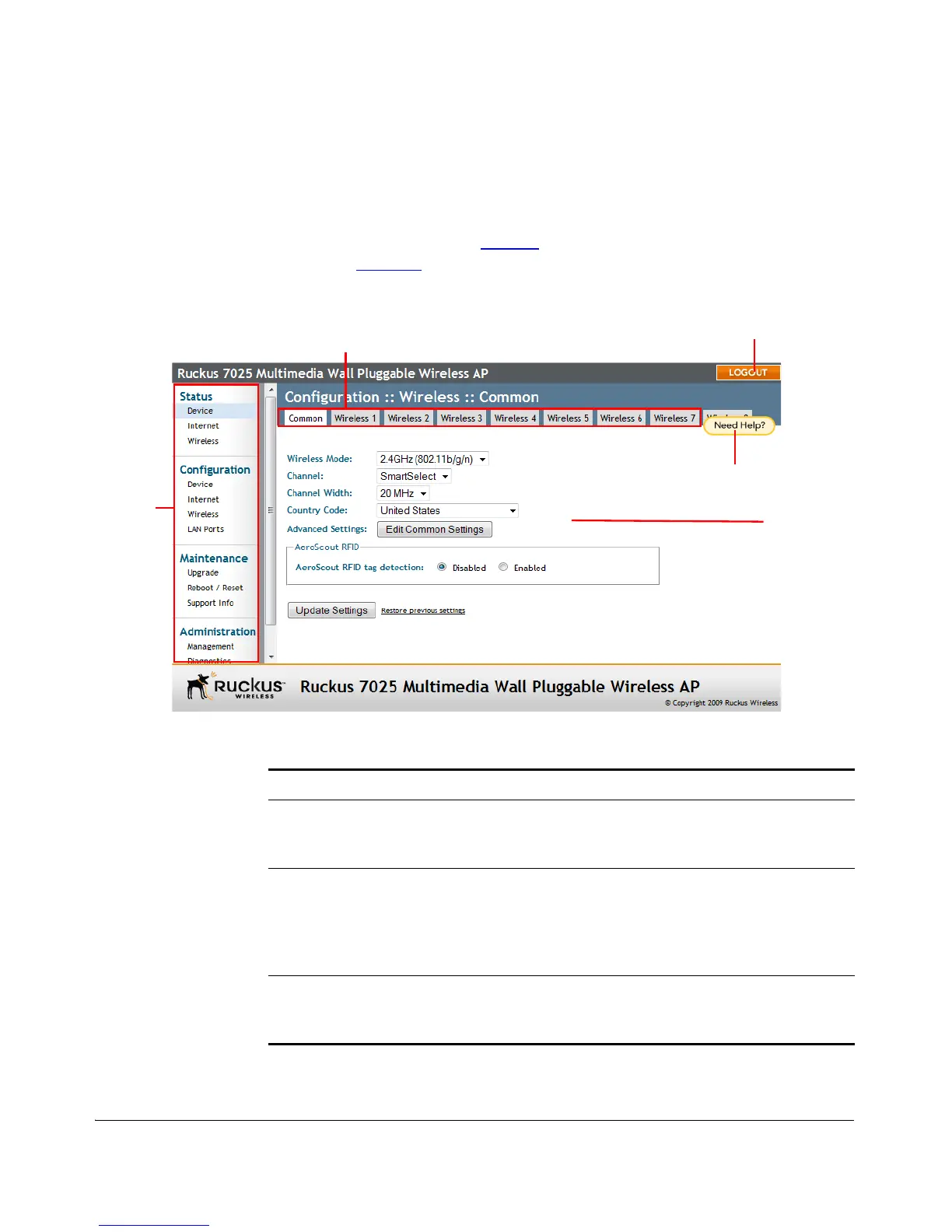
You manage the Multimedia Wi-Fi Wall Switch through a Web browser-based inter-
face that you can access from any computer that is on the same subnet as the
Multimedia Wi-Fi Wall Switch. Tab le 11
lists the Web interface features that are
identified in Figure 15
.
Figure 15. Elements of the 7025 Multimedia Wi-Fi Wall Switch Web Interface
Table 11. 7025 Multimedia Wi-Fi Wall Switch Web interface elements
Element Description
Menu Under each category (Status, Configuration, etc.)
are options that, when clicked, open the related
workspace in the area to the right.
Tabs Contains additional options for the configuration
page. For example, the Configuration > Wireless
page includes one tab for common wireless
configuration and eight tabs for each of the
available WLANs.
Workspace This large area displays features, options and
indicators relevant to the menu item that you
clicked.



 To Next Page