63
Managing the Multimedia Wi-Fi Wall Switch
Rebooting the Multimedia Wi-Fi Wall Switch
Rebooting the Multimedia Wi-Fi Wall Switch
You can use the Web User interface to prompt the Multimedia Wi-Fi Wall Switch to
reboot, which simply restarts the Multimedia Wi-Fi Wall Switch without changing any
of the current settings.
CAUTION: Rebooting the Multimedia Wi-Fi Wall Switch will disrupt network commu-
nications on any currently active WLANs.
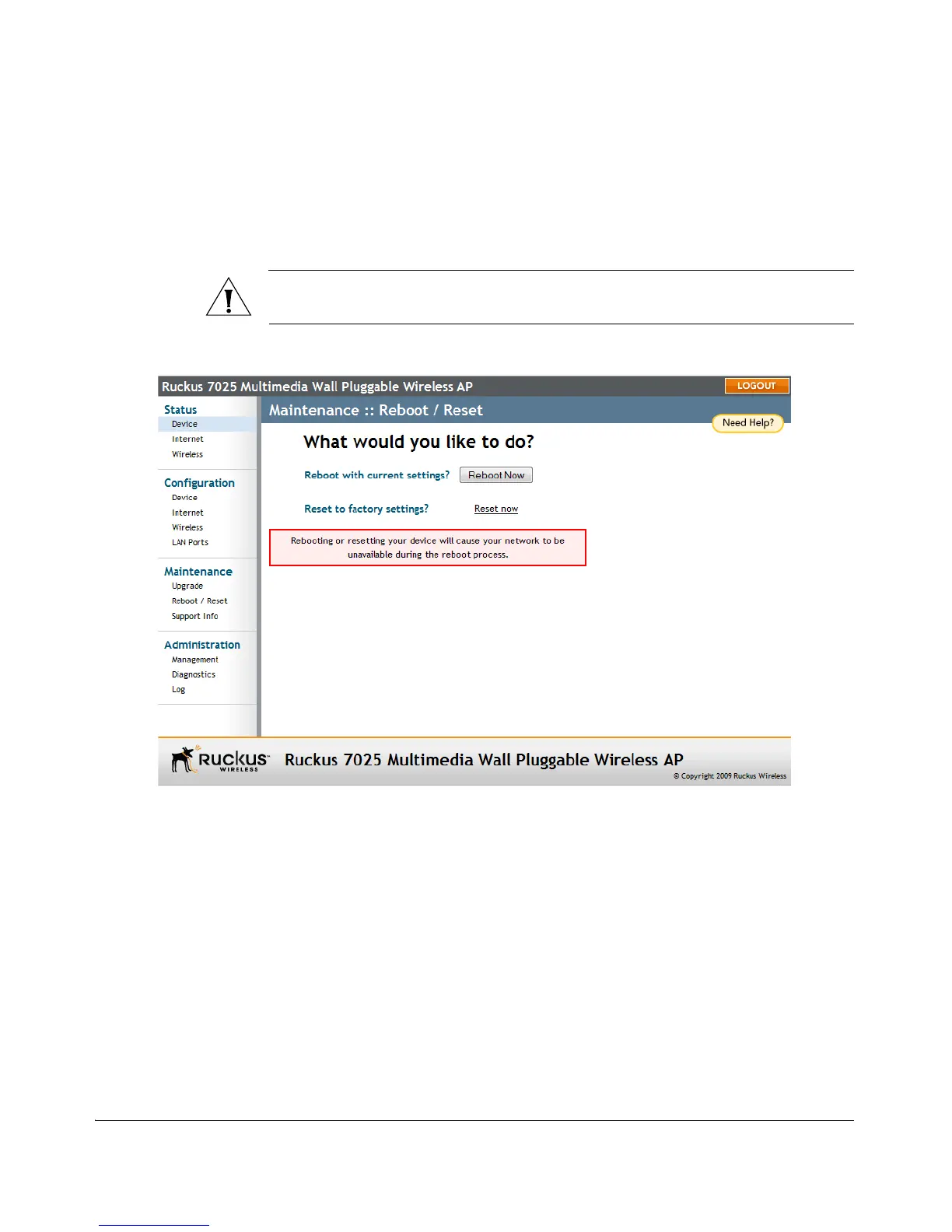
Figure 35. The Maintenance > Reboot/Reset page
To reboot the Multimedia Wi-Fi Wall Switch
1. Go to Maintenance > Reboot/Reset. The Maintenance :: Reboot/Reset page
appears.
2. Click Reboot Now. After a brief pause, you will be automatically logged out of
the Multimedia Wi-Fi Wall Switch.
After a minute or so, you should be able to log back into the Multimedia Wi-Fi Wall
Switch, which verifies that the reboot was successful. You can also check the LEDs on
the Multimedia Wi-Fi Wall Switch to verify the status of the device.



 To Next Page