40
Configuring the Multimedia Wi-Fi Wall Switch
Configuring Wireless Settings
Using WPA
Use of WPA-PSK allows automatic key generation based on a single passphrase. WPA-
PSK provides very strong security, but may not be supported on older wireless devices.
In some cases, the older devices can be upgraded with adapters to take advantage
of WPA-PSK.
If you configure the WLAN with WPA-PSK, some network users will not be able to
connect to your WLAN unless their devices are manually set to WPA-PSK and
configured with the same passphrase.
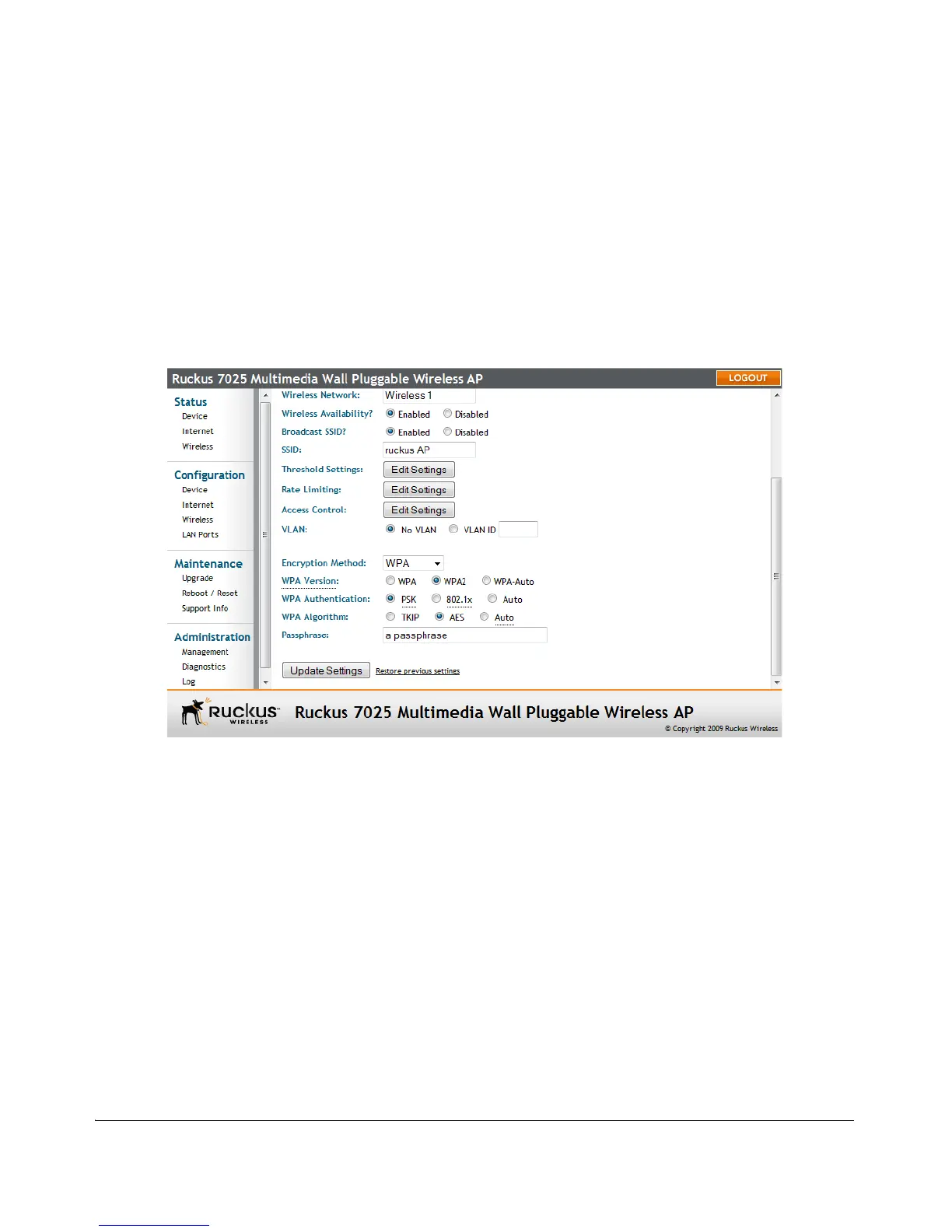
Figure 23. WPA settings
To configure WPA encryption settings
1. Go to Configuration > Wireless. The Configuration :: Wireless :: Common page
appears.
2. Click the Wireless # tab that you want to configure. The Configuration :: Wireless
:: Wireless[#] page appears.
3. Click the Encryption Method menu, and then click WPA. An additional set of
WPA-specific encryption options appear on this page.



 To Next Page