42
Configuring the Multimedia Wi-Fi Wall Switch
Configuring Wireless Settings
Customizing 802.1X Settings
CAUTION: Do not customize these options unless you are an experienced network
administrator or are under the guidance of an IT/support professional.
If you choose WPA as the encryption method, you have the option to set up the
Multimedia Wi-Fi Wall Switch to act as an 802.1X proxy, utilizing external authentica-
tion sources such as a RADIUS server. This provides a higher level of security, when
compared to the static security process in a WEP configuration.
Using 802.1X lets a device complete authentication prior to the exchange of data, as
in a DHCP environment. Another benefit is that each BSSID can be individually
configured to forward all authentication requests to its own server.
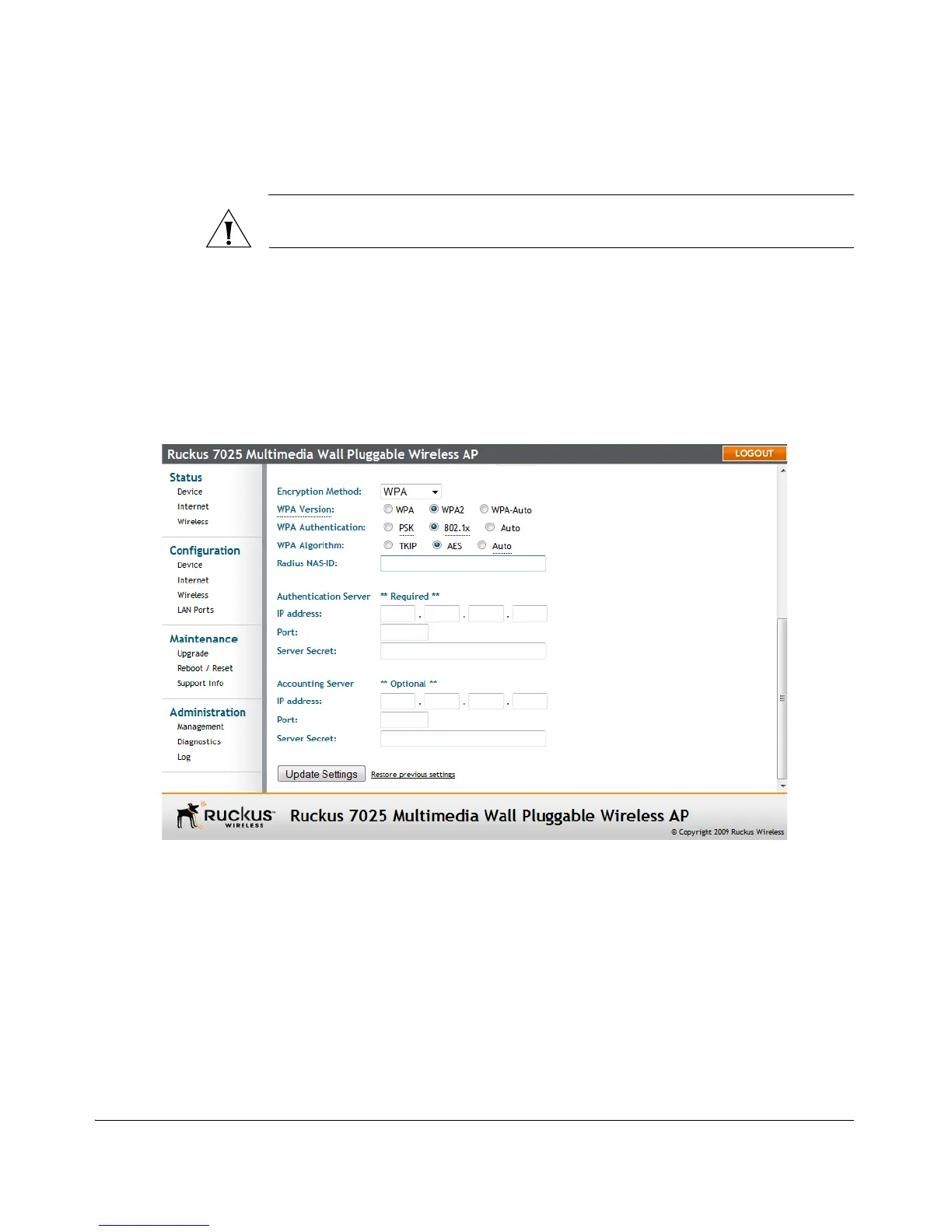
Figure 24. 802.1X settings
To configure WLAN-specific 802.1X authentication settings
1. Go to Configuration > Wireless. The Configuration :: Wireless :: Common page
appears.
2. Click a Wireless # tab to configure. The Configuration :: Wireless :: Wireless[#]
page appears.
3. Click the Encryption Method menu, then click WPA. The basic set of WPA-specific
encryption options appear on the page.
4. Select 802.1X as the WPA Authentication mode. Additional options appear.
5. Configure the following settings to customize your 802.1X authentication:



 To Next Page