F11GIM User Manual
4.3 Communication Range of Transmitter
Copyright ©2021 Ruko All Rights Reserved.
24
The forward direction of the Aircraft is based on the direction of the nose.
Smart RTH Button
Tap the smart RTH button on the Transmitter, and the Aircraft will activate the automatic
return home function. Tap it again to exit the smart return home. The aircraft is hovering
in the mid-air of the return home. At this time, you can operate the joystick to control
the Aircraft.
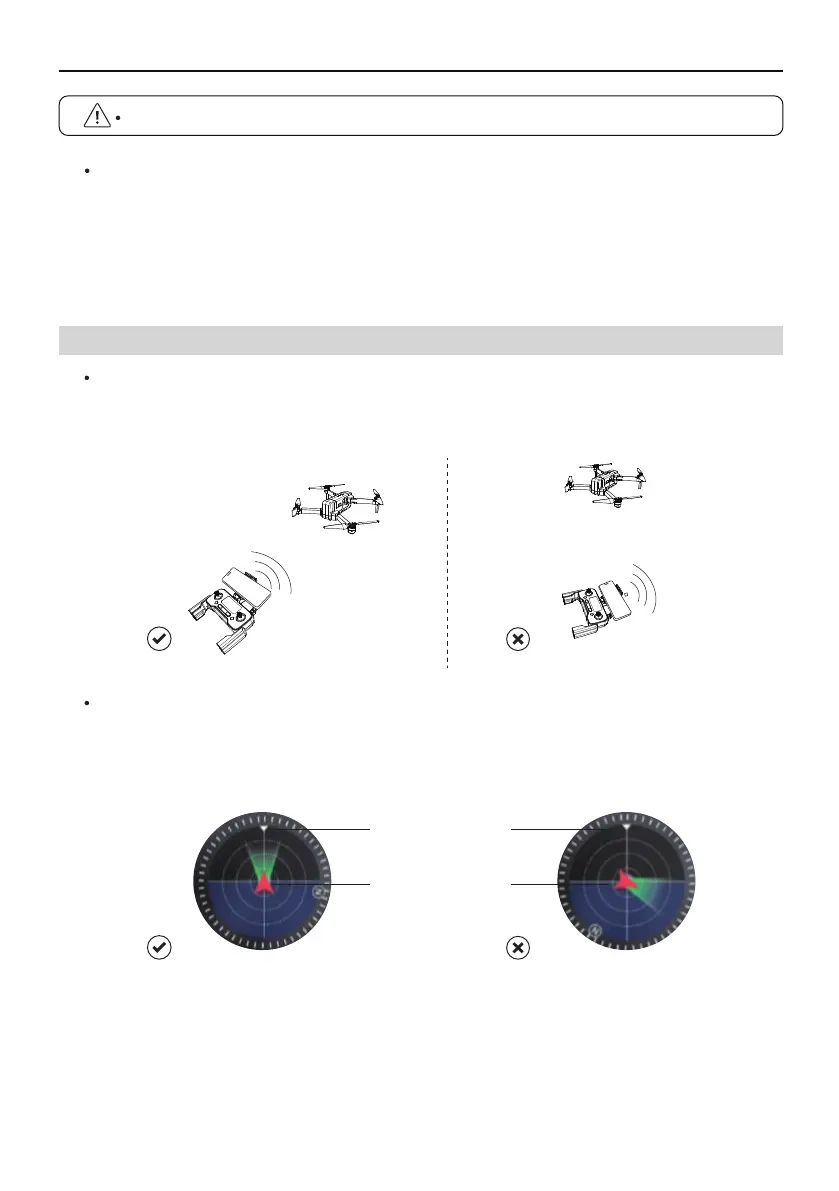
When controlling the Aircraft, the position and distance between the Transmitter and the
Aircraft should be adjusted in time, and the antenna position should be adjusted to ensure
that the Aircraft is always within the best communication range.
Install the mobile phone into the Transmitter bracket, refer to the aircraft flight direction
of the Attitude Indicator in the app, and the Attitude Indicator points straight ahead
(perpendicular to the coordinates), indicating that the Transmitter is facing the Aircraft.
Aircraft
orientation
Remote controller
position



 To Next Page