Take-off
After the Aircraft is calibrated, users can use the take-off function:
Method 1: Start the motor after confirming the safe take-off conditions.
Tap One-key Take-off button on the App to take off.
The Aircraft will take off automatically and hover at a distance of 4 ft from the
ground.
③
6.4 Starting/Stopping the Motors
6.5 Take-off / Landing
①
②
Please choose a flat ground to land.
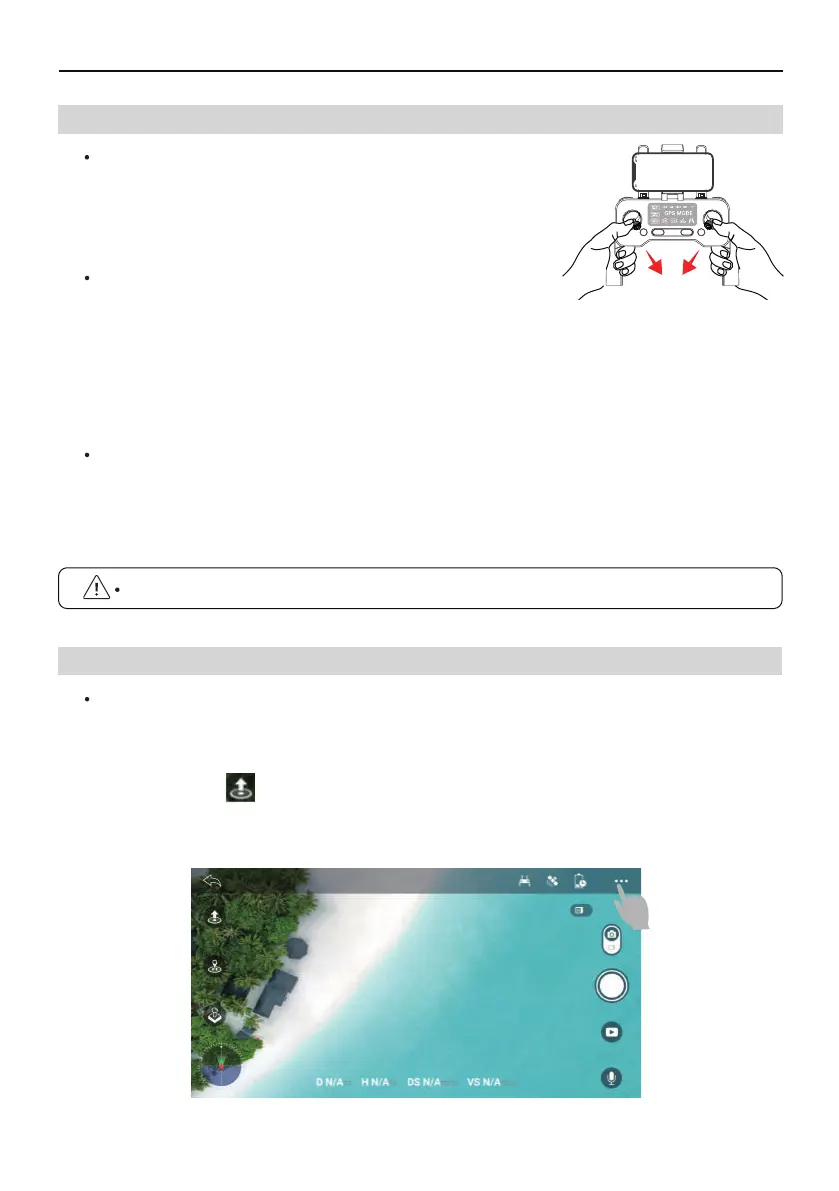
Starting the Motors
Push the joysticks into 5 & 7’o clock position to start the motor.
Stopping the Motors
After the motor starts rotating, there are two ways to stop:
Method 1: After the Aircraft takes off, push the throttle stick to the lowest position and
operate the Aircraft to land until the motor stops, then release the joystick.
Method 2: When the flight is not taking off, Push the joysticks into 5 & 7’o clock position
to start the motor. After the motor is turned off, please release the joystick immediately.
Copyright ©2021 Ruko All Rights Reserved.36
F11GIM User Manual
Manually Land the Aircraft
When you need to manually land the Aircraft, continue to push the Transmitter throttle
lever downwards. Do not release the throttle lever during landing until the Aircraft lands
and the motors stop.



 To Next Page