3.7 Camera Overview
Camera Overview
The camera uses an upgraded 5GHz Wi-Fi FPV real-time transmission
function, equipped with a 120° FOV lens and a 90° adjustable camera,
which can stably shoot 4K HD video and photos when store in SD card,
providing you with a broad field of vision for unforgettable moments.
SD card is not included
Please remove the lens protective
film before the camera is using.
Storage of Photos and Videos
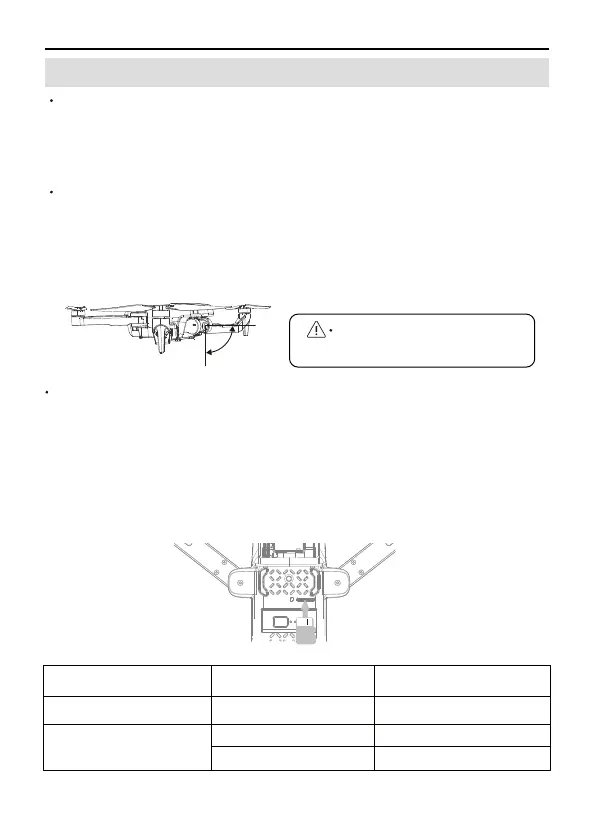
U11PRO is equipped with a micro SD card slot for storage space
expansion.( microSD card is not included)
Card speed:10M/s;
File format: support FAT32 format;
Memory capacity: the capacity of a memory card should equal to
32G or less than it.
The phone and the memory card store photos and videos at the
same time.
Camera Guideline
Remove the camera cover before usage.
Do not place the Aircraft on rough ground and turn it on, because
the camera will adjust up and down for self-calibration. Please place
it in a horizontal position to ensure that there is enough clearance
under the camera, otherwise the camera will get stuck.
①
②
①
②
③
④
Storage Mode Photo Resolution Video Resolution
Mobile Phone 3840x2160P 1280x720P@20fps
SD Card
3840x2160P
2560x1440P
3840x2160P@15fps
2560x1440P@25fps
U11PRO User Manual
Copyright ©2023 Ruko All Rights Reserved.
31
0°
-90°



 To Next Page