U11PRO Transmitter uses the 2.4 GHz frequency band, and the
Transmitter distance is up to 984FT-1640FT (unobstructed and
interference-free environment). The foldable handle can stably
place the mobile device, and the maximum adjustable width is 3.38
inches.
The charging time of the built-in 500mAh capacity battery is 1 hours,
the voltage of the battery is 3.7V, and the longest working time is
about 3.5 hours.
4.1 Transmitter Profile
4.2 Usage of the Transmitter
4 Transmitter
Power on and Power off
Power on : Long Press power switch for
3 seconds until the 4 indicator light flash
Power off : Long Press power switch for 3
seconds until the 4 indicator light off
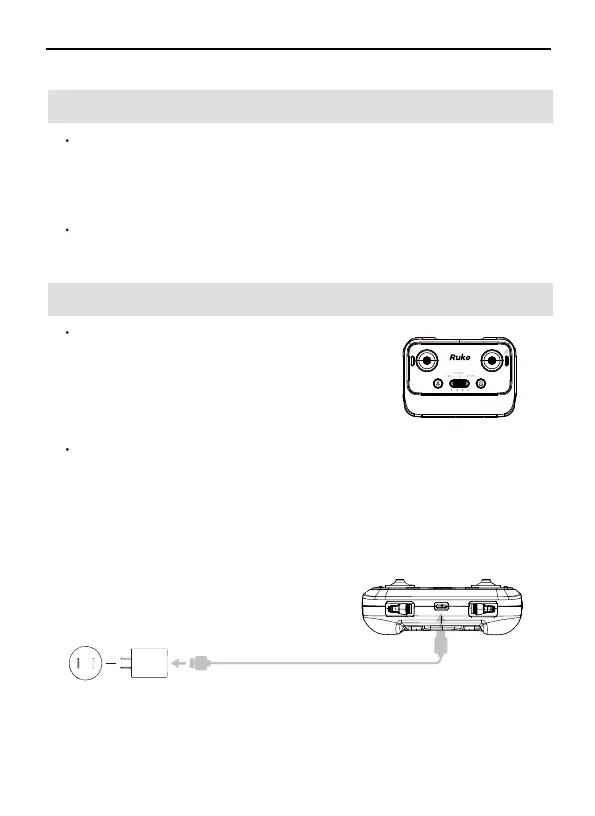
Charging the Battery
Connect the Transmitter Micro USB interface to the charger for
charging. It is forbidden to use fast chargers that exceed the rated
power of the battery. It is recommended to use 5V/2A or 5V/3A
chargers, do not use more than 5V/3A chargers.
When charging, 4 lights flash in turn, 4 lights are always on when
fully charged.
5V/2A~3A Adapter
(Not Including)
Charging Time:
About 1 hours
Original USB cable
②
①
U11PRO User Manual
Copyright ©2023 Ruko All Rights Reserved.
32



 To Next Page