U11PRO User Manual
Copyright ©2023 Ruko All Rights Reserved.
24
Aircraft records its position as the Home Point when taking off
after the GPS signal is successfully received;
Trigger RTH (triggered by low battery of Transmitter, signal loss,
etc.
Lost Signal RTH
When the Transmitter has low battery or is loses signal for 6 sec-
onds, the aircraft will enter the auto-return mode and return to the
take-off point. If the signal is recovered during the return home
process, the Aircraft will stop returning and rebind with the Trans-
mitter signal, then the Transmitter can control the Aircraft again at
this time.
①
②
After triggering the Return-to-Home function, the Aircraft adjusts
the direction and starts to return home;
The Aircraft automatically flies above the home point, then starts to
land, and completes the home return.
④
③
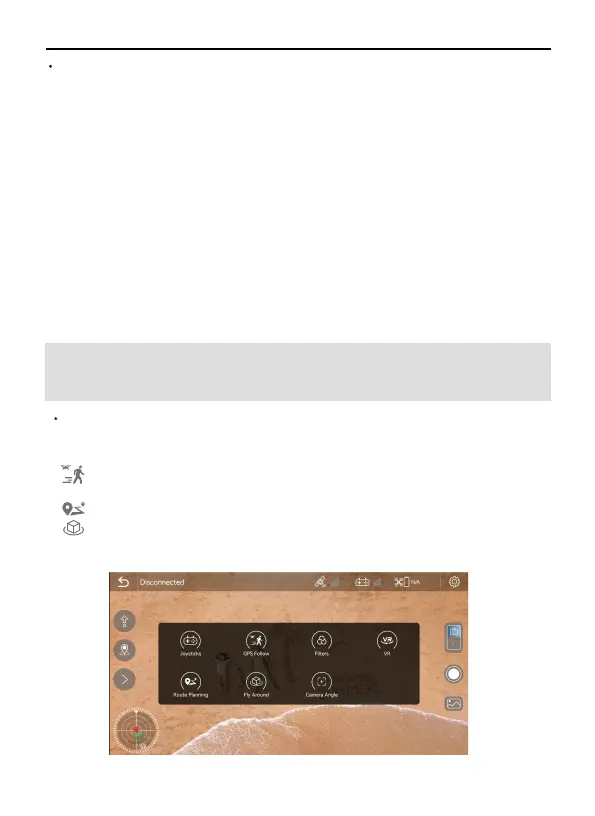
3.4 Intelligent Flight Mode
(GPS Follow / Route Planning / Fly Arround)
16GB/ 14GB
U11PRO has 3 intelligent flight modes: GPS Follow, Route Planning,
Fly Arround. According to the user's shooting needs, the
operation can be completed by one click, which is easy and fast.
GPS Follow: The aircraft will lock onto the user and can track
user’s movement as he moves.
Route Planning: Aircraft flies along the path marked on the app.
Fly Around: You can set a radius of 16ft-65ft(5-20m) , The aircraft
starts to fly around according to the set radius and speed.



 To Next Page