Saab 9-4X Owner Manual - 2011
Instruments and Controls 5-3
b / g (Push to Talk): For vehicles
with a Bluetooth
®
, OnStar
®
,
or navigation system, press to
interact with those systems. See
the OnStar Owner's Guide or the
separate infotainment system
manual for more information.
$ / i (Mute/End Call): Press to
silence the vehicle speakers only.
Press again to turn the sound on.
For vehicles with Bluetooth, OnStar,
or navigation systems, press to
reject an incoming call, or end a
current call.
_ SRC ^ (Rotary Control): Turn
to select an audio source.
Turn
_ or ^ to select the next or
previous favorite radio station, CD,
DVD track/chapter (with navigation),
or MP3 track.
Press SRC to change between
radio and CD or DVD.
+ x − (Volume): Press + to
increase the volume. Press − to
decrease the volume.
Horn
Press near the horn symbols or
press on the steering wheel pad to
sound the horn.
Windshield Wiper/Washer
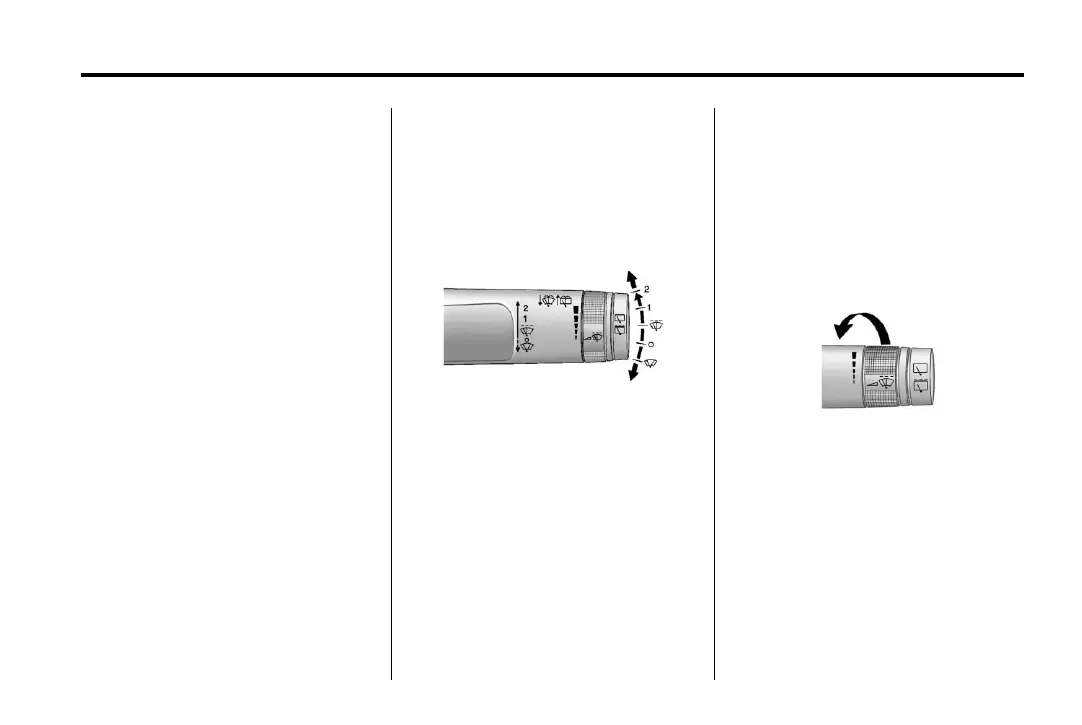
The windshield wiper/washer lever
is located on the right side of the
steering column. With the ignition in
ACC/ACCESSORY or ON/RUN/
START, move the windshield wiper
lever to select the wiper speed.
2: Use for fast wipes.
1: Use for slow wipes.
G (Adjustable Interval Wipes):
Move the lever up to
G for
adjustable interval wipes, then
turn the
3 band up for more
frequent wipes or down for less
frequent wipes. If the vehicle has
Rainsense™, see the following
Rainsense information.
( (Off): Use to turn the wipers off.
8 (Mist): For a single wipe, briefly
move the wiper lever down. For
several wipes, hold the wiper
lever down.



 To Next Page