Saab 9-4X Owner Manual - 2011
In Brief 1-19
Driver Information
Center (DIC)
The DIC display is located in the
center of the instrument panel
cluster. It shows the status of many
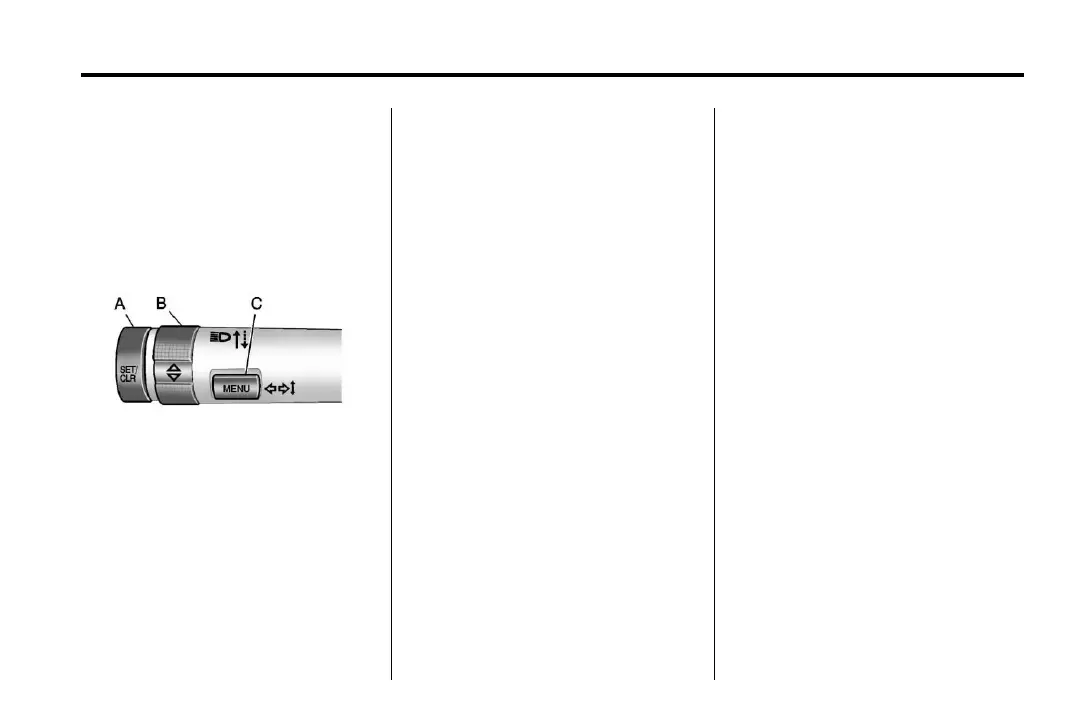
vehicle systems. The controls for
the DIC are located on the turn
signal lever.
A. SET/CLR: Press to set or clear
the menu item when it is
displayed.
B.
w x: Use the thumbwheel to
scroll through the items in
each menu.
C. MENU: Press to get to the
Trip/Fuel Menu and the
Vehicle Information Menu.
This button is also used to
return to or exit the last screen
displayed on the DIC.
For more information, see Driver
Information Center (DIC) on
page 5‑29.
Rear Vision
Camera (RVC)
If available, the rear vision camera
displays a view of the area behind
the vehicle when the vehicle is
shifted into R (Reverse). The
display will appear on either the
inside rearview mirror or navigation
screen, if equipped.
To clean the camera lens, located
above the license plate, rinse it with
water and wipe it with a soft cloth.
See Rear Vision Camera (RVC) on
page 9‑43.
Ultrasonic Parking Assist
If available, Ultrasonic Front and
Rear Parking Assist (UFRPA) uses
sensors on the front and rear
bumpers to detect objects while
parking the vehicle. It operates at
speeds less than 8 km/h (5 mph).
UFRPA uses audio beeps to provide
distance and system information.
Keep the sensors on the vehicle's
front and rear bumpers clean to
ensure proper operation.
See Ultrasonic Parking Assist on
page 9‑41 for more information.
Storage Compartments
The glove box is air conditioned and
can be used to store items at a
lower temperature. Move the slide
control to open or close the opening
to adjust the air flow. See Glove Box
on page 4‑1 for more information.


 To Next Page