5-30 Instruments and Controls
DIC Operation and Displays
The DIC has different displays
which can be accessed by using
the DIC buttons on the turn signal
lever located on the left side of the
steering wheel. The DIC displays
trip, fuel, vehicle system information,
and warning messages if a system
problem is detected.
The bottom of the DIC display
shows what position the shift
lever is in and the odometer. The
direction the vehicle is driving will
be shown on the top of the display.
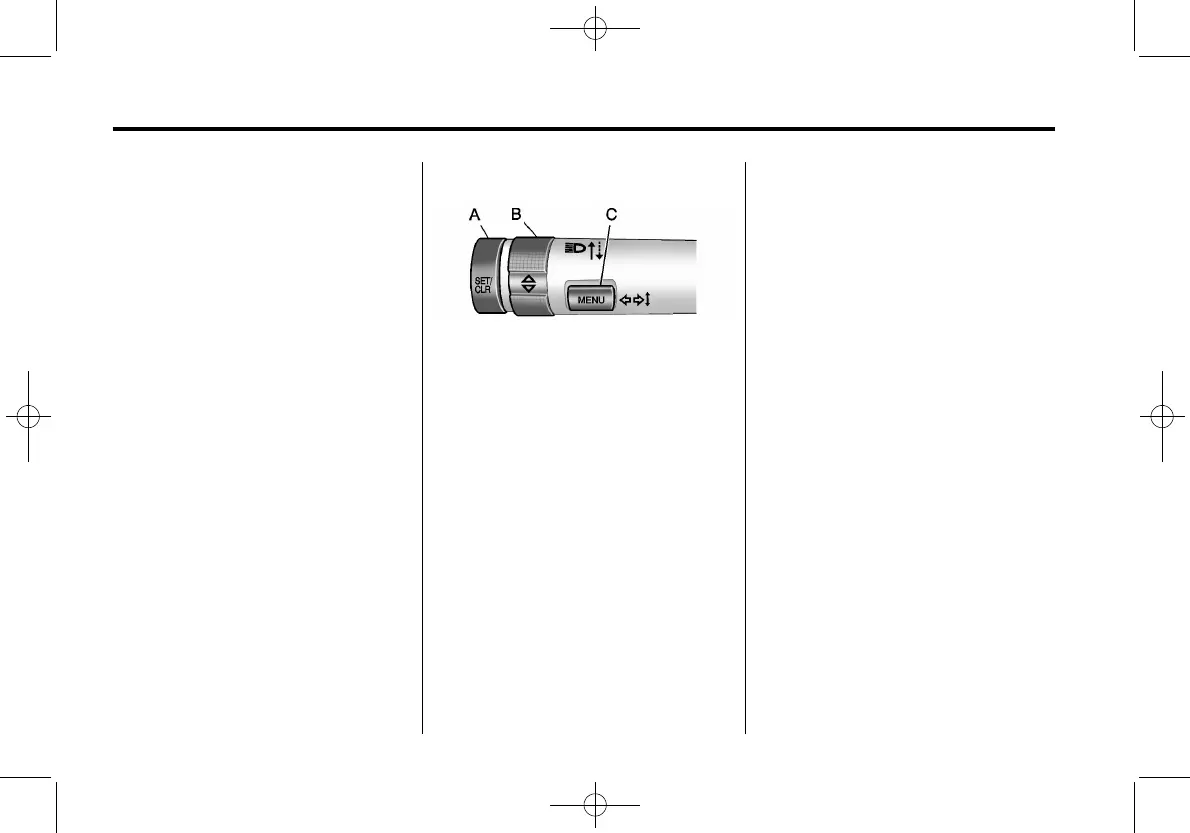
DIC Buttons
A. SET/CLR (Set/Clear): Use this
button to set or clear the menu
item when it is displayed.
B.
w x (Thumbwheel): Use the
thumbwheel to scroll through
the items in each menu. A small
marker will move up or down
the side of the display as you
scroll through the items. This
shows where each item is in
the menu.
C. MENU: Press this button to get
to the Trip/Fuel Information
Menu and the Vehicle
Information Menu.
Trip/Fuel Information
Menu Items
Press the MENU button on the
turn signal lever until Trip/Fuel
Information Menu is displayed.
Use the thumbwheel to scroll
through the following menu items:
.
Digital Speedometer
.
Trip
.
Fuel Range
.
Average Fuel Economy or
Average Fuel Economy and
Instantaneous Fuel Economy
.
Average Vehicle Speed
.
Navigation
.
Speed and Curve Assist
.
Distance to Destination
.
Blank Display


 To Next Page