Instruments and controls 119
Vehicle personalisation
Certain vehicle functions can be per‐
sonalized via changing the settings in
the Info-Display.
Some of the personal settings for dif‐
ferent drivers can be memorized indi‐
vidually for each remote control.
Memorized settings 3 19
Depending on vehicle equipment and
country-specific regulations some of
the functions described below might
not be available.
Vehicle information is only displayed
in Ignition on mode (green LED in
Start/Stop button illuminated).
Personal settings in the Graphic
Information Display (GID)
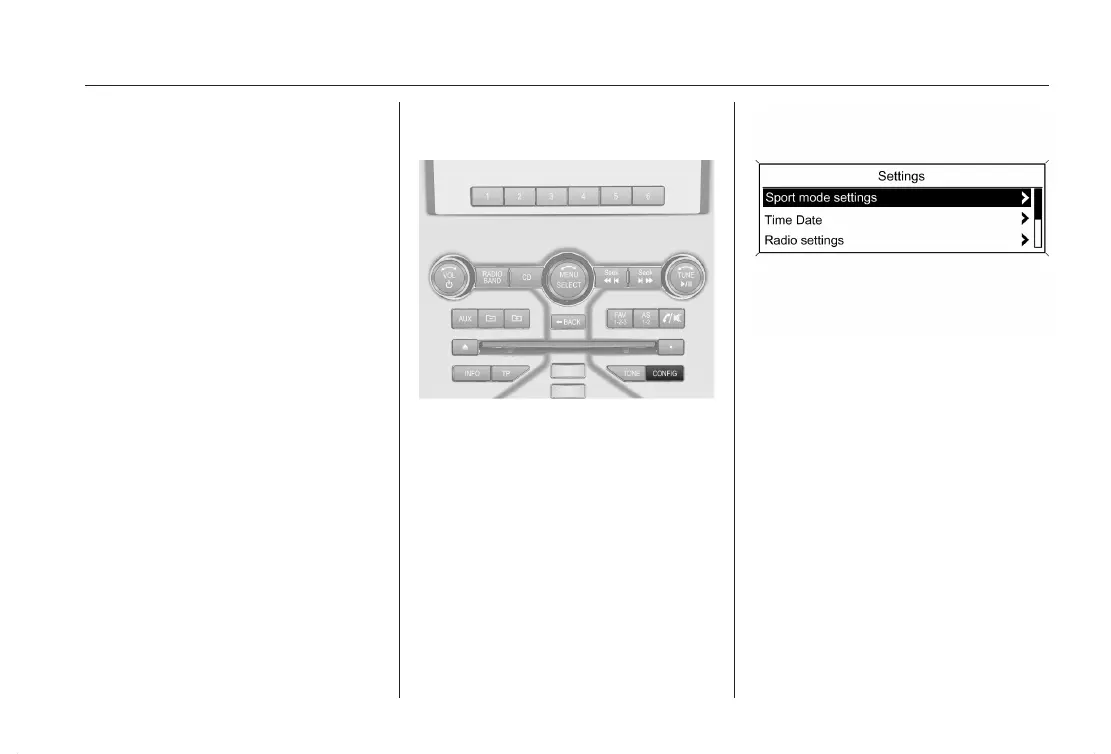
Press the CONFIG button. The menu
Settings is displayed.
The following settings can be se‐
lected by turning and pushing the
multifunction knob:
■ Sport mode settings
■ Time Date
■ Radio settings
■ Phone settings
■ Vehicle settings
■ Restore factory settings
In the corresponding submenus the
following settings can be changed:












 To Next Page