9
SafeLine Pro
SafeLine MX2
1
2
3
4 5 6
97 8
*
0
#
www.safeline-group.com
SafeLine MX2
1
2
3
4 5 6
97 8
*
0
#
www.safeline-group.com
SafeLine MX2 v.5.2.1 EN
Conguration
overviews
The unit has to be
connected to a power
sourcebeforethecongu-
ration can begin.
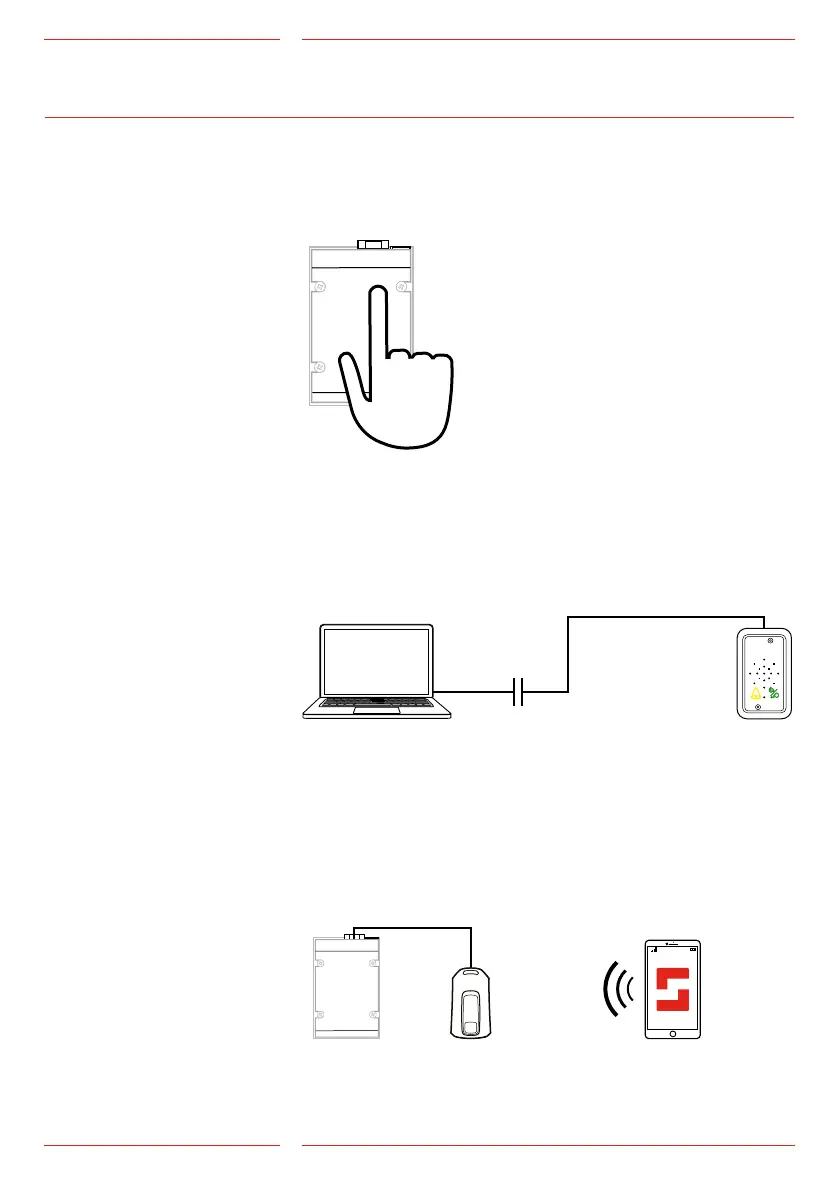
CongurationwithSafeLinePro
The unit can be congured at the ofce prior to the installation or at
site after installation, with a conguration cable (*PCable).
Conguration
LYNX app
To congure the unit through the LYNX app, the CONNECTable
(*CONNECTABLE) is required. Plug in CONNECTable through the
unit’s serial port and congure the unit through the app just like any
other unit.
Keyboardconguration
The integrated keyboard at the rear of the SafeLine enables a fast
programming of the unit.


 To Next Page