15
© 2015 SafeLine and all the SafeLine products and accessories are copyrighted by law.
MX3 v1.06 EN
Confi guration
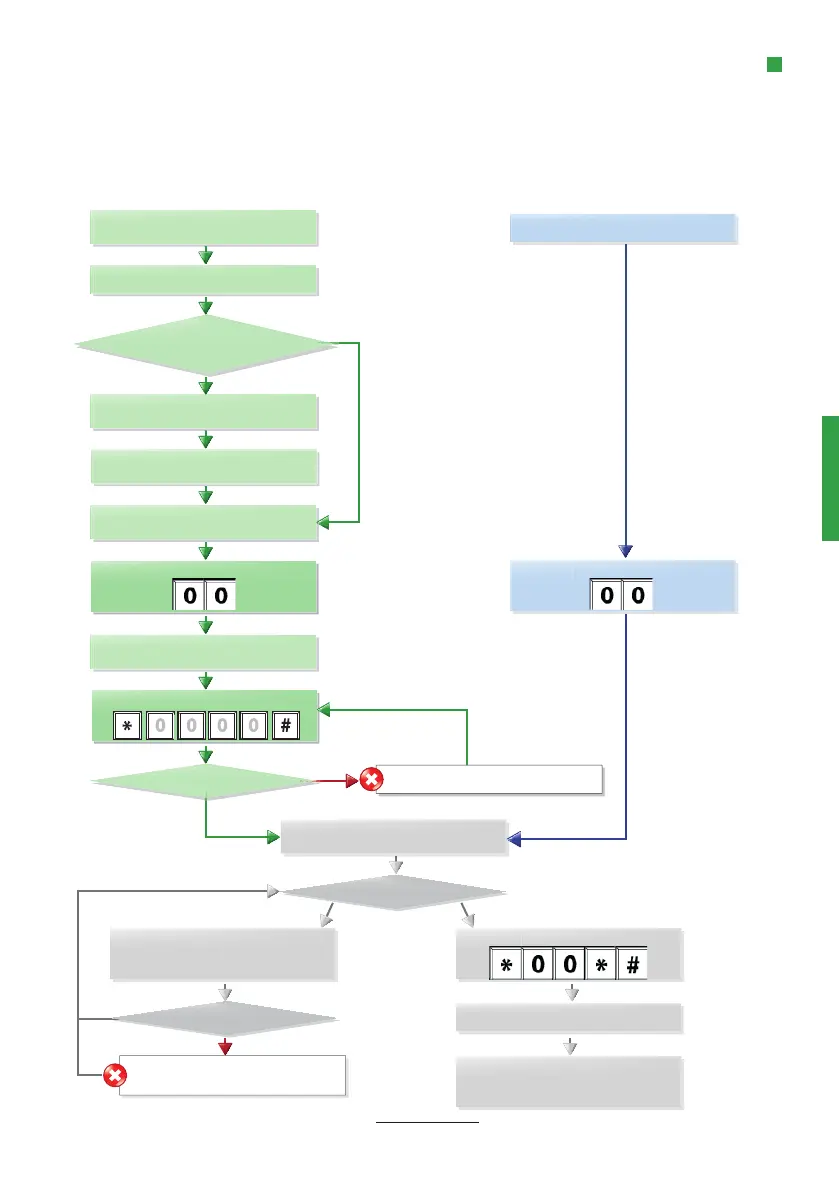
CONFIGURATION METHOD
On-site confi guration using the keyboard.
Start confi guration:
Remote confi guration with external
telephone.
1 beep.
(All MX answers)
3 beeps.
(Requested unit answers)
2 short beeps.
(Waiting for password)
Valid password?
Start confi guration:
Dial phone number.
Multiple units connected to
phone line?
Press unit no. [ 1-9 ] repeatedly.
(Until recieving 3 tones)
Enter the password:
No
Yes
Wrong password (One long beep).
If the time between the operation of two keys exceeds 10 seconds, the code has to be re-entered. If the
time exceeds 30 seconds, the call is disconnected or confi guration mode is ended.
2 short beeps.
(Entering confi guration mode)
One long beep. Invalid input. Last code
has to be re-entered.
Enter code,eg: *11*
Enter setting, eg: 012341234
End parameter: #
Quit confi guration:
Call disconnected or end of confi guration.
MX3 will restart with the new settings.
2 short beeps?
No
Yes
2 short beeps.
Continue confi guration?
Yes
No
No
Yes


 To Next Page