22
© 2015 SafeLine and all the SafeLine products and accessories are copyrighted by law.
MX3 v1.06 EN
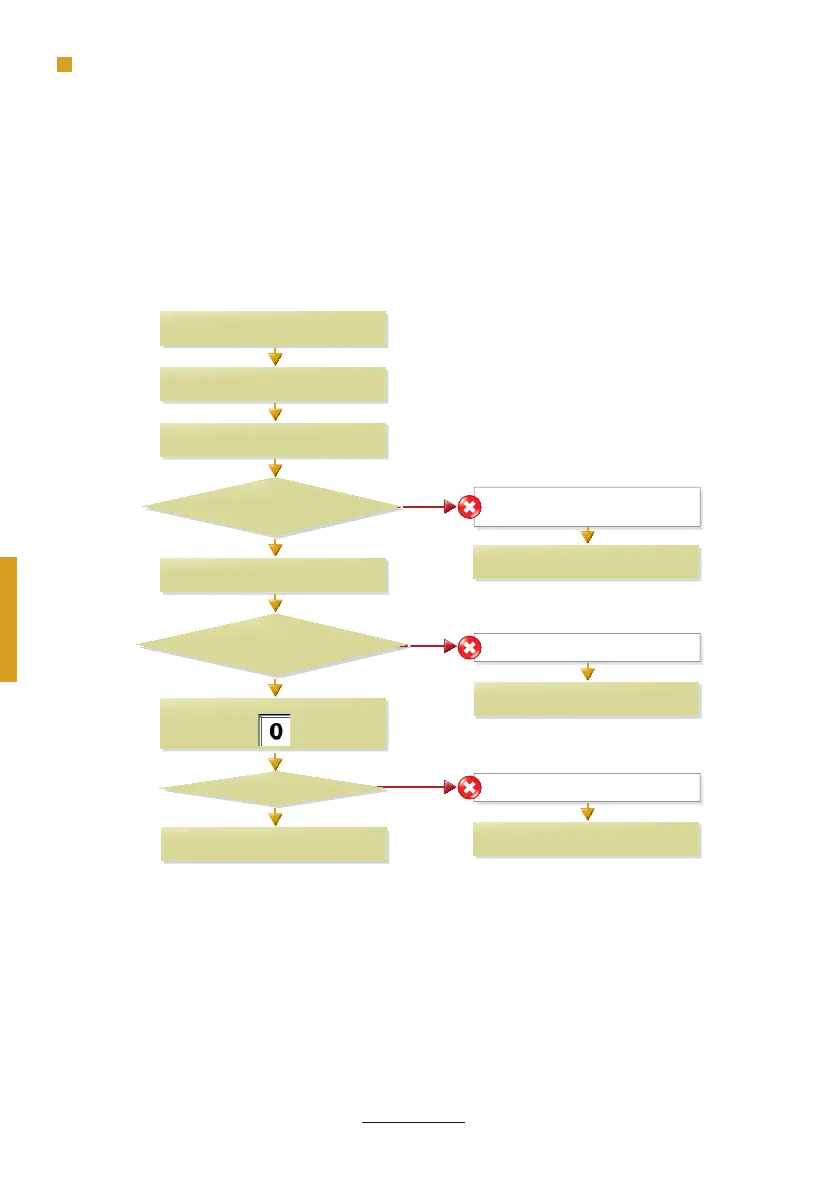
Operating
TESTING
Phone line dial tone?
SafeLine MX3 will make a self test.
Connect telephone line.
Green LED fl ashes 5 times.
Short tone in the speaker?
Green LED fl ashes
every 5 sec?
Yellow LED fl ashes every 5 sec.
No connection.
Yellow LED fl ashes 5 times.
Long tone in the speaker.
Press on keypad:
Dial out on keypad.
Check PSTN-line,
Go to Troubleshoot tables.
Check telephone line.
Connect 10-30 VDC.
Check the mic and speaker connections.
Testing the SafeLine MX3.
No
Yes
Yes
Yes
No
No


 To Next Page