SAFETYTEST 1ST User Manual
SAFETY
SAFETYTEST GmbH June 15
2015 Page 7 of 22
4 Connections, Display and Keyboard
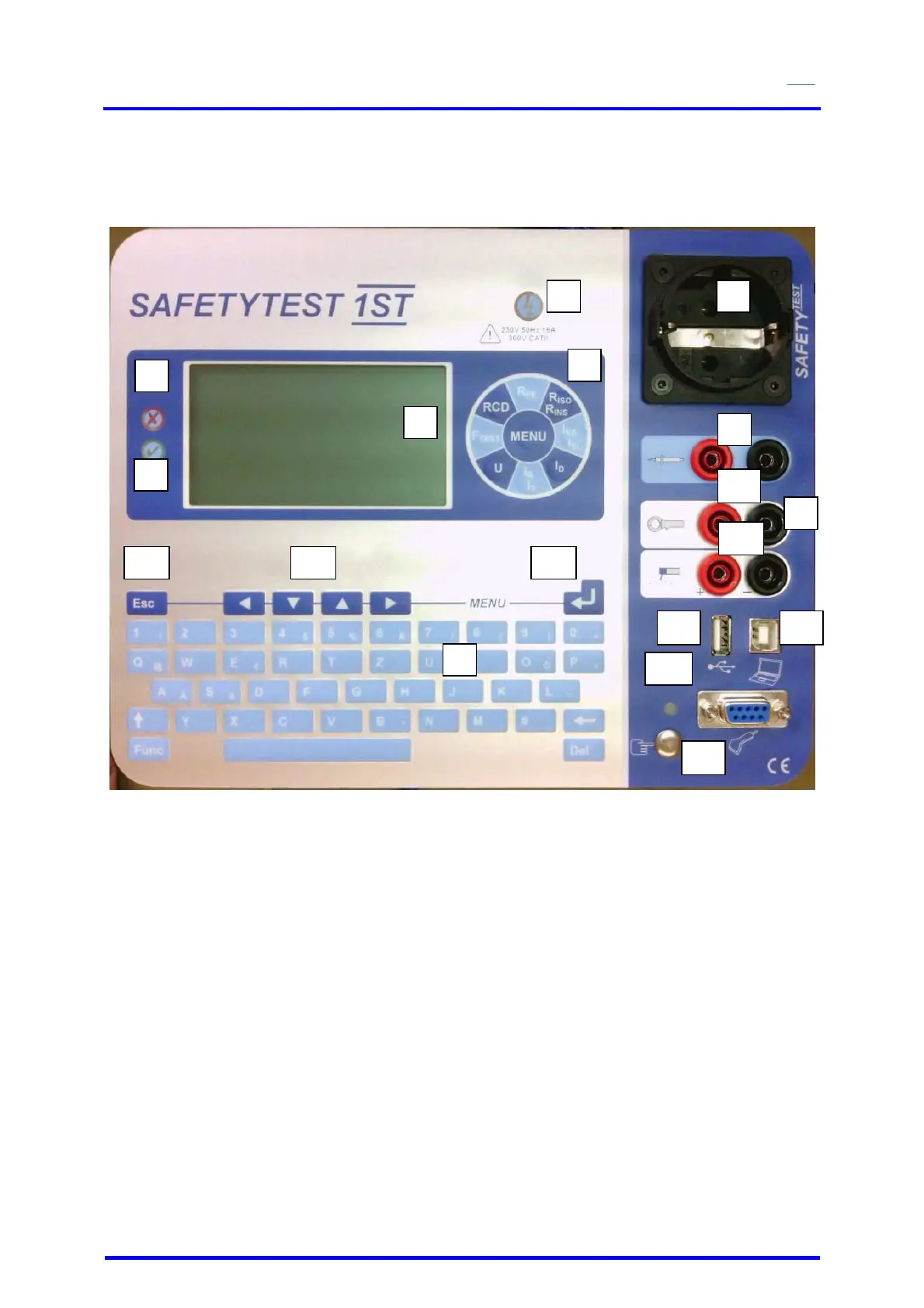
Figure 2
1. OK LED indicates a PASSED test result
2. FULT LED
3. Panel for individual measurements
4. Glow lamp indicating that mains is connected to the test socket
5. Test socket
6. LCD – display
7. Alphanumeric keypad
8. Connection sockets for the test probe (red + black)
9. Clamp connection and GND connection for voltage measurement over the probe
connected to PE potential when mains is switched to the test socket
10. Clamp connection for the differential current clamp/ line current clamp
11. Welders electrode terminal
12. RS232 interface over an extension cable from the PC for connection of the barcode
scanner, transponder scanner and serial line printer.
13. USB PC connection
14. Interface for Memory Stick
15. Finger contact
16. “Enter – key” to input and confirm the Menu
17. Navigation keypad to move the cursor
18. “ESC – key” to cancel measurements or to toggle into the previous Menu.
1
2
4 5
6
7
8
9
10
11
12
13
3
14
15
18 17 16


 To Next Page