This document and the information therein are the property of Morpho, and must not be
copied or communicated to a third party without the prior written authorization of Morpho.
10
RS-485 Communication
MorphoAccess® SIGMA Lite Series –
Quick User Guide - 2015_2000005700-V4
IMPORTANT:
A maximum of 31 devices may be installed on the same line.
The maximum total cable length is 4000 ft. (1200m).
The cable must be dedicated to this installation and not used for any other purpose
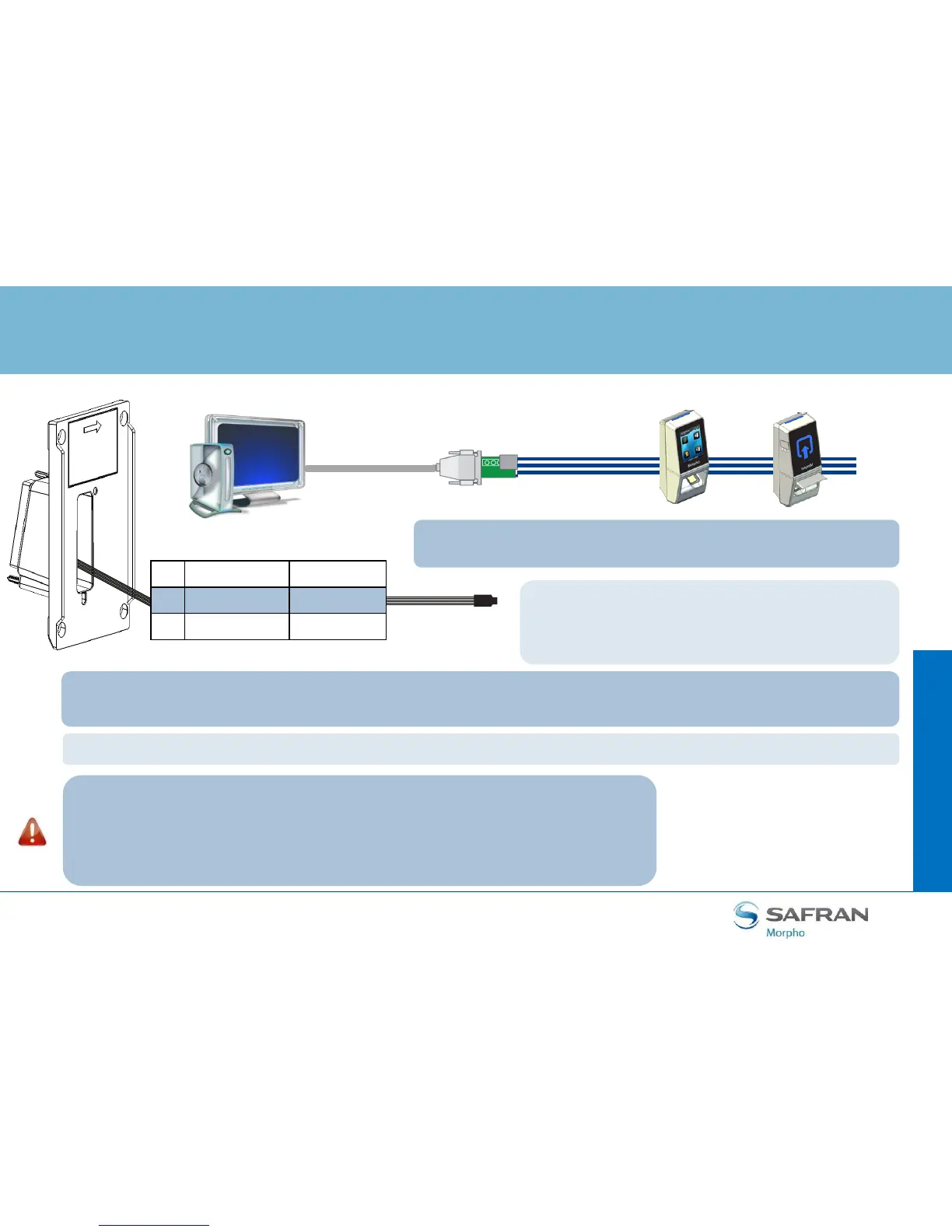
Wiring Block
Step
three : communications
5 RS485_A Blue
7 RS485_B Blue / Red
6 RS485_GND Black / Red
RS-232
from the
Com Port
RS-232 to
RS-485
converter
RS-485 to
1200m (4000ft)
For RS-485 installations, the cable should be run in a daisy-chain
configuration (i.e. converter > position 1 > position 2 > position 3, etc.).
Use CAT-5 UTP (or better) cable (shielded recommended) with a characteristic impedance of 120 ohms.
AWG 24 should be the minimum wire gauge used.
Choose one twisted pair of conductors to use for RS-
485 TDA (Blue wire - Pin 5) and RS-485 TDB (Blue /
Red wire - Pin 7). Another conductor should be used
for Signal Ground (Black / Red wire - Pin 6).
Choose a RS-232 to RS-485 converter that supports Sense Data to switch from Send to Receive mode.


 To Next Page