This document and the information therein are the property of Morpho, and must not be
copied or communicated to a third party without the prior written authorization of Morpho.
11
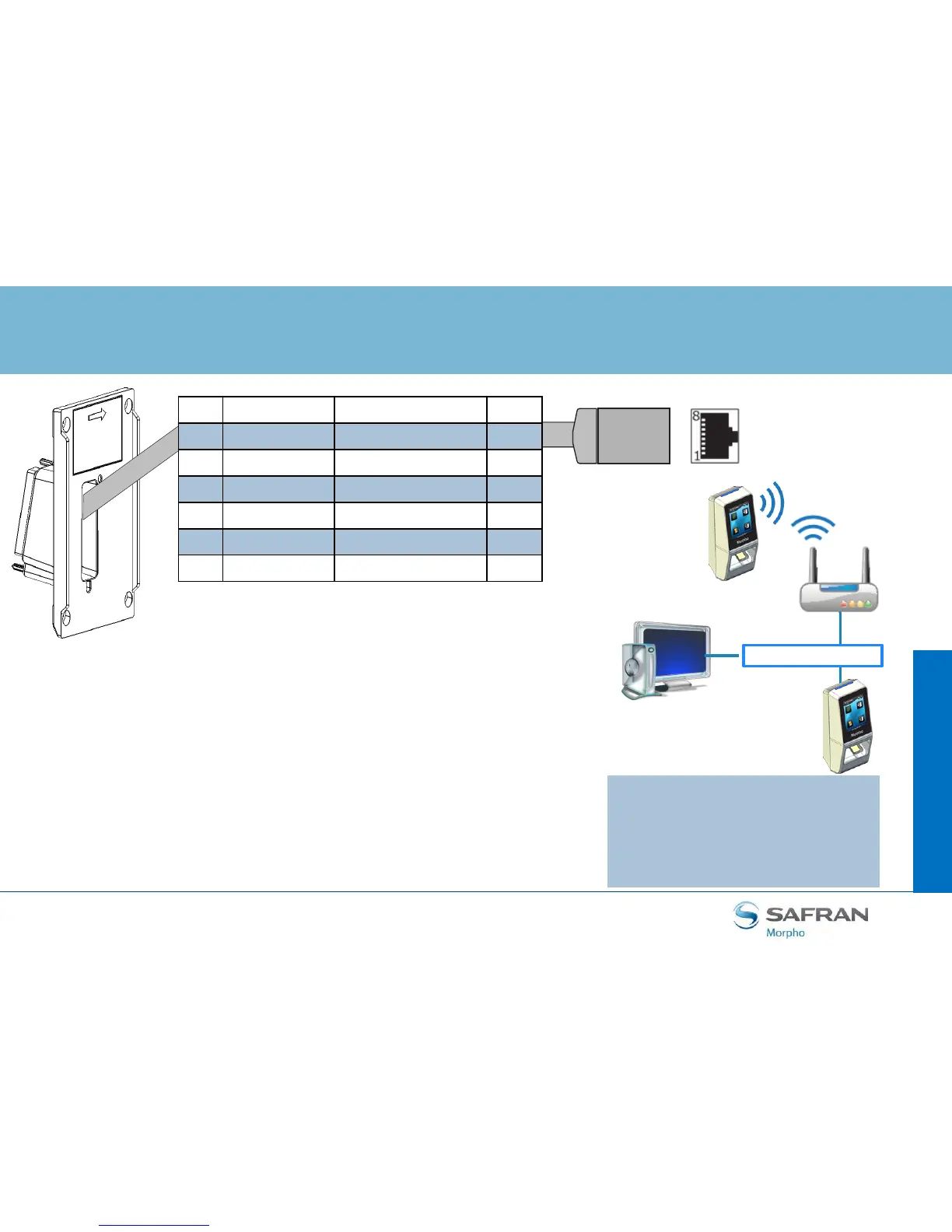
Ethernet and Wireless LAN
MorphoAccess® SIGMA Lite Series –
Quick User Guide - 2015_2000005700-V4
Step
three : communications
RJ-45
LAN Ethernet
Management
station
Wireless
25 ETH TX+ Orange 1
27 ETH TX- Orange / White 2
29 ETH RX+ Green 3
31 ETH RX- Green / White 6
30 ETH VPORT+ Blue 4 & 5
32 ETH VPORT- Blue / White 7 & 8
28 ETH GND Drain wire (no color) Shell
Use a category 5 shielding cable (120 Ohms) or better. It is strongly
recommended to insert a repeater unit every 90m.
DHCP is enabled by default on MorphoAccess® SIGMA Lite terminals
(factory setting).
Terminal Block Ethernet connection
Extreme care must be taken while connecting Ethernet wire to the
block board since low quality connection may strongly impact
Ethernet signal sensibility.
Connect Rx+ and Rx- with the same twisted-pair wire (and to do the
same with Tx+/Tx- and the other twisted-pair wire).
WLAN option
Morpho wireless enabled devices
support 802.11b and 802.11g
standards. WEP Open, WPA and
WPA2 are supported.


 To Next Page