EasyManua.ls Logo

SAGEMCOM C112 ECO - Initial Installation and Setup; Getting Started with the Telephone

SAGEMCOM C112 ECO
41 pages
Print Icon
To Next Page IconTo Next Page
To Previous Page IconTo Previous Page
Loading...
10
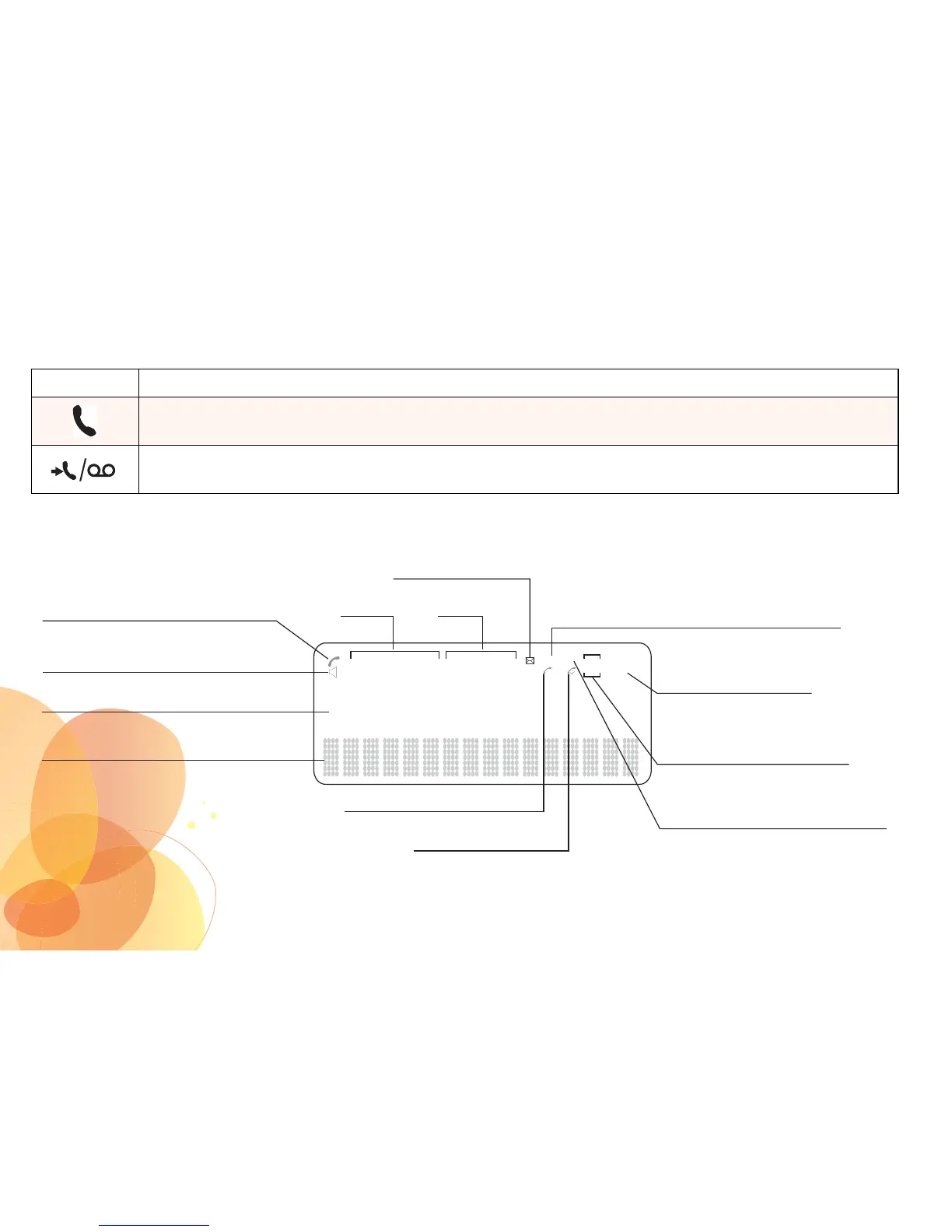
DESCRIPTIONS OF ICONS
LED Function
Line in use indicator :
Shows that the line is being used
New event indicator :
Indicates non-consulted missed calls and voice messages
Communication in progress
8888888888888888
Time Date
Handsfree mode (*)
Numerical display line
Alphabetic display line
New voice mail
List of received calls /
List of made calls
Position
in the list of calls
Missed calls(s) not viewed
in the list of received calls
Repeat of a non-consulted missed
call in the list of received calls
Missed call icon
Received call icon
88:88
AM
PM
88/88
REP NEW IN
OUT
88
x
(*) Only C130 ECO

Table of Contents

Related product manuals