EasyManua.ls Logo

Sako SKI780 - Page 31

Sako SKI780
72 pages
Print Icon
To Next Page IconTo Next Page
To Previous Page IconTo Previous Page
Loading...
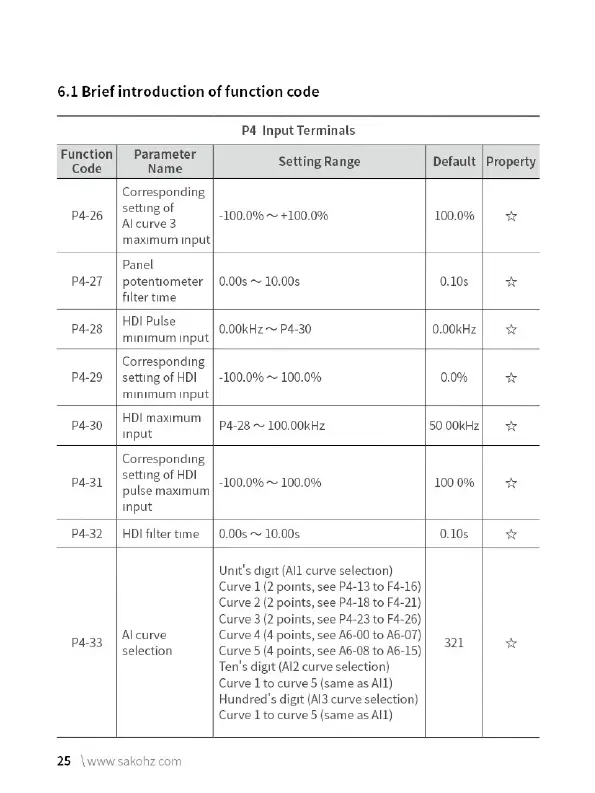
6.1
Brief
introduction
of
function
code
P4
Input
Terminals
Function|
Parameter
Code
Nannie
Setting
Range
Default
|
Property
Corresponding
p4-26
|
Setting
of
-100.0%
~
+100.0%
100.0%
|
+r
Alcurve3
maximum
Input
Panel
P4-27
|
potentiometer
|
0.00s
~
10.00s
0.10s
Ww
filter
time
pang
| NDI
eulks
0.00kHz
~
P4-30
0.00kHz
|
4x
minimum
input
Corresponding
P4-29
|
settingofHDI
|
-100.0%
~
100.0%
0.0%
*
minimum
input
HDI
maximum
P4-30 P4-28
~
100.00kHz
50
00kHz
Ww
Input
Corresponding
p41
|
SetNEOFHD!
|
_109.0%-~
100.0%
1000%
|
4
pulse
maximum
input
P4-32
|
HDI
filtertime
|
0.00s
~
10.00s
0.10s
Ww
Unit's
digit
(All
curve
selection)
Curve
1
(2
points,
see
P4-13
to
F4-16)
Curve
2
(2
points,
see
P4-18
to
F4-21)
Curve
3
(2
points,
see
P4-23
to
F4-26)
Al
curve
Curve
4
(4
points,
see
A6-00
to
A6-07)
pa3
selection
Curve
5
(4
points,
see
A6-08
to
A6-15)
321
*
Ten's
digit
(Al2
curve
selection)
Curve
1
to
curve
5
(same as
All)
Hundred's
digit
(Al3
curve
selection)
Curve
1
to
curve
5
(same
as
Al1)
25
\wwwsakohzcom

Related product manuals