Select • YES by using “ ” or “ ” buttons to delete the
timer. Select NO to cancel.
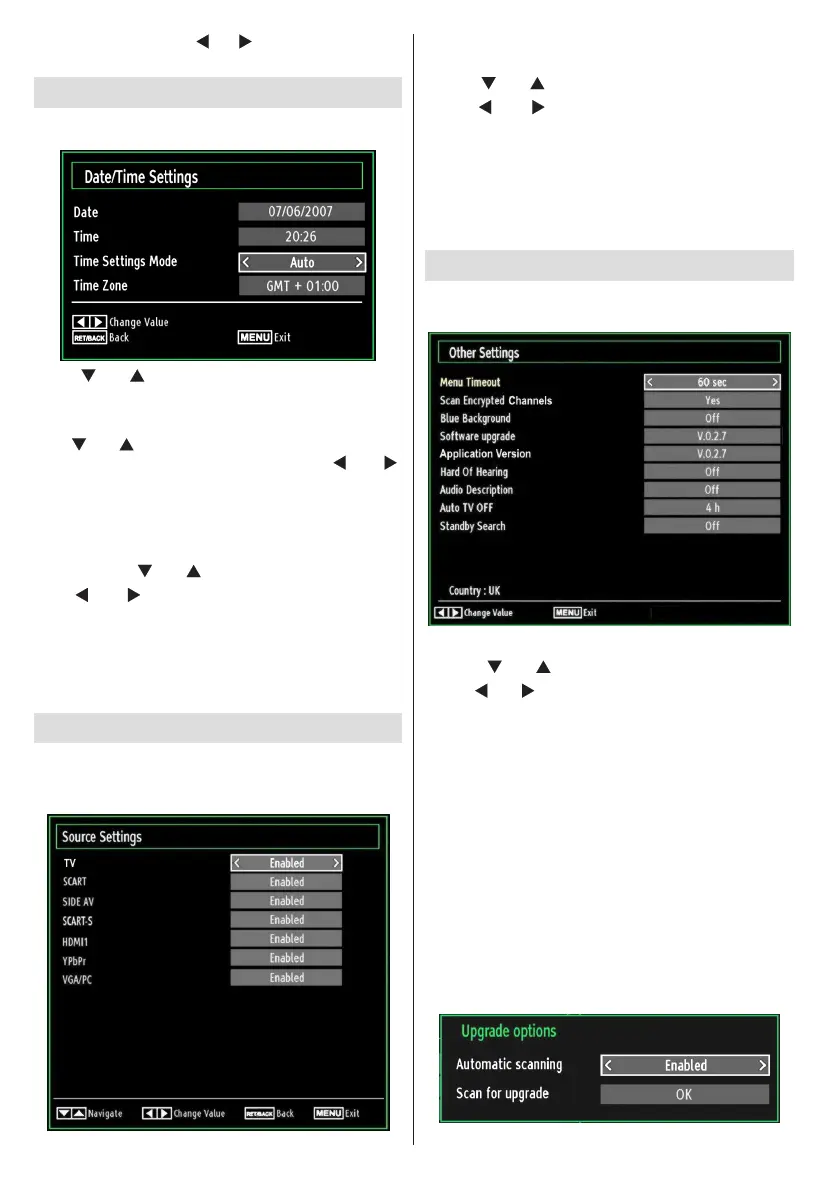
ConguringDate/TimeSettings
Select Date/Time in the Settings menu to congure
Date/Time settings. Press OK button.
Use “• ” or “ ” buttons to highlight Date/Time.
Date,Time,Time Settings Mode and Time Zone Setting
will be available.
Use “
” or “ ” buttons to highlight the Time Settings
Mode. Time Settings Mode is set using “ ” or “ ”
buttons. It can be set to AUTO or MANUAL.
When AUTO is selected, Date/Time and Time Zone
options will not be available to be set. If MANUAL
option is selected as the Time Zone can be altered:
• By pressing “
” or “ ” buttons select Time Zone.
Use “
” or “ ” buttons to change the Time Zone
between GMT-12 or GMT+12. Date/Time on the top
of the menu list will then change according to the
selected Time Zone.
Changes are automatically stored. Press • “MENU”
to exit.
ConguringSourceSettings
You can enables or disable selected source options. The
TV will not switch to the disabled source options when
“SOURCE” button is pressed.
Select • Sources in the Settings menu and press OK
button.
Press“•
” or “ ” buttons to select a source.
Use “•
” or “ ” button to enable or disable the
selected source. Changes are automatically
stored.
Note : YPbPr mode can be used only when you
connect a device that has a YPbPr output through the
PC input with YPbPr to PC cable (not supplied).
ConguringOtherSettings
To view general conguration preferences, select Other
Settings in the Settings menu and press OK button.
Operation
Press “• ” or “ ” buttons to select an item.
Use “•
” or “ ” button to set an option.
Press• OK button to view a sub-menu.
Menu Timeout: Changes timeout duration for menu
screens.
Scan Encrypted Channels: When this setting is on,
search process will locate the encrypted channels as
well. If it is set as Off, encrypted channels will not be
located in automatic search or manual search.
Blue Background (Optional): Activates or deactivates
blue background system when the signal is weak or
absent.
Software Upgrade: To ensure that your TV always
has the most update information, you can use this
setting. In order for the proper operation, please
ensure that the TV is set to standby mode.
(optional)














 To Next Page