23
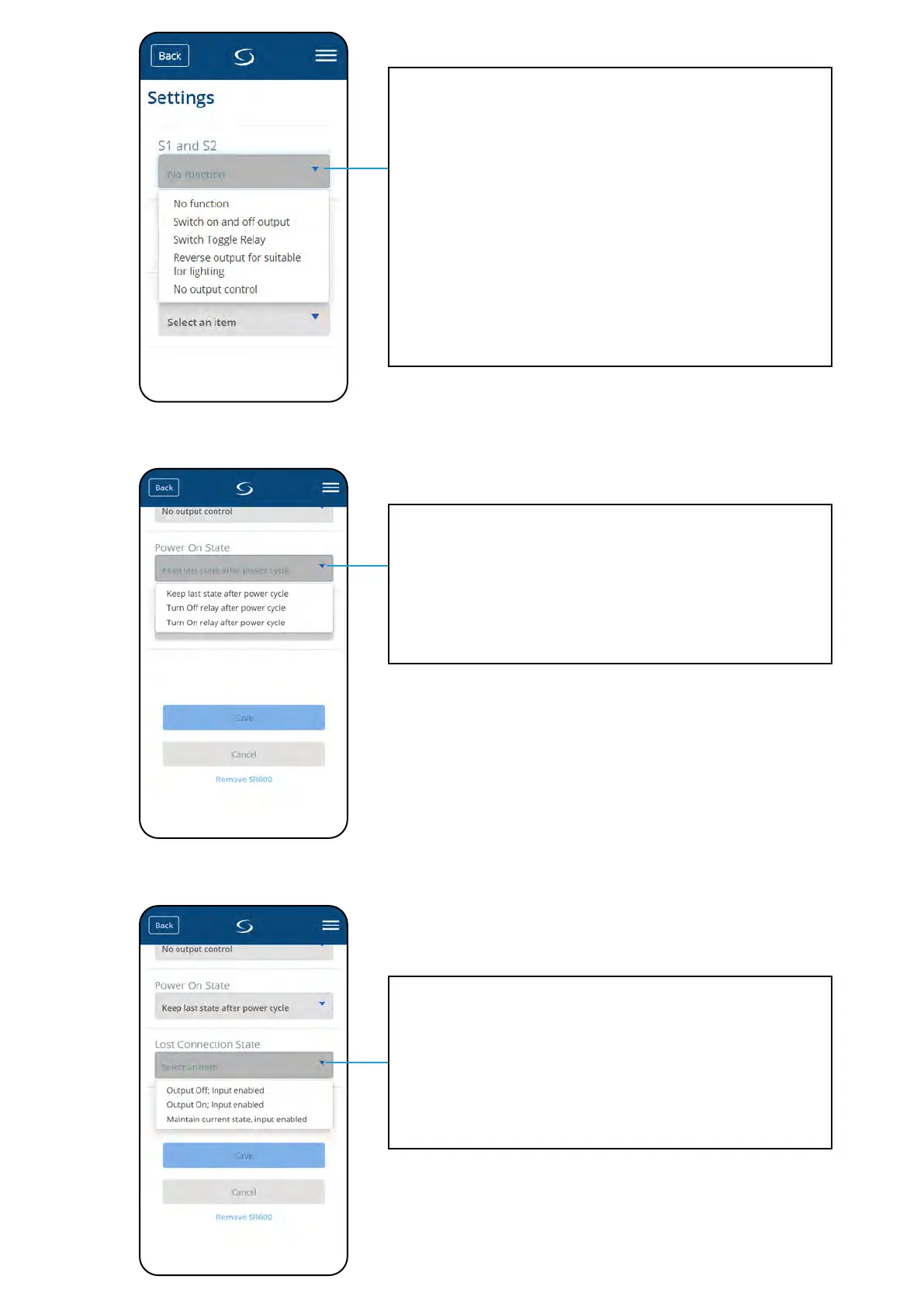
No function - S1/S2 volt-free input is not active
Switch on and o outputs - S1/S2 volt-free input is active. SR600 cannot be controlled
from app, COM/NO relay operation is controlled only by S1/S2 input. When S1/S2 input
is closed (shorted) then SR600 turns ON (COM/NO output is closed). When S1/S2 input is
opened then SR600 turns OFF (CON/NO output is opened).
Switch Toggle Relay - S1/S2 volt-free input is active. SR600 can be controlled both from
app and by S1/S2 input. When S1/S2 input is closed or opened (state change) - then SR600
changes its last COM/NO output state.
Reverse output for suitable for lighting - S1/S2 volt-free input is active. SR600
can be controlled both from app and by S1/S2 input. In this mode S1/S2 input requires
momentary type of switching (S1/S2 are giving an „impulse” kind of signal to the system
by fast, momentary shorting/opening). This mode can be used e.g to control lights, where
the same light have to be controlled by several manual wall switches and app.
No output control - S1/S2 volt-free input is active but doesn’t have impact to the
operation of the COM/NO relay output. S1/S2 input can be used as a OneTouch rule trigger.
Keep last state after power cycle - in case of power breakdown SR600 will re-enter to
the state (On or O) which was active before power was lost.
Turn O relay after power cycle - in case of power breakdown SR600 will turn OFF
when power supply will be restored.
Turn On relay after power cycle - in case of power breakdown SR600 will turn On when
power supply will be restored.
Output O, Input enabled - in case of lost communication with Smart Home system,
SR600 will be turned O (S1/S2 input still will be active).
Output On, Input enabled - in case of lost communication with Smart Home system,
SR600 will be turned On (S1/S2 input still will be active).
Maintain current state, input enabled - in case of lost communication with Smart
Home system, SR600 will keep current state (S1/S2 input still will be active).


 To Next Page