11
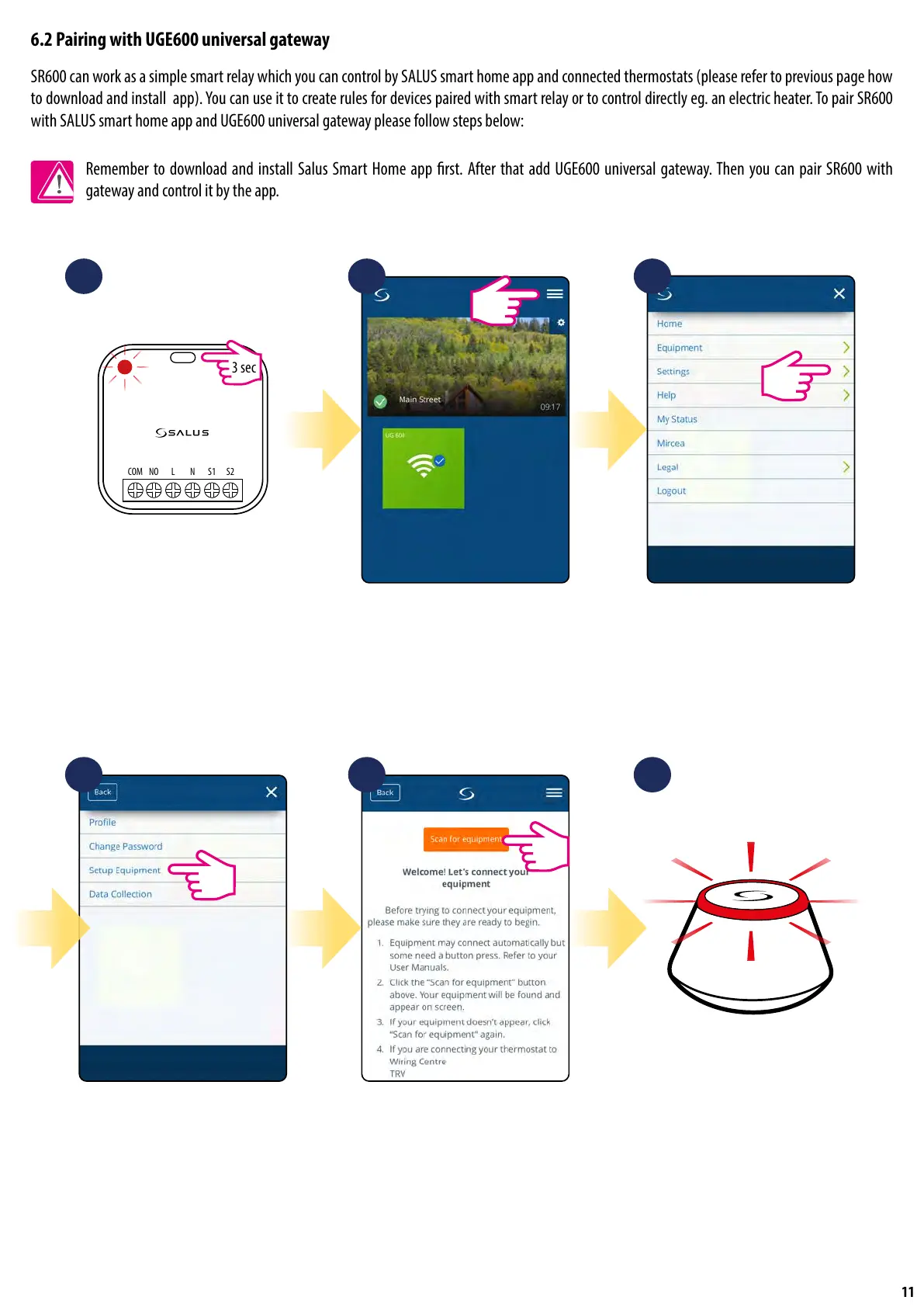
6.2 Pairing with UGE600 universal gateway
SR600 can work as a simple smart relay which you can control by SALUS smart home app and connected thermostats (please refer to previous page how
to download and install app). You can use it to create rules for devices paired with smart relay or to control directly eg. an electric heater. To pair SR600
with SALUS smart home app and UGE600 universal gateway please follow steps below:
Remember to download and install Salus Smart Home app rst. After that add UGE600 universal gateway. Then you can pair SR600 with
gateway and control it by the app.
NOCOM L N S1 S2
3 sec
1
4 5 6
2 3
Press and hold main button for 3
seconds. Red diode will start
ashing.
Go to the smart home app. There,
open main menu.
Select „Settings”.
Now enter to the „Setup Equipment”. Press „Scan for equipment” button. ...Gateway has started ashing red
and searching for the SR600...


 To Next Page