16
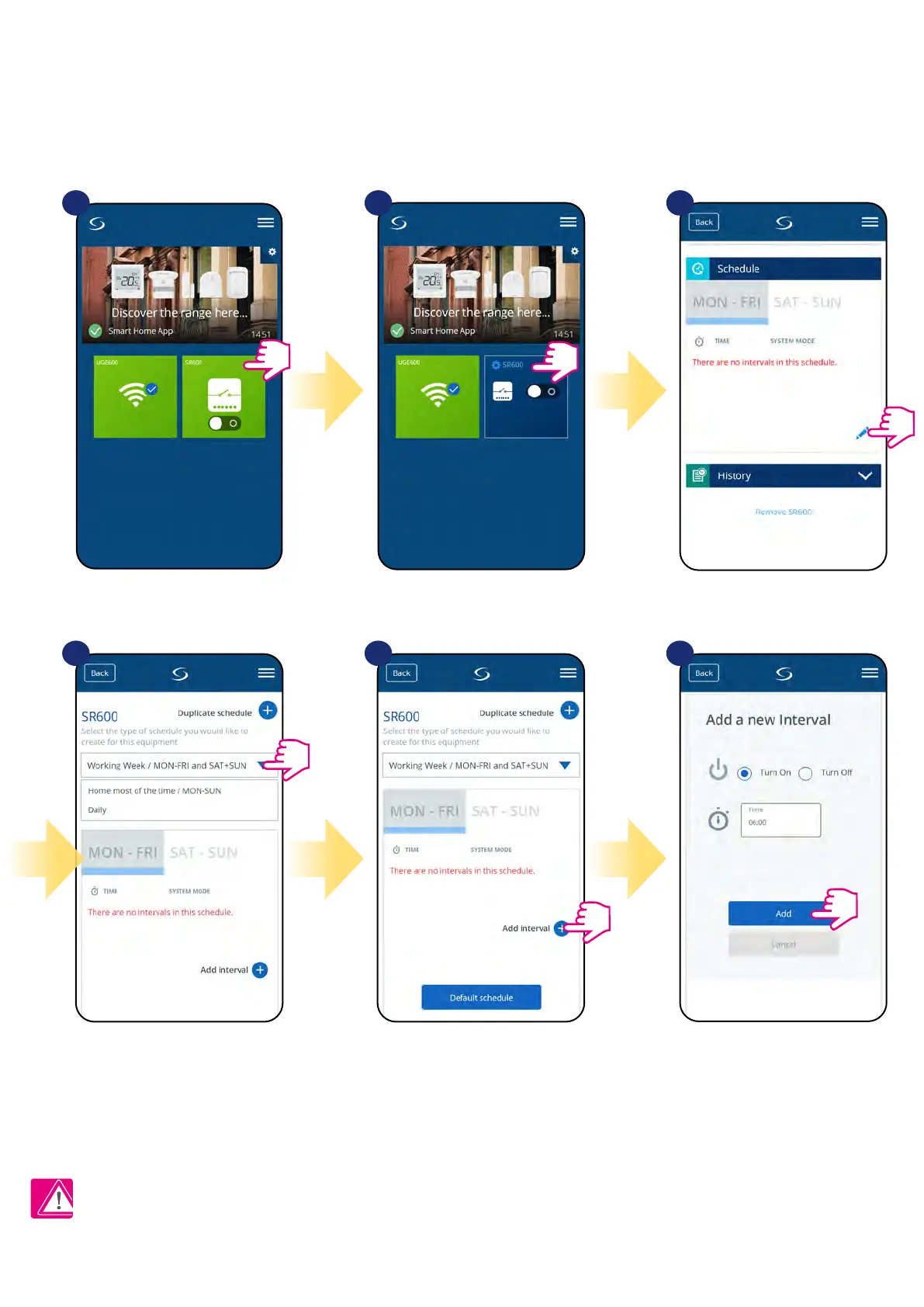
The SR600 gives you the possibility to programm schedule. You can choose from 3 dierent schedule congurations:
• Separate schedule for working days (Mo-Fri) and weekend (Sat-Sun)
• Individual schedules for each day of the week
• One schedule for whole week
7.5 Schedule mode
Select device in the main
app menu.
1 2 3
Scroll down and press pencil button.
Choose for which days you want to
program your schedule:
• Working Week / MON - FRI and SAT + SUN
• Home most of the time / MON - SUN
• Daily
After days period selection use
„Add interval” option to add your
intervals to the schedule.
Then select if you want SR600 be
turned ON or OFF, enter time value
and after all - conrm by pressing
„Add” button.
4 5 6
TO SET THE SCHEDULE IN THE APP:
Press device’s name.
Please note:
You can add as many intervals as you wish by repeating the procedure described from steps 3 to 6. The procedure is the same for all 3 schedule
congurations. You can customize the programs in the SR600 in any way you want.


 To Next Page