22 Product Support 1-888-202-9831
12. Device Power Down and Removal
12.1. POWER OFF THE POWER CONTROLLER
Press and hold the Power Button on the sam Power Controller for at least 1 second to
turn the device ‘OFF’ (See Figure 11A for device diagram).
12.2. REMOVE DEVICE FROM SKIN
A. Remove the Patch(s) from the skin.
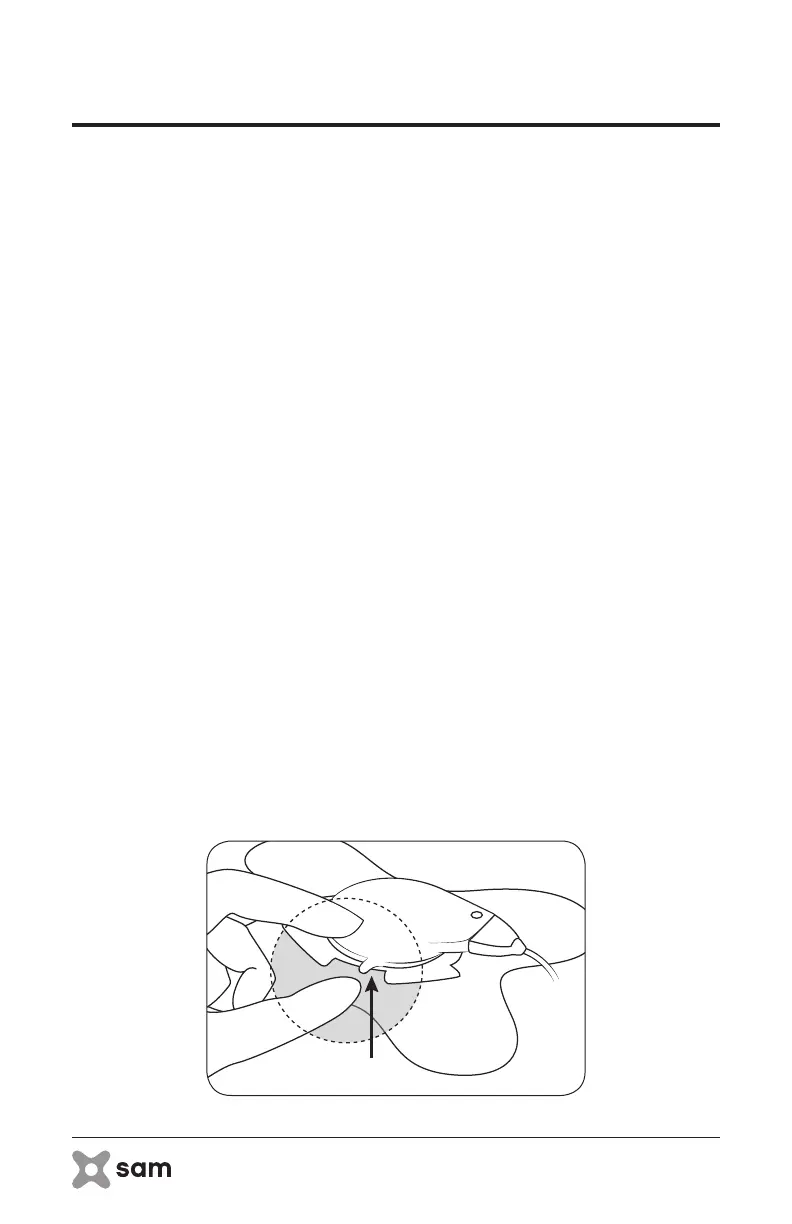
B. Remove the applicator from the sam Ultrasound Coupling Patch by pulling the
tab on the side of the gel cup. This unlocks the cup from the applicator (See
Figure 12).
C. Throw away the sam Patches.
Warning: NEVER use a sam Ultrasound Coupling Patch for more than one use.
Misuse of sam Ultrasound Coupling Patches or use for more than the
intended treatment duration MAY RESULT IN BURN OR REPEATED SHUTOFF
of the applicator.
12.3. CLEAN THE APPLICATORS
Clean any residual ultrasound coupling media off of the applicator and off of the skin.
See section 14 for ‘Cleaning and Maintenance’ details.
12.4. RECHARGE THE DEVICE
Connect the sam Power Controller to the sam Electrical Charger for recharging. Prior
to the next use, allow up to 6 hours to recharge the battery to 100% charge. See section
9 for charging instructions.
figure 12: Removing Applicator



 To Next Page