17
Samson AirLine
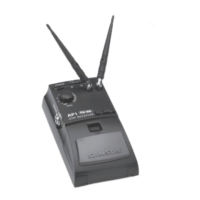
13. Temporarily turn down the level of your mixer/amplifier system and turn off the power to your transmitter, leaving the AR1 on.
Then restore the previously set level of your mixer/amplifier. With the transmitter off, the receiver output should be totally silent—if it
is, skip ahead to the next step. If it isn’t (that is, if you hear some noise), you may need to adjust the AR1 Mute (squelch) control.
When the Mute control is at its minimum setting, the AirLine system always provides maximum range without dropout; however,
depending upon the particular environment your system is used in, you may need to reduce that range somewhat in order to eliminate
band noise when the transmitter is turned off. To do so, use the provided screwdriver to rotate the Mute control completely
counterclockwise (to the “Min” position), then slowly turn it clockwise until the noise disappears. If no noise is present at any
position, leave it at its fully counterclockwise “Min” position (so as to have the greatest overall range available).
14. When first setting up your AirLine System in a new environment, it’s always a good idea to do a walkaround in order to make sure
that coverage is provided for your entire performance area. Accordingly, turn down the level of your audio system and turn on both
the transmitter and receiver. Then, with the transmitter unmuted, restore the level of your audio system and while speaking or singing,
walk through the entire area that will need to be covered. As you do so, observe the “Power On / RF” LED on the AR1 receiver; it
should always remain lit steadily green, indicating that it is receiving sufficiently strong RF signal. Always try to minimize the distance
between transmitter and receiver as much as possible so that the strongest possible signal is received from all planned transmission
points. In fixed installations such as A/V or corporate conference rooms, you may find it handy to mount the AR1 in the supplied wall-
mount holder. In certain environments, it may be desirable to angle the receiver antenna differently from its vertical position. Where
extended range coverage is required, a Samson UR1 true diversity receiver (set to the same channel) can be substituted.
If you have followed all the steps above and are experiencing difficulties, contact your local distributor or, if purchased in the
United States, call Samson Technical Support (1-800-372-6766) between 9 AM and 5 PM EST.
Setting Up and Using Your AirLine System
ENGLISH






 To Next Page