23
ENG
Channel names will be assigned automatically when channel
information is broadcast. These names can be changed, allowing
you to assign new names.
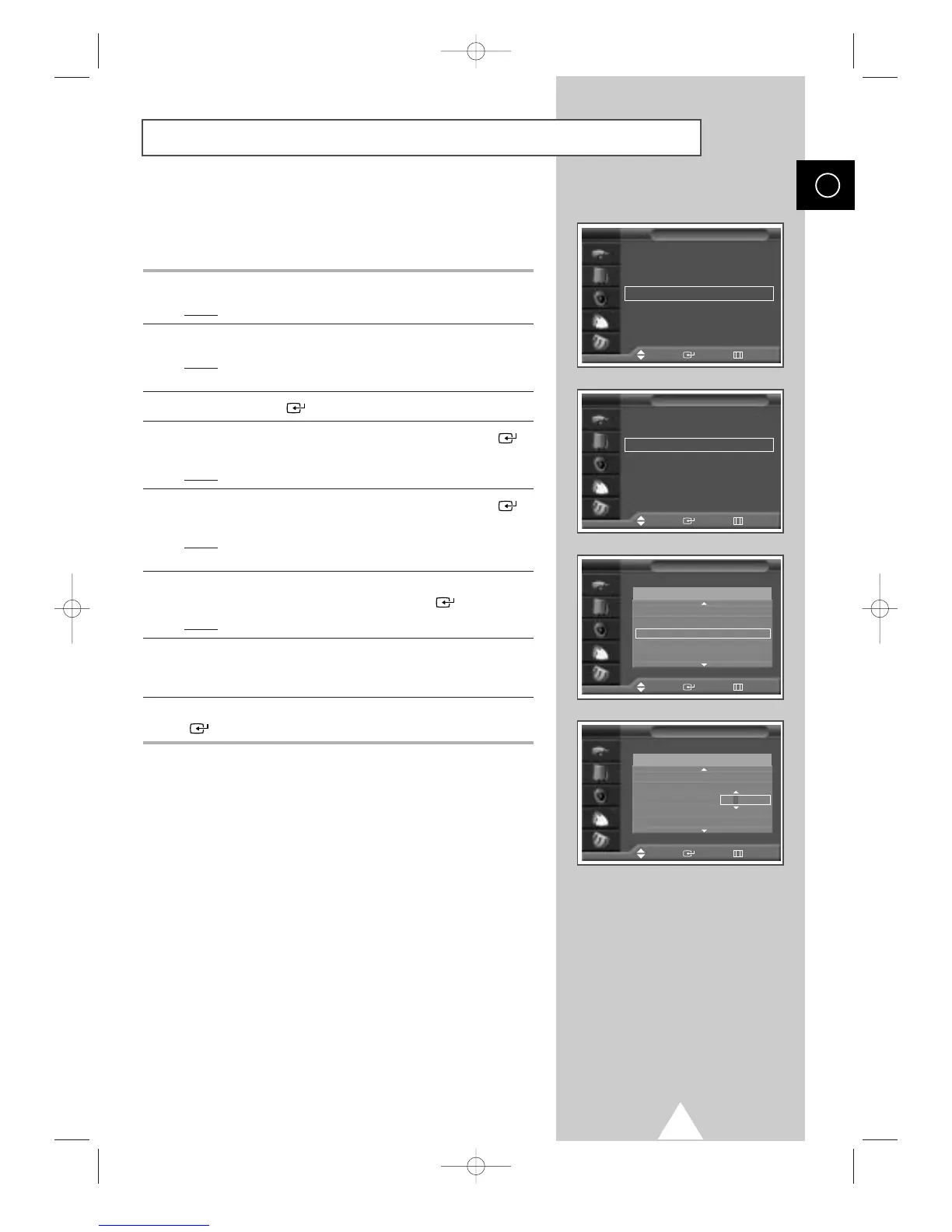
1 Press the MENU button.
Result
: The main menu is displayed.
2 Press the † or … button to select Channel.
Result
:
The options available in the
Channel
group are
displayed.
3 Press the ENTER () button.
4 Press the † or … button to select Edit. Press the ENTER ()
button.
Result
: The Edit menu is displayed.
5 Press the † or … button to select Name. Press the ENTER ()
button.
Result
: The Name menu is displayed with the current channel
automatically is selected.
6 If necessary, select the channel to be assigned a new name by
pressing the
† or … button. Press the ENTER () button.
Result
: Arrow indications are displayed around the name box.
7 Press the † or … button to select a letter (A~Z), a number (0~9)
or a symbol (
-
, space). Move on the previous or next letter by
pressing the
œ or √ button.
8 When you have finished entering the name, press the ENTER
() button to confirm the name.
Assigning Names to Channels
Name
TV
Prog. Name
Name
TV
2
----- -----
3
----- -----
4
----- -----
5
----- -----
6
----- -----
Prog. Name
Country : Austria
√√
Auto Store
√√
Manual Store
√√
Edit
√√
Fine Tune
√√
Ch. Scan
√√
Channel
Move Enter Return
TV
Add/Delete
√√
Sort
√√
Name
√√
LNA : Off
√√
Child Lock
√√
Edit
Move Enter Return
Move Enter Return
Adjust Enter Return
TV
2
----- -----
3
----- -----
4
----- -----
5
----- -----
6
----- -----




 To Next Page