44
ENG
Time
√√
Language : English
√√
AV Setup
√√
Digital NR : On
√√
Miscellaneous
√√
PC Setup
√√
Setup
Move Enter Return
TV
Clock 00 : 00
√√
Sleep Timer Off
√√
On Timer Off
√√
Off Timer Off
√√
Time
Move Enter Return
TV
Clock
Adjust
√√
Move Return
TV
Hour Min
00 00
You can set the television’s clock so that the current time is displayed
by pressing the “INFO ( )” button. You must also set the time if
you wish to use the automatic on or off timers.
➣
When pressing the “I / ” button (On/Off) on the front of
the television, the clock setting will be reset.
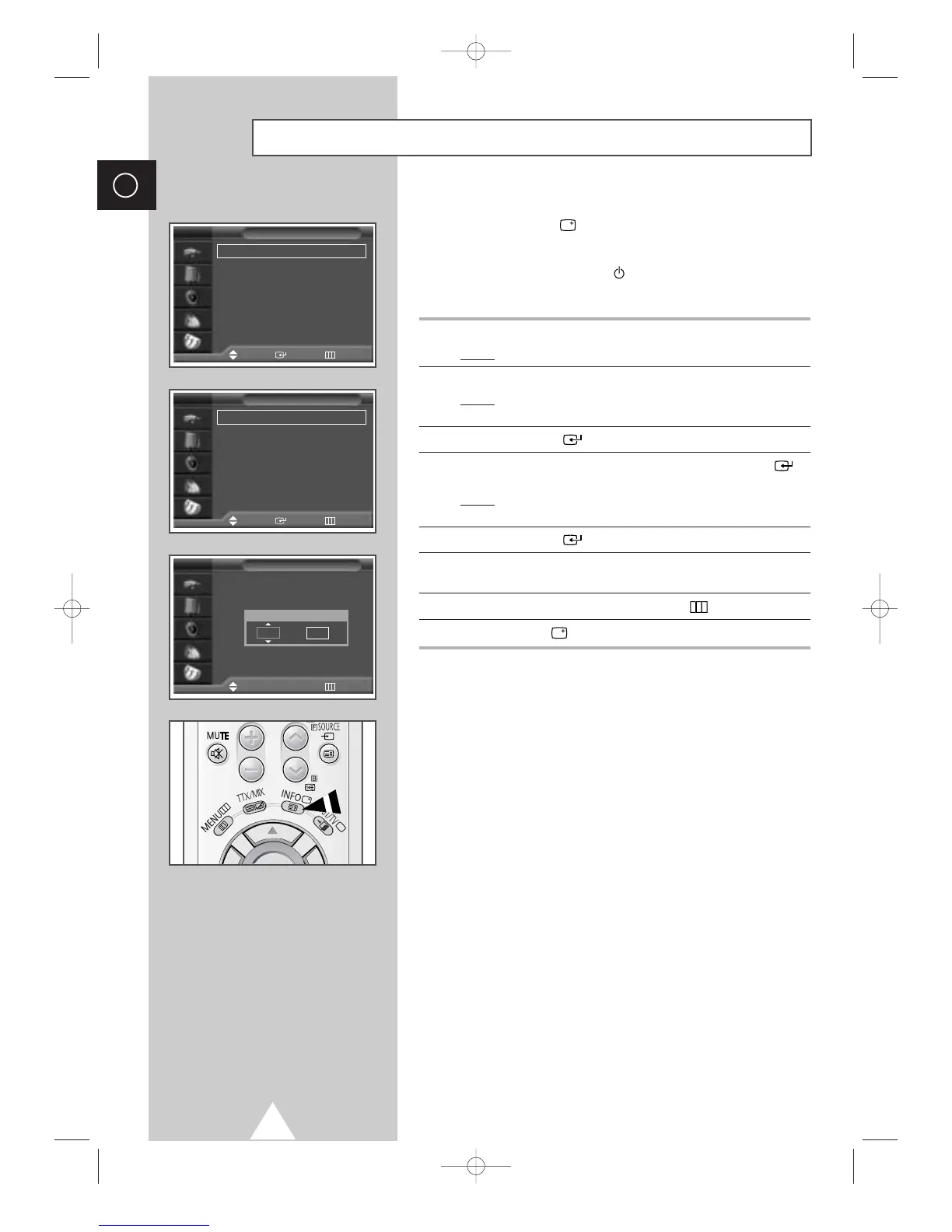
1 Press the MENU button.
Result
: The main menu is displayed.
2 Press the ▼ or ▲ button to select Setup.
Result
: The options available in the Setup group are
displayed.
3 Press the ENTER () button.
4 Press the ▼ or ▲ button to select Time. Press the ENTER ()
button.
Result
: The options available in the Time group are displayed
with
Clock is selected.
5 Press the ENTER () button.
6 Press the ¦ or button to move to the hour or minute.
Set the hour or minute by pressing the
▼ or ▲ button.
7 When you have finished, press the MENU () button to exit.
8 Press the INFO () button to display the current time.
Setting and Displaying the Current Time




 To Next Page