Troubleshooting _ 23
4-3. CORRECTIVE ACTIONS FOR EACH CHECK CODE
► Thesearecommontroubleshootingproceduresforeachdrum-typewasherCheckmode.Fordetailedinformation,refertothegeneralrepairscripts.
Symptom Check Code Countermeasure Troubleshooting Procedure Measurement Picture
Water Level
Sensor
►1C
Checkifthewaterlevel
sensor is defective.
• Checkthewaterlevelsensorterminal
connections.
• Checkthepartcodeofthewaterlevel
sensor,becauseifanincorrectpartisused,
an abnormal operation may occur. (Abnormal
operation)
• Ifthewaterlevelsensorisdefective,replace
it.
• Ifnoproblemswerefoundforallofthe
proceduresabove,replacethePBA.
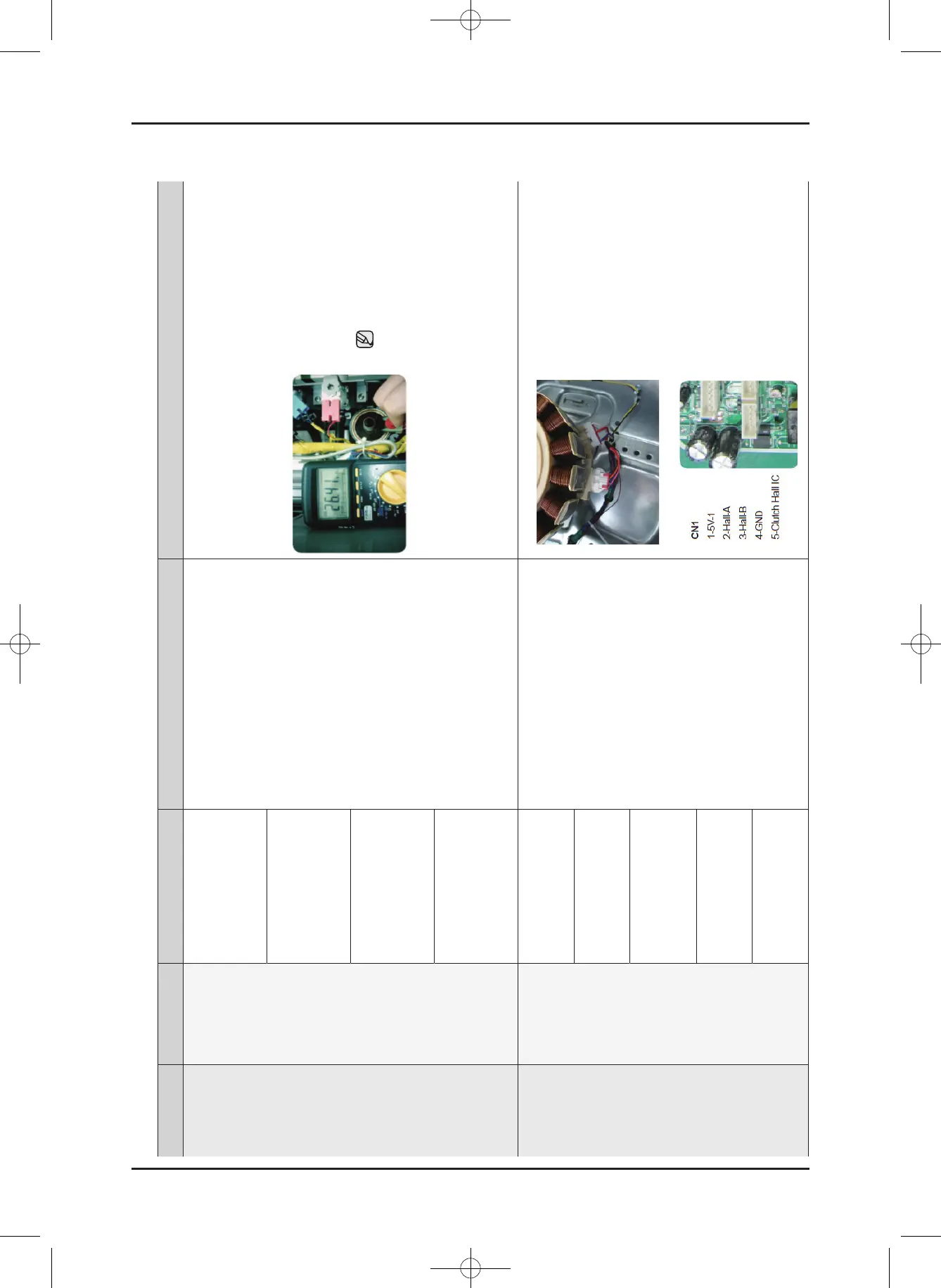
►Checkthewaterlevelsensor
frequency.
1.Checkitafterthewaterlevel
sensor and the connector are
connected.
CheckingPart:Blue
Color Wire Oragne Color
Wire
2.Frequency:Approx.26.4KHz
without water (Min 25.9KHz)
Checkifthewaterlevel
sensor terminal is properly
connected.
Checkifthewaterlevel
sensorhoseisbroken.
This may occur when the
main PCB is defective.
Washing Motor
Defect
►3C
Washing motor fault.
• Checkthemotorconnectorterminal
connections and contacts.
• 3Cisdisplayedbecauseoverloadingoccurs
due to too much laundry.
• Ifthehallsensorterminalisfaulty,replace
the hall sensor.
• Checkwhetherthestatorofthemotorcover
is damaged.
• Checkforcoildisconnectionsduetoforeign
material.
• IfthePBAcontrolcircuitisfaulty,replacethe
PBA.
►CheckthemotorWindingCoil
•Plugouttheconnectorandread
resistances at any two of the three
terminals on Motor: Should be
12Ω(at25oC)
►CheckthemotorHallSensor
•Checktheresistanceonthemain
PCBmotor(Betweenpins2and4,
3 and 4 of the four (4) pins)
-Resistance:Approx.2to4MΩ
-Checkthevoltagewhenthe
power is on.
Washing motor hall sensor
fault.
Incorrect connections of
the washing motor/hall
sensor connector.
Washing motor rotor and
stator fault.
Main PCB fault.
WA8700K Washer.indb 23 2016/2/4 16:56:14
This document can not be used without Samsung's authorization.
SAMSUNG PROPRIETARY. DO NOT COPY OR DISTRIBUTE WITHOUT PERMISSION





 To Next Page