EasyManua.ls Logo

Samsung BD-F5100 - User Manual

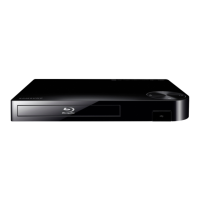
Samsung BD-F5100
25 pages
Print Icon
To Next Page IconTo Next Page
Loading...
imagine the possibilities
Thank you for purchasing this Samsung product.
To receive more complete service,
please register your product at
www.samsung.com/register
Blu-ray
Disc Player
user manual
BD-F5100
ENGLISH

Other manuals for Samsung BD-F5100

Questions and Answers

  • S
    simonjamesAug 19, 2025
    What to do if the screen is blank on my Samsung BD-F5100 Blu-ray Player?
    • R
      Robert CarterAug 19, 2025
      If the screen is blank, and the HDMI output is set to a resolution your TV doesn't support (like 1080p), you might not see a picture. To fix this, or if you are still experiencing a blank screen, press the button on the front panel for more than 5 seconds without a disc inside. Note that all settings will revert to the factory settings, and all stored user BD data will be deleted.
  • A
    Angie DuranAug 21, 2025
    How to fix Samsung BD-F5100 remote control not working?
    • R
      Rebecca JohnsonAug 21, 2025
      If your Samsung Blu-ray Player remote control isn't working, try these steps: First, replace the batteries. If that doesn't work, make sure you're within 20 feet of the player. As a last resort, remove the batteries, press and hold one or more buttons for several minutes to reset the remote's microprocessor, then reinstall the batteries.
  • C
    Cheryl GibsonAug 23, 2025
    How to reset forgotten password on Samsung BD-F5100?
    • J
      jamesturnerAug 23, 2025
      If you've forgotten your password for your Samsung Blu-ray Player, you can reset all settings, including the password, to the factory defaults by pressing the button on the front panel for more than 5 seconds with no disc inside. Be aware that this will erase all stored user BD data, so only do this if absolutely necessary.
  • D
    David ArnoldAug 26, 2025
    Why no HDMI output from my Samsung Blu-ray Player?
    • B
      brittanysalazarAug 26, 2025
      If you're getting no HDMI output from your Samsung Blu-ray Player, first check the connection between the TV and the player's HDMI jack. Also, verify that your TV supports the HDMI input resolution (480p, 720p, 1080i, or 1080p).
  • M
    Mark WalkerAug 27, 2025
    What to do if Samsung Blu-ray Player disc does not play?
    • J
      Joseph ParrishAug 27, 2025
      If your Samsung Blu-ray Player isn't playing discs, make sure the disc is placed with the label side facing up. Also, check if the Blu-ray Disc/DVD region number is compatible with your player.
  • J
    John BrownAug 30, 2025
    Why is the picture noisy or distorted on my Samsung BD-F5100?
    • T
      Tracy JohnsonAug 30, 2025
      If the picture on your Samsung Blu-ray Player is noisy or distorted, make sure the disc isn't dirty or scratched. Clean the disc to resolve the issue.
  • I
    Isaiah OrrSep 1, 2025
    Why is video played intermittently on my Samsung Blu-ray Player?
    • E
      Elizabeth PenningtonSep 1, 2025
      If you're experiencing intermittent video playback on your Samsung Blu-ray Player, check if your network connection is stable. Also, ensure the network cable is properly connected and that the network isn't overloaded.
  • N
    Nicole PetersSep 3, 2025
    What causes an abnormal HDMI output screen on Samsung BD-F5100 Blu-ray Player?
    • G
      Gabriela FryeSep 3, 2025
      If you see random noise on the screen from your Samsung Blu-ray Player via HDMI, it means that your TV doesn't support HDCP (High-bandwidth Digital Content Protection).
  • W
    William WoodsSep 5, 2025
    Why is the DLNA connection between my Samsung Blu-ray Player and PC unstable?
    • G
      Gina HarrellSep 5, 2025
      If you are experiencing an unstable DLNA connection between your Samsung Blu-ray Player and PC, ensure the IP addresses under the same subnetwork are unique to prevent IP interference. Also, check if you have a firewall enabled and, if so, disable it.
  • A
    Adam AdamsSep 7, 2025
    How to get audio on Samsung Blu-ray Player?
    • G
      Gregory LewisSep 7, 2025
      To get audio from your Samsung Blu-ray Player, ensure you have selected the correct Digital Output in the Audio Options Menu.

Summary

Safety Information

General Warnings and Precautions

Covers warnings about electric shock, laser radiation, and general product handling safety.

Regulatory and Laser Safety

Information on FCC compliance, CATV installation, and Class 1 Laser product safety.

Important Safety Instructions

Essential safety guidelines to follow before and during unit operation.

Handling and Disc Management

Apparatus Handling Cautions

Cautions regarding moisture, ventilation, power cord safety, and preventing liquid spills.

Disc Handling, Cleaning, and Storage

Proper methods for holding, cleaning, and storing discs to ensure optimal playback quality.

Getting Started

User Manual Guidance

Tips for effectively navigating and utilizing the user manual.

Disc Compatibility and Region Codes

Details on playable disc types, logos, region codes, and incompatible disc formats.

Supported File Formats and USB Notes

Information on supported file formats and essential guidelines for USB device connections.

File Format Support Details

Video, Music, and Picture File Specs

Specifications for supported video, music, and picture file formats, codecs, and resolution.

Playback Limitations and Notes

Information on potential playback issues and general limitations with media files and discs.

Product Overview and Accessories

AVCHD Format Information

Details about the AVCHD format and its compatibility with the player.

Included Accessories

List and identification of the accessories supplied with the player.

Front and Rear Panel Layouts

Diagrams and labels for the player's front and rear panel controls and connection ports.

Remote Control and TV Connection

Remote Control Operations

Guidance on remote control functions, including button operations and battery installation.

Connecting to a Television

Steps to connect the player to a television using an HDMI cable.

TV Connection Notes

Important considerations for connecting the player to a TV, including HDMI and HDCP.

Audio and Network Connectivity

Audio System Connection Methods

Methods for connecting the player to an audio system via HDMI or digital coaxial cable.

Wired Network Setup

Instructions for establishing a wired network connection for the player.

Network Connection Notes

Important notes regarding network setup, ISP policies, and DSL users.

Player Settings and Navigation

Initial Setup and Menu Navigation

Guide for initial setup and instructions on navigating player menus.

Display Settings and TV Aspect Ratio

Configuration of display settings like aspect ratio and resolution for optimal picture.

BD Wise Feature (Samsung TVs)

Details on the BD Wise feature for enhanced inter-connectivity with Samsung TVs.

Video and Audio Output Settings

HDMI Resolution and Progressive Mode

Setting HDMI output resolution and improving DVD picture quality with progressive scan.

Digital Audio Output Configuration

Selecting the digital audio output format for your TV or AV Receiver.

Movie Frame (24 Fs) and HDMI Color

Adjusting video output for improved picture quality and color accuracy.

HDMI Deep Color Output

Enabling Deep Color output for enhanced color reproduction and depth.

Advanced Audio and Network Settings

Audio Output Adjustments

Adjusting audio output for PCM compatibility and controlling dynamic range.

Automatic Network Setup

Guide for automatically configuring network settings using DHCP.

Manual Network Setup Procedure

Step-by-step guide for manually configuring network settings if Auto setup fails.

Network Features and Services

BD-Live Internet Connection and Usage

Configuring internet connection allowance for BD-LIVE services and usage instructions.

DLNA Functionality and Software

Explanation of DLNA function for playing media from PC or NAS and software download.

Quick Start and Anynet+ Features

Enabling quick power-on and linked operations with Anynet+ (HDMI-CEC).

Data Management, Security, and Support

Data Management, Language, and Security

Managing BD data, language settings, and security features like PIN and parental controls.

PIN Management and Reset

Procedures for changing or resetting the security PIN.

General and Support Settings

Configuring time zone, software upgrades, and other general support options.

Software Updates and Media Playback

Software Upgrade and System Reset

Instructions for upgrading player software and restoring player settings to default.

Playing Commercially Recorded Discs

Steps to play commercially produced discs like Blu-ray, DVD, or CD.

Playing Files from a USB Device

How to play multimedia files (video, music, photos) from a connected USB storage device.

Media Playback: User Discs and PC Streaming

Playing User-Recorded Discs

Playing multimedia files (video, music, photos) recorded on user discs.

Streaming Content from Your PC

Streaming multimedia content from a PC to the player via network using DLNA.

Video Playback Controls and Remote Use

How to control video playback using remote buttons across various media sources.

Music Playback Controls

Music Playback Operations

Controlling playback of music from discs, USB devices, or computers.

Remote Controls for Music Playback

Mapping remote control buttons to music playback functions.

Audio CD;MP3 Repeat Modes and Playlists

Setting repeat modes for audio CDs and MP3 files, and creating playlists.

Photo Playback and Online Services

Photo Content Playback and Tools Menu

Controlling photo playback and using the Tools menu for features like slideshows.

Netflix Streaming Service

Streaming movies and TV shows from Netflix.

Selecting Content on Netflix

How to select and play movies or videos within the Netflix application.

Streaming Music and Video Services

Pandora Music Service

Streaming music from Pandora.

YouTube Video Service and Playback

Streaming video content from YouTube and controlling playback.

YouTube Video Discovery

Finding and Selecting Videos

Locating and selecting related videos or videos from the current play list.

Searching for YouTube Videos

Searching for videos on YouTube using keywords.

My YouTube Account Features

Accessing your YouTube account and sending videos from mobile devices.

Troubleshooting and DLNA Notes

Common Player Troubleshooting

Solutions for common problems related to remote control, disc playback, and output.

DLNA Function Troubleshooting

Notes on DLNA file visibility, intermittent video playback, and unstable network connections.

Player Specifications and Service

Product Technical Specifications

Detailed technical specifications of the Blu-ray player.

Repair Service Information

Information on administration fees for service calls and repair procedures.

Compliance and Compatibility Notices

Disc Compatibility and Format Issues

Information on disc compatibility, format evolution, and player operation limitations.

Progressive Scan and Copy Protection

Notes on progressive scan output, TV compatibility, and copy protection systems.

Licensing and Service Disclaimers

Software and Technology Licenses

Information on licenses for Dolby, DTS, HDMI, Oracle, Java, and open source software.

Third-Party Network Service Disclaimer

Disclaimer regarding third-party content and services provided through the device.

Limited Warranty Information

Warranty Period and Terms

Details of the limited warranty period, terms, and conditions for the product.

Warranty Exclusions and Limitations

Information on what is not covered by the warranty and its limitations.

Customer Support Contact

Contact Information and Resources

Provides contact details for customer support, online resources, and service centers.

Samsung BD-F5100 Specifications

General IconGeneral
3DYes
Depth38.1 mm
Width269.2 mm
Height193 mm
Weight1000 g
Product colorBlack
Audio decodersDolby Digital, Dolby Digital Plus, Dolby TrueHD
AC input voltage220 - 240 V
Progressive scan-
AC input frequency50 - 60 Hz
Composite video in0
Disc types supportedBD, BD-R, BD-R DL, BD-R XL, BD-RE, BD-RE DL, BD-RE XL, BD-ROM, CD, CD-R, CD-ROM, CD-RW, DVD, DVD+R, DVD+R DL, DVD+RW, DVD+RW DL, DVD-R, DVD-R DL, DVD-RAM, DVD-RW, DVD-RW DL
Playback disc formatsBlu-Ray audio, CD audio, CD video
Supported video modes1080p
Card reader integratedNo
USB 2.0 ports quantity1
Audio formats supportedAAC, LPCM, MP3, WMA
Ethernet LAN data rates10, 100, 1000 Mbit/s
Image formats supportedJPG
Video formats supportedAVCHD, DIVX, DIVX HD, MKV, MPEG2, MPEG4, WMV
Sustainability certificatesENERGY STAR
Consumer Electronics Control (CEC)Anynet+
Audio output channels- channels

Related product manuals