Title/Chapter/Time Selection
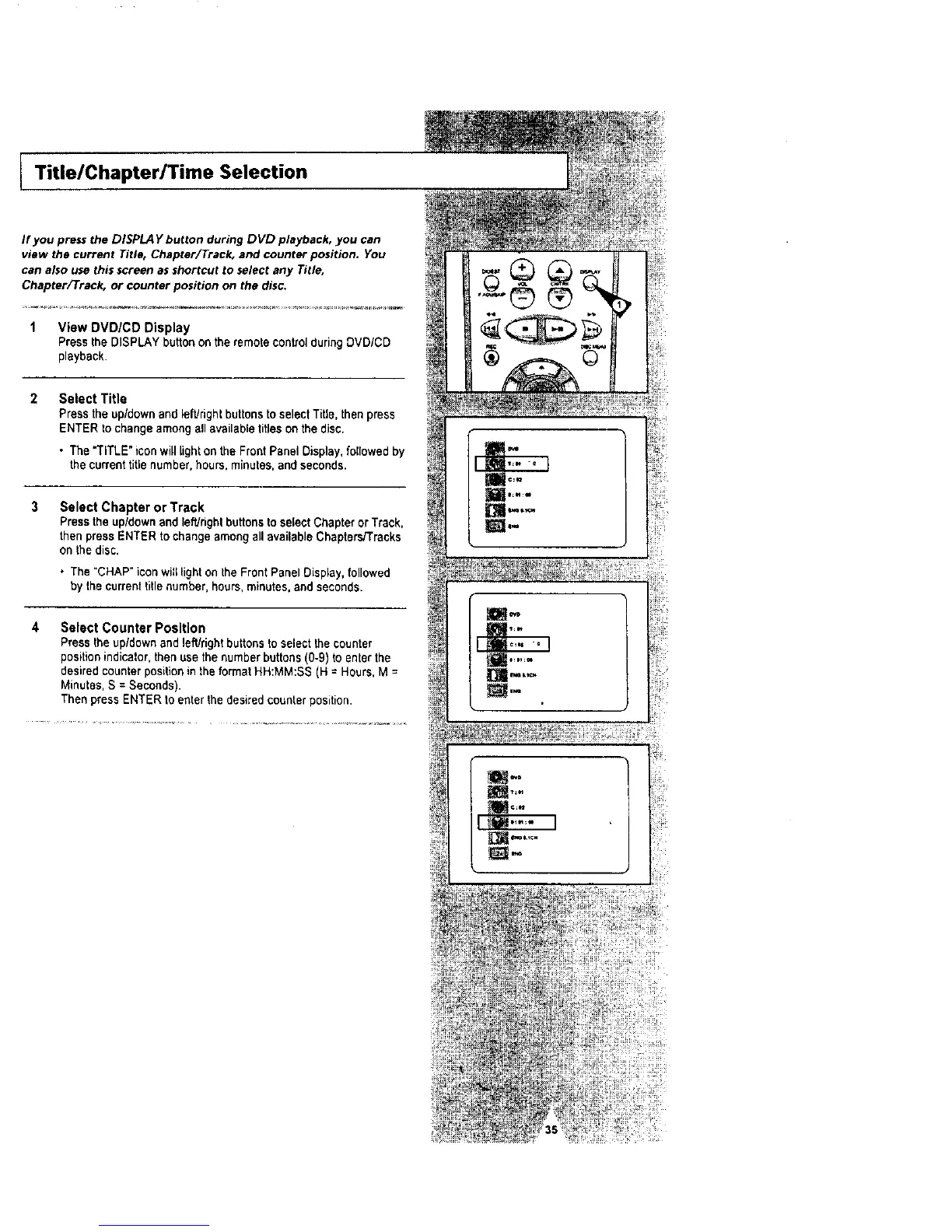
If you press the DlSPLA Y button during DVD playback, you can
view the current Title, Chapter/Track, and counter position. You
can also use this screen as shortcut to select any Title,
Chapter[Track, or counter position on the disc.
1 View DVD/CD Display
Press the DISPLAY button on the remote controlduring DVD/CD
playback.
Select Title
Press the up/down and left/right buttons to select Title, then press
ENTER to change among all available titleson the disc.
• The "TITLE" iconwill light on the Front Panel Display, followed by
the current title number, hours, minutes, and seconds.
Select Chapter or Track
Pressthe up/down and left/rightbuttonsto select Chapter or Track,
then press ENTER to change among all available Chapters/Tracks
on the disc.
• The "CHAP" iconwitl light on the Front Panel Display,followed
by the current titlenumber, hours, minutes, and seconds.
4 Select Counter PosJtion
Press the up/down and left/right buttonsto select the counter
positionindicator,thenuse the number buttons(0-9) to enter the
desired counter positionin theformat HH:MM:SS (H = Hours,M =
Minutes, S = Seconds).
Then press ENTER to enter the desired counterposition,




 To Next Page