I AutoPlay
If you want your videotapes to play automatically when you insert
them, turn on Auto Play,
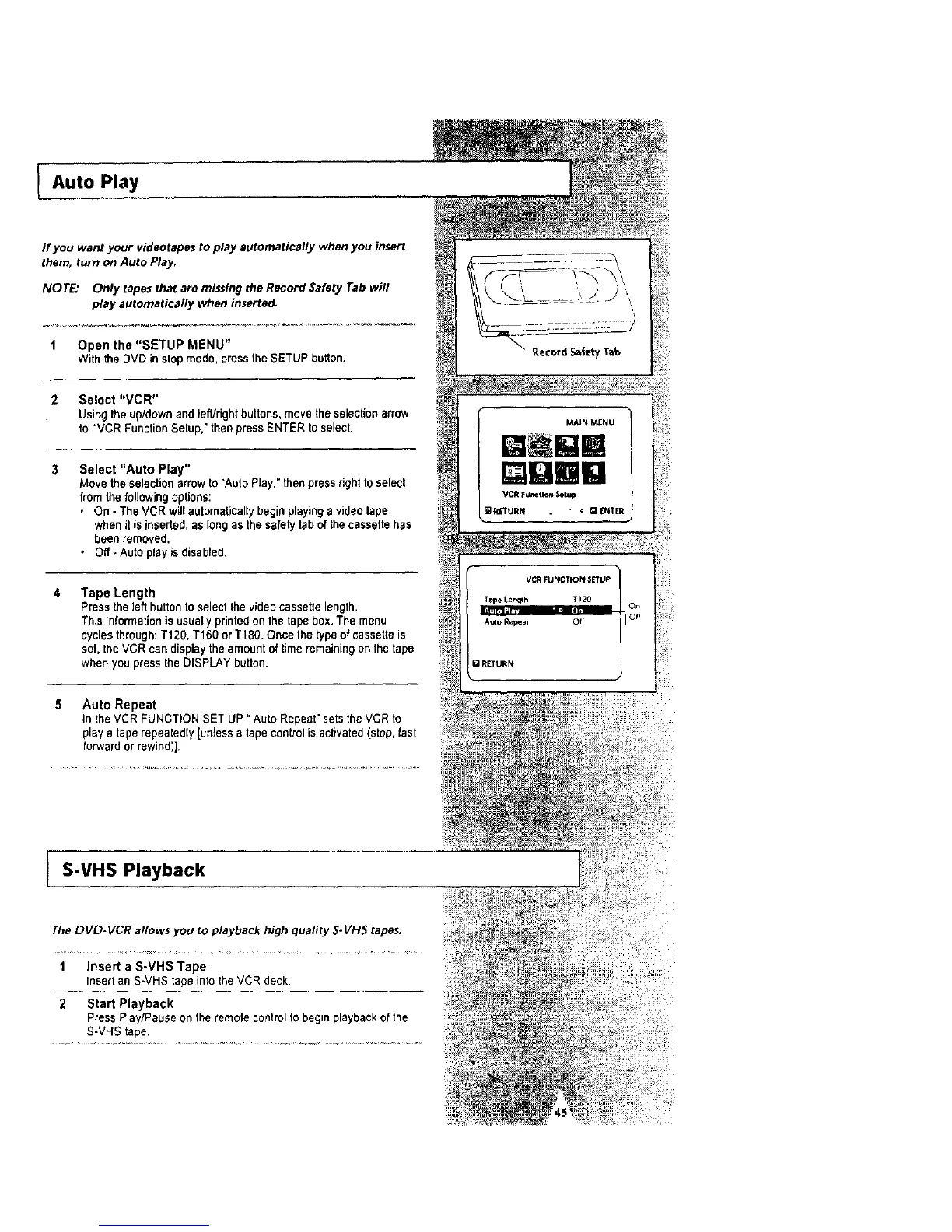
NOTE: Only tapes that are missing the Record Safety Tab wifl
play automatically when inserted.
1 Open the "SETUP MENU"
With the DVD in stop mode. press the SETUP button.
2 Select "VCR"
Using the up/down and lefUdghtbuttons, move the selectionarrow
to "VCR FunctionSetup," then press ENTER to select,
3 Select "Auto Play"
Move the selection arrowto "AutoPlay." then press rightto select
from the following options:
, On - The VCR will automatically begin playing a video tape
when it is inserted,as long as the safety tab of thecassette has
been removed.
• Off _Auto play is disabled.
Tape Length
Press the left button to select the videocassette length.
This informationis usuallyprinted on the tape box, The menu
cyclesthrough: T120, T160 or T18g. Once the type of cassette is
set, the VCR can displaythe amount oftime remaining on the tape
when you pressthe DISPLAY button.
Auto Repeat
In the VCR FUNCTION SET UP" Auto Repeat" setsthe VCR to
playa tape repeatedly [unless a tape controlisactivated (stop,fast
forward or rewind)].
S-VHS Playback
The DVD-VCR allows you to playback high quality S. VH5 tapes.
1 Insert a S-VHS Tape
Insert an S-VHS tape into the VCR deck.
2 Start Playback
Press Play/Pause on the remote controlto begin playbackof the
S-VHS tape.
MAIN _NU
QBm
_RETURN " • gaENTER
VC_ FUNCTION srruP
Tape Ler_h TI20
........
Auto Repeal Off
RETURN




 To Next Page