l Programmed Playback
Programmed Playback lets you set a custom order for playback of
chapters/tracks on a DVD or CD.
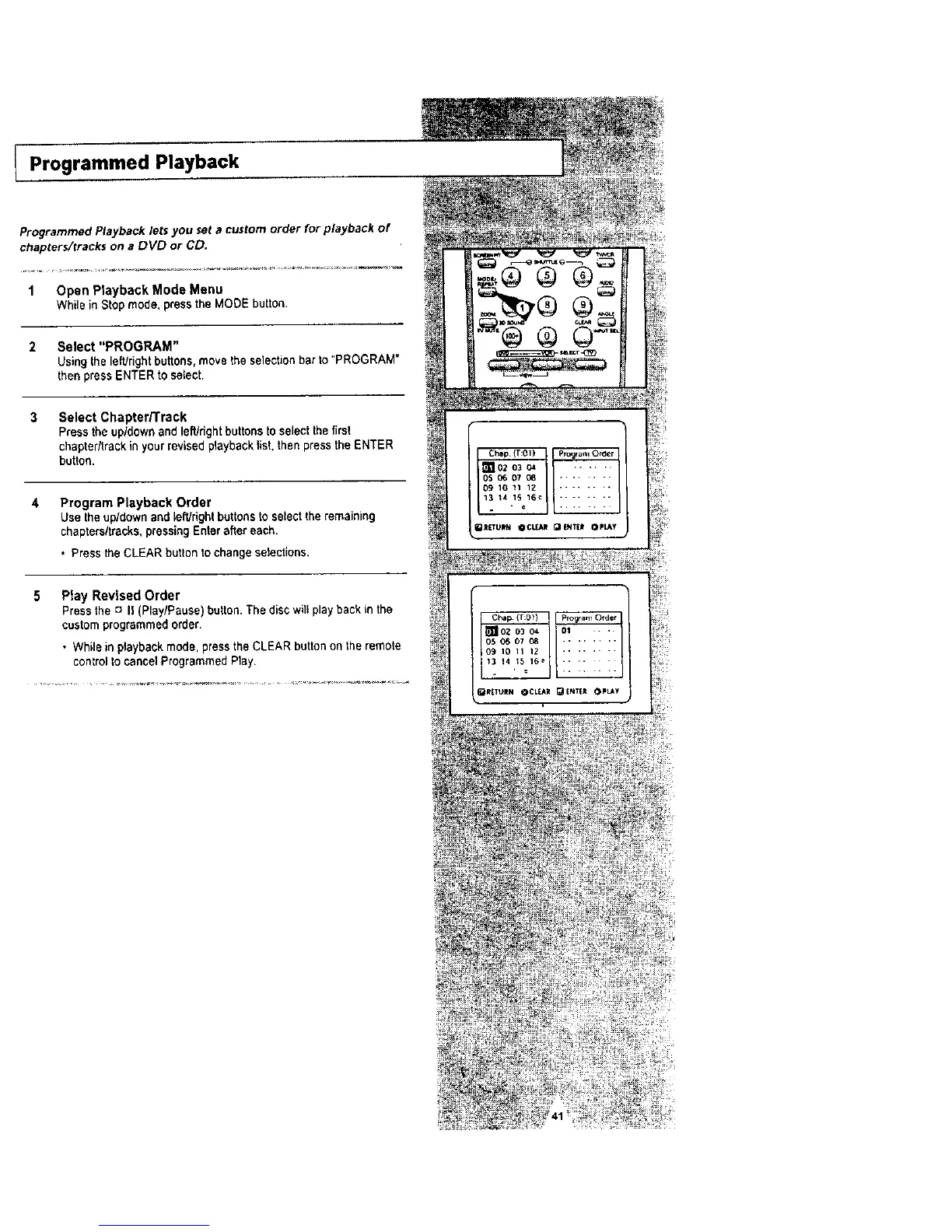
1 Open Playback Mode Menu
While in Stop mode, press the MODE button.
2 Select "PROGRAM"
Using the lefUdght buttons, move the selection bar to "PROGRAM"
then press ENTER to select.
3 Select Chapter/Track
Press the up/down and left/right buttons to select the first
chapter/track in yourrevised playback Ust.then press the ENTER
button.
4 Program Playback Order
Use the up/down and left/right buttons to selectthe remaining
chapters/tracks, pressing Enter after each.
• Press the CLEAR button to change selections,
5 Play Revised Order
Pressthe c_II (Play/Pause) button,The disc will playback in the
customprogrammed order,
• While in playbackmode, press the CLEAR button on the remote
control to cancel ProgrammedPlay.
Chep (T:01) p_c_ram Otoer
_102 03 04 ......
_ 05 07 08
IO 11 1Z
13 t4 1_ 16_
- b
_R[TLIIN QC_R _[NTEI OPLAy




 To Next Page