
 To Next Page
L
lloydbrianSep 7, 2025
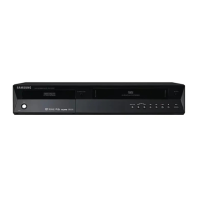
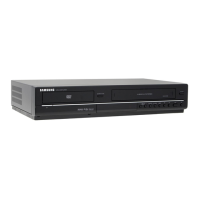
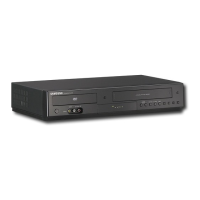
Why was my Samsung DVD-VR350 DVD Player timer recording unsuccessful?
- JJohnny SmithSep 7, 2025
Re-check the recording start and stop time settings, as well as the current time on your Samsung DVD Player.

Why was my Samsung DVD-VR350 DVD Player timer recording unsuccessful?
Re-check the recording start and stop time settings, as well as the current time on your Samsung DVD Player.
What to do if Samsung DVD-VR350 DVD Player remote control doesn’t work?
Ensure that you are pointing the remote control at the remote control sensor on your Samsung DVD Recorder & VCR. Make sure you are within the operational distance (15ft) and that there are no obstacles between the remote control and the DVD Recorder & VCR. Finally, check if the batteries are depleted and replace them if needed.
What to do if my Samsung DVD-VR350 DVD Player cannot play the disc?
First, check whether the disc is inserted correctly with the label facing up. Next, verify the regional code of your DVD disc. Finally, be aware that your Samsung DVD Recorder & VCR might not be able to playback some types of disc.
How to fix no HDMI output on Samsung DVD VCR Combo?
If there's no HDMI output from your Samsung DVD VCR Combo, ensure the Video output is HDMI enabled. Also, check the connection between the TV and the HDMI jack of the DVD Recorder & VCR.
Why angle operation does not work on Samsung DVD VCR Combo?
Angle operation is available on your Samsung DVD VCR Combo only when the disc contains images captured at different angles.
Why aren't the desired audio and subtitle languages playing on my Samsung DVD Player?
Only the sound and subtitle languages contained on a DVD disc are available and displayed on the disc menu, as audio and subtitle languages are disc-specific.
Why does my Samsung DVD-VR350 have abnormal HDMI output screen?
If snow noise appears on the screen, it means that TV does not support HDCP (High-bandwidth Digital Content Protection).
Why does Samsung DVD-VR350 disc revolves, but no image or bad quality images are output?
Check whether there is damage or foreign materials on your disc. Some discs with bad manufacturing quality may not be played back. If the scene changes from dark to bright suddenly, the screen may jitter temporarily, but it is not a defect.
How to enable progressive output on Samsung DVD VCR Combo?
To ensure progressive output on your Samsung DVD VCR Combo, make sure to change the component video output using the Progressive button when the disc is stopped.
What to do if Samsung DVD VCR Combo cannot play the disc?
If your Samsung DVD VCR Combo cannot play the disc, check whether the disc is inserted correctly with the label facing up. Also, verify the regional code of your DVD disc. Note that this DVD Recorder & VCR cannot playback some types of disc.
Essential safety instructions for preventing electric shock and radiation exposure.
Guides for HDMI/DVI, Progressive Scan, and AV Receiver connections.
Navigating menus, auto setup, date/time, and TV tuning.
Supported discs, formats, and compatibility charts for recording.
Explains recording modes, speeds, immediate, DV input, OTR, and timer recording.
Solutions for common DVD and VCR operational problems.
 General
| Brand | Samsung |
|---|---|
| Model | DVD-VR350 |
| Category | DVD Player |
| Language | English |