Shooting options
46
Using face detection
If you use face detection options, your camera can automatically detect a human face. When you focus on a human face, the camera
adjusts the exposure automatically. Take photos quickly and easily by using Blink Detection to detect closed eyes or Smile Shot to
capture a smiling face.
Detecting faces
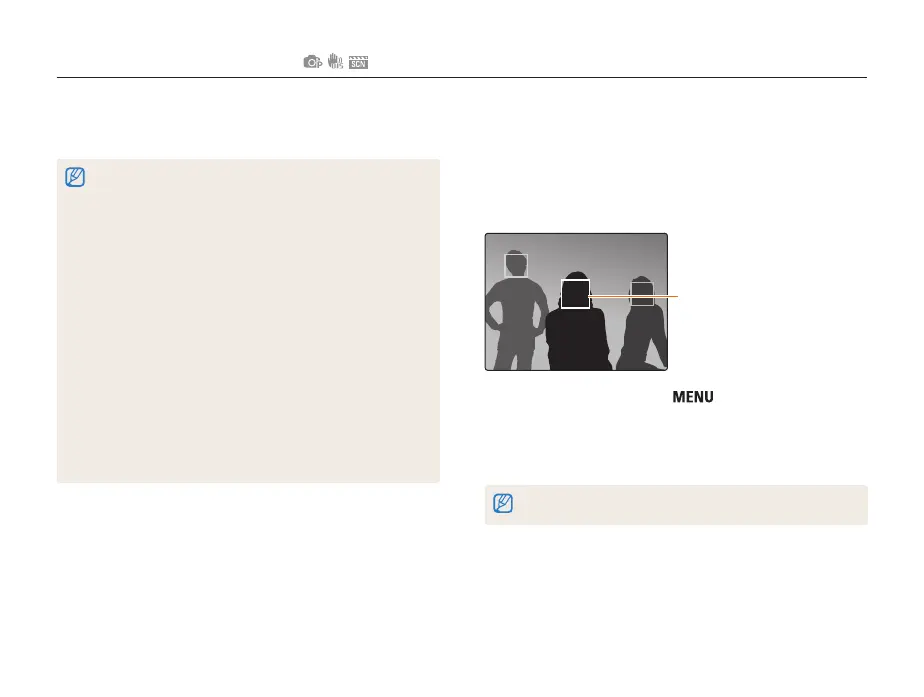
Your camera automatically detects human faces (up to 10 faces
in one scene).
The nearest face appears in
a white focus frame and the
rest of the faces appear in
gray focus frames.
1
In Shooting mode, press [ ].
2
Select Shooting → Face Detection → Normal.
• The nearest face appears in a white focus frame and the rest
of the faces appear in gray focus frames.
The closer you are to the subject, the quicker your camera detects faces.
• If the camera recognizes any number of faces, the focus
automatically tracks the motion of those faces.
• In some scene modes, face detection is unavailable.
• Face detection may not be effective when:
- the subject is far from the camera (The focus frame will appear
orange for Smile Shot and Blink Detection.)
- it is too bright or too dark
- the subject is not facing the camera
- the subject is wearing sunglasses or a mask
- the subject is backlit or the lighting condition is unstable
- the subject’s facial expression changes remarkably
• Face detection is not available when using a Photo Style Selector, or
image adjustment option or when used with Tracking AF.
• Face detection is not available when you are using the digital zoom.
• Depending on the face detection option you selected, the timer or
some timer options are not available.
• Depending on the face detection option you selected, some
continuous options are not available.
• When you set face detection options, the AF area is automatically
set to Multi AF.



 To Next Page