Playback/Editing
60
Playing back
Viewing photos
Zoom in on part of a photo or view photos in a slide show.
Enlarging a photo
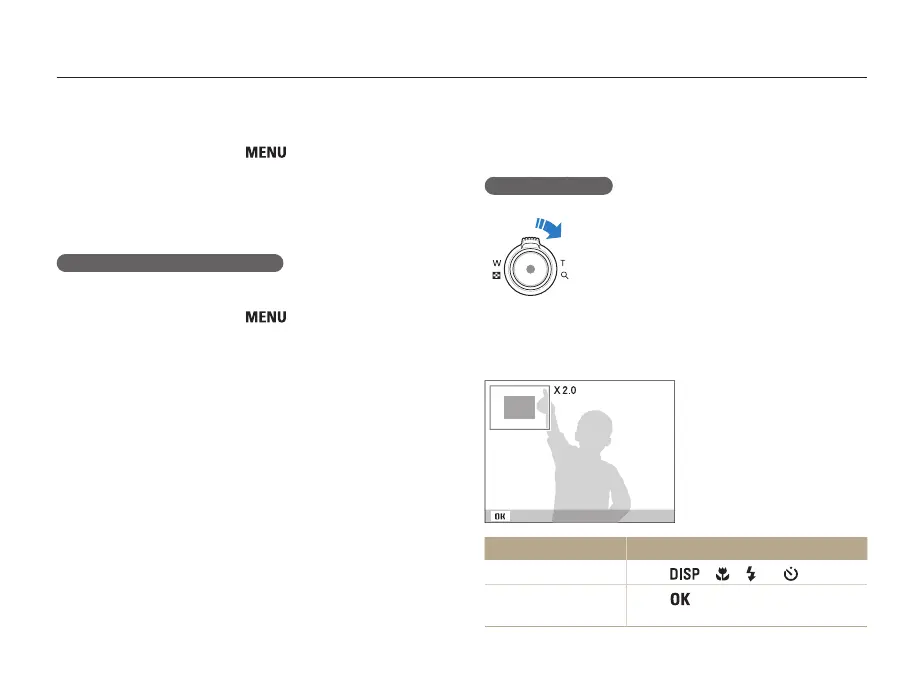
In Playback mode, rotate [Zoom] to the right
to enlarge a photo (rotate [Zoom] to the left to
reduce a photo).
The enlarged area and zoom ratio are indicated on the top of the
screen. The maximum zoom ratio may vary depending on the
resolution.
Trim
To Do this
Move the enlarged area
Press [ ], [ ], [ ] or [ ].
Trim the enlarged photo
Press [ ], and then select Yes. (The
trimmed photo is saved as a new file.)
To delete all files,
1
In Playback mode, press [ ].
2
Select File Options → Delete → All → Yes.
• All unprotected files are deleted.
Copying files to the memory card
You can copy files from the internal memory to a memory card.
1
In Playback mode, press [
].
2
Select File Options → Copy to Card.
3
Select Yes to copy files.


 To Next Page