Using the Ring
17
•
Hold your hand so it is above your heart or rest for some time. When your finger’s
circumference returns to normal, remove the Ring from your finger.
•
If the methods above do not work, consult a specialist immediately.
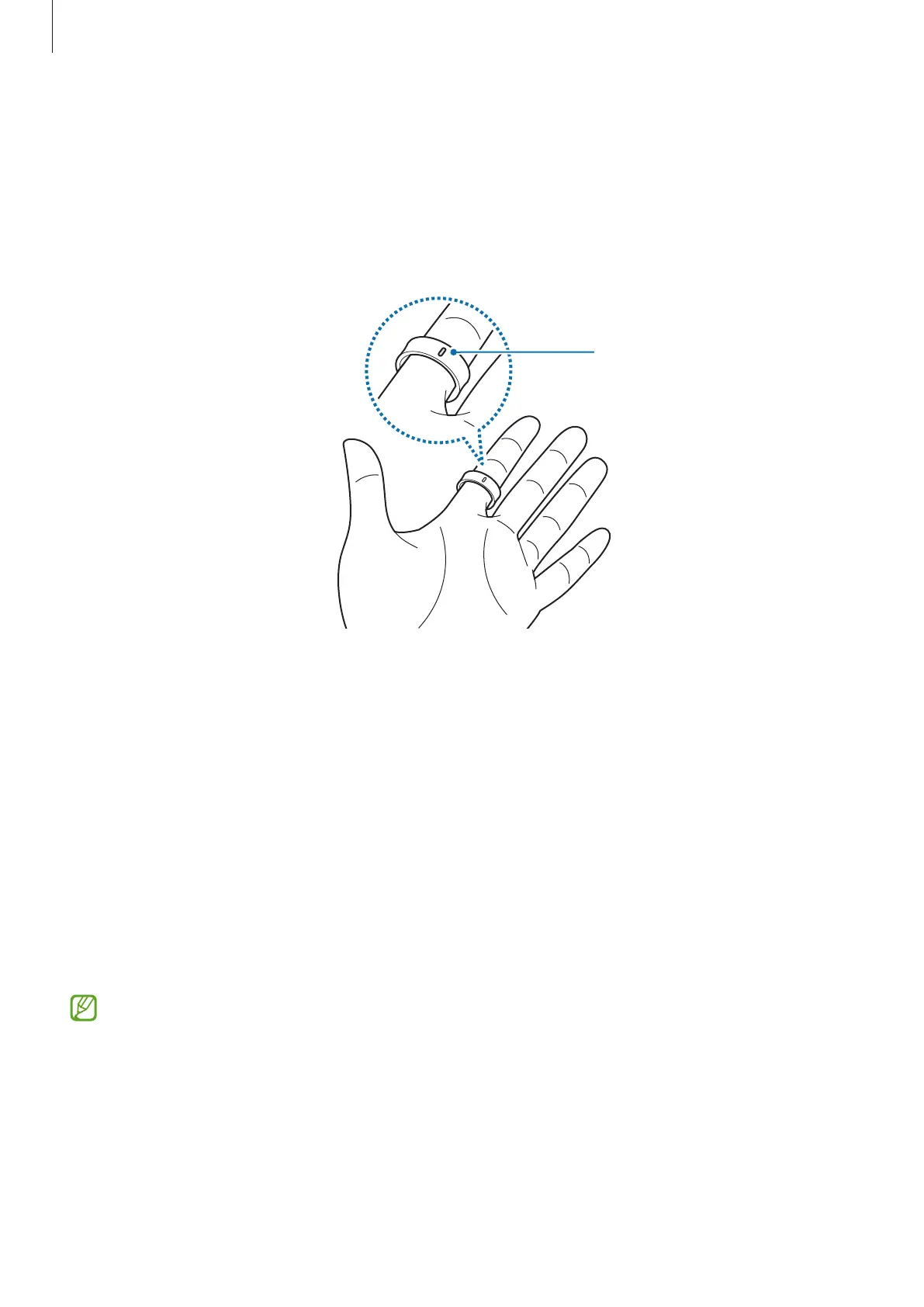
If you need to cut the Ring off in an emergency, cut it along the orientation indicator to
avoid damaging its battery.
Orientation
indicator
Connecting the Ring to a phone
Installing the Galaxy Wearable app
To connect your Ring to a phone, install the Galaxy Wearable app on the phone.
Depending on your phone, you can download the Galaxy Wearable app from the
following places:
•
Samsung Android phones:
Galaxy Store
•
Other Android phones:
Play Store
•
It is compatible with Android phones that support Google mobile services.
•
You can install the Galaxy Wearable app on phones that support Ring syncing.
Ensure that your phone is compatible with a Ring.
•
You cannot connect your Ring to a tablet or a computer.


 To Next Page