BLUETOOTH
®
SETUP
Your phone comes with Bluetooth technology, which is a wireless
technology that enables a data connection between your phone and a
Bluetooth wireless headset.
Prepare a Bluetooth wireless headset
To pair your phone with a Bluetooth headset, make sure that your
headset is fully charged and that you put the headset into pairing
mode. See your Bluetooth headset’s manual for more information.
Turn on the Bluetooth feature and pair with a headset
1.
From the main screen, select Menu.
2. Scroll to and select Settings.
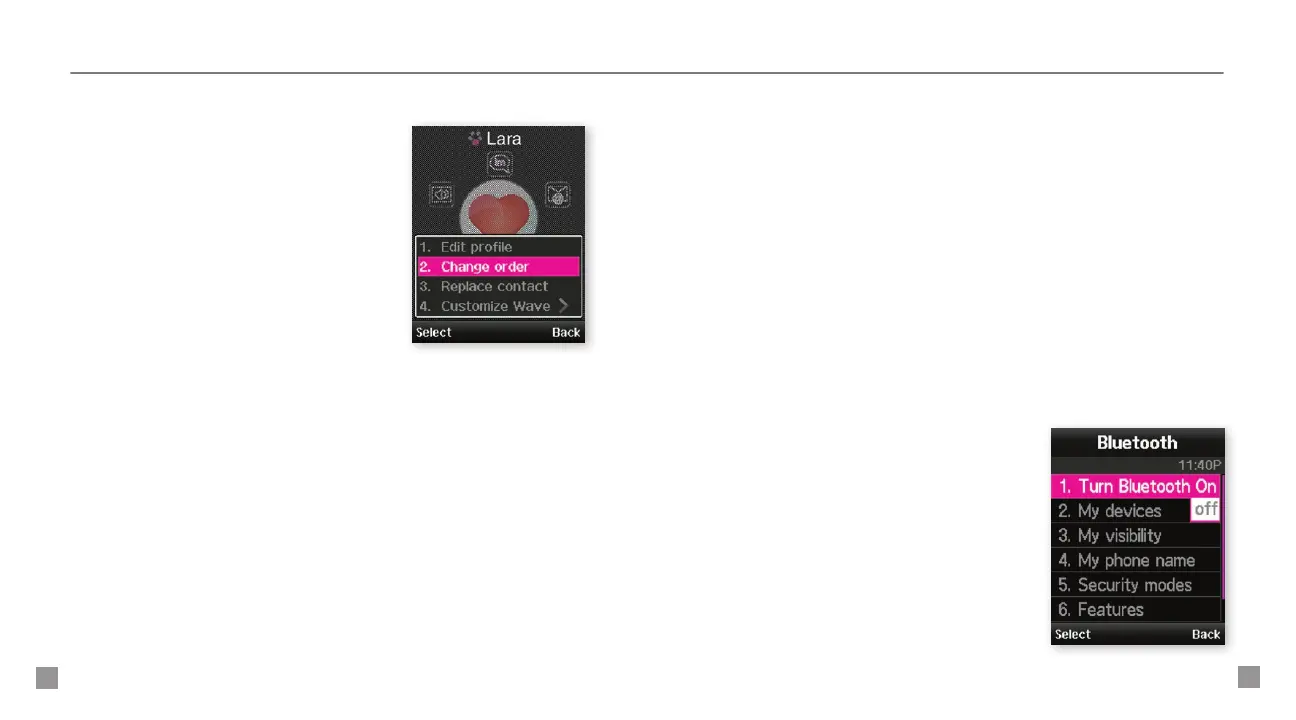
3. Scroll to and select Bluetooth.
4.
Select Turn Bluetooth On. Your
phone turns on Bluetooth and
searches for your Bluetooth headset.
5. Select the headset.
6. Type the PIN if required and
select OK.
Move a myFaves contact to another circle
1. From the main screen, scroll to
the contact and press the OK key.
2. Select Options > Change order.
3. Scroll to the desired location
and select Save.
Minimize myFaves circles
1.
From the main screen, select Menu.
2. Scroll to and select Settings.
3. Select myFaves settings.
4. Select Display.
5. Scroll to and select Minimize.
6. Select OK.
7. Press the red End key to exit.
When minimized, press the OK key to show myFaves and press
the red End key to hide myFaves.







 To Next Page