EasyManua.ls Logo

Samsung HMX-F90BN/XAA - Menu Items

Samsung HMX-F90BN/XAA
113 pages
Print Icon
To Next Page IconTo Next Page
To Previous Page IconTo Previous Page
Loading...
50
Using the menu items
MENU ITEMS
• The items available in each menu vary depending on the operation mode.
• For item operation details, see the page number listed under Page in the table.
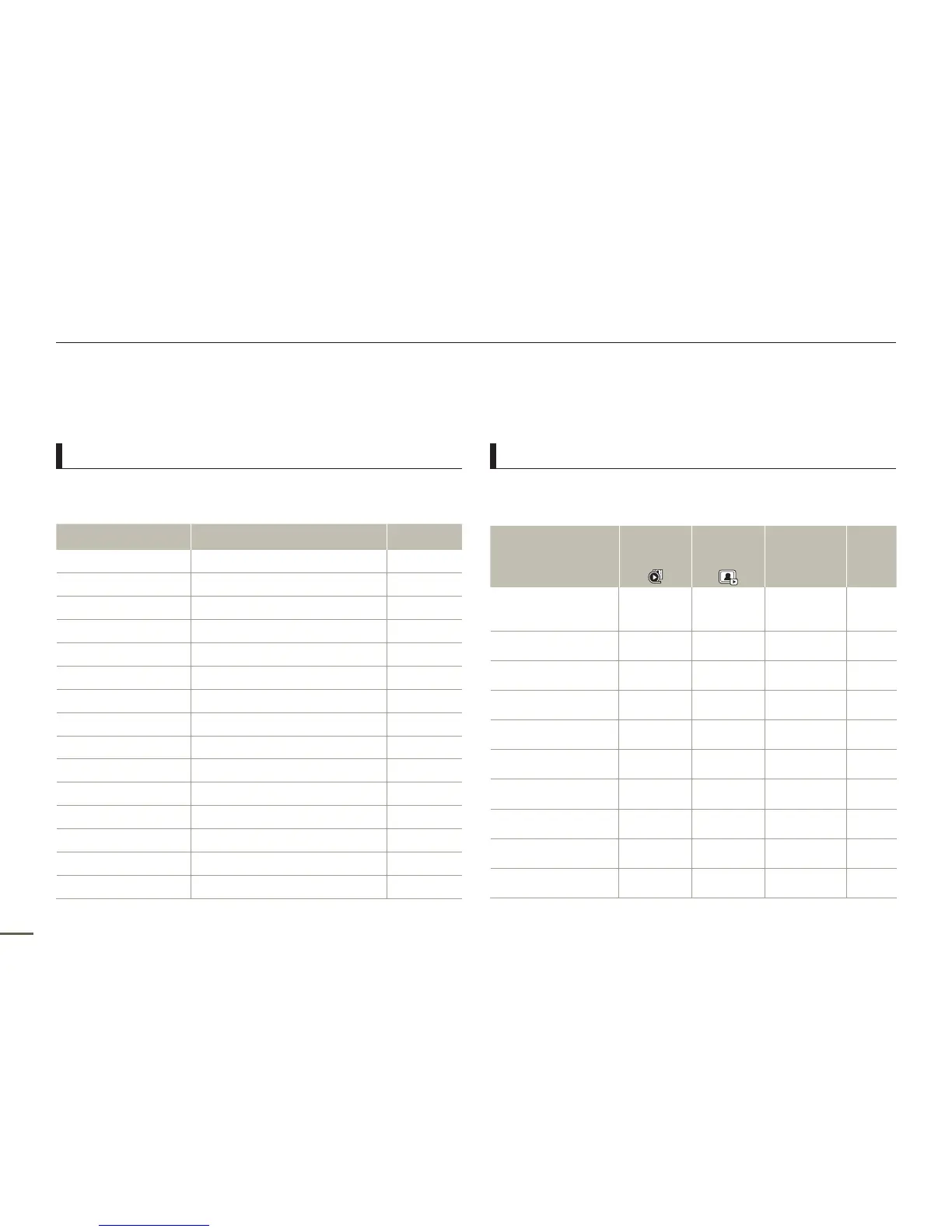
Recording menu items
Items Default value Page
iSCENE
Auto 52
Video Resolution
1280X720/30p 53
Photo Resolution
1696x954 (16:9) 54
White Balance
Auto 54
Face Detection
Off 56
EV
- 57
C.Nite
- 58
Focus
Auto 58
Anti-Shake(HDIS)
Off 60
Digital Special Effect
Off 61
Zoom Type
Optical Zoom 62
Cont. Shot
Off 63
Time Lapse REC
Off 64
Guideline
Off 66
Settings
-
75
Playback menu items
: Accessible
: Not accessible
Items
Video
playback
mode
(
)
Photo
playback
mode
(
)
Default value Page
Thumbnail View
Option
(Thumbnail view only)
Normal 67
PlayOption
Play All 68
Smart BGM Option
(Single view only)
The Flea Waltz 68
Delete
- 70
Delete My Clip
- 71
Protect
- 72
Share Mark
- 73
Slide Show
-
74
File Info
-
74
Settings
-
75

Table of Contents

Related product manuals