EasyManua.ls Logo

Samsung HT-E3550 - User Manual

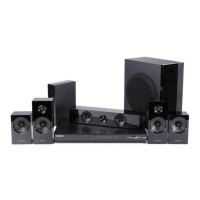
Samsung HT-E3550
50 pages
Print Icon
To Next Page IconTo Next Page
Loading...
imagine the possibilities
Thank you for purchasing this Samsung product.
To receive more complete service,
please register your product at
www.samsung.com/register
5.1CH Blu-ray™
Home Entertainment System
user manual
HT-E3500
HT-E3530
HT-E3550
HT-E3500_XY_0229.indd 1HT-E3500_XY_0229.indd 1 2012-02-29 오후 3:33:082012-02-29 오후 3:33:08

Table of Contents

Questions and Answers

  • K
    Kyle ChandlerSep 7, 2025
    Why can't I connect to the BD-LIVE server on my Samsung Home Theater System?
    • S
      stephen24Sep 7, 2025
      If you're unable to connect to the BD-LIVE server with your Samsung Home Theater System: * Test whether the network connection is active by using the Network Status function. * Check whether a USB memory device is connected to the product. * The memory device must have at least 1GB of free space to accommodate the BD-LIVE service. You can check the available size in BD Data Management. * See if the BD-LIVE Internet Connection option is set to Allow(All).
  • A
    annawilliamsAug 22, 2025
    What to do if my Samsung Home Theater System remote control does not work?
    • R
      Richard TaylorAug 22, 2025
      If your Samsung Home Theater System remote control isn't working, first ensure you're within its operational range and at the proper angle relative to the sensor. Also, check if the batteries are drained and replace them if needed.
  • M
    monique92Sep 4, 2025
    Why can I only hear sound from a few speakers on my Samsung Home Theater System?
    • S
      Susan ChenSep 5, 2025
      If you're only hearing sound from a few speakers on your Samsung Home Theater System, note that on certain Blu-ray/DVD discs, sound is output from the front speakers only. Check if the speakers are connected properly and adjust the volume. When listening to a CD, radio, or TV, sound is typically output to the front speakers only.
  • C
    Carmen JonesSep 3, 2025
    Why can't I receive radio broadcasts on my Samsung HT-E3550?
    • C
      Carol MartinSep 3, 2025
      If you can't receive radio broadcasts on your Samsung Home Theater System, ensure the antenna is connected properly. If the antenna's input signal is weak, install an external FM antenna in an area with good reception.
  • T
    tracy93Sep 2, 2025
    Why does playback not start immediately on Samsung Home Theater System?
    • C
      Christina PayneSep 2, 2025
      If playback doesn't start immediately when you press the Play/Pause button on your Samsung Home Theater System, the disc may be deformed or scratched. Try wiping the disc clean.
  • E
    Elizabeth PadillaAug 31, 2025
    Why is the video played intermittently on my Samsung Home Theater System?
    • B
      Brooke CarterSep 1, 2025
      If video is played intermittently on your Samsung Home Theater System, check if the network is stable. Also, check if the network cable is properly connected and if the network is not overloaded.
  • K
    Katherine CameronAug 30, 2025
    Why does playback not start on my Samsung HT-E3550?
    • J
      James VasquezAug 30, 2025
      If playback doesn't start on your Samsung Home Theater System, check the region number of the Blu-ray/DVD disc, as discs purchased from abroad may not be playable. Also, CD-ROMs and DVD-ROMs cannot be played. Make sure that the rating level is correct.
  • W
    wardfaithAug 29, 2025
    Why can't I eject the disc from my Samsung Home Theater System?
    • A
      Alex BatesAug 29, 2025
      If you're having trouble ejecting a disc from your Samsung Home Theater System, make sure the power cord is securely plugged into the outlet. If it is, try turning the power off and then back on.
  • R
    Robert BrownAug 27, 2025
    Why is there no sound coming from my Samsung HT-E3550 Home Theater System?
    • K
      Kyle Bender MDAug 27, 2025
      There could be several reasons why your Samsung Home Theater System isn't producing sound. It's possible that the speakers are not connected properly, or the speaker setup is not correctly customized. Also, during fast playback, slow playback, and step motion playback, the home cinema does not play sound. Finally, a severely damaged disc can also cause this issue.
  • D
    Danielle CowanAug 27, 2025
    What to do if Dolby Digital 5.1 CH Surround Sound is not produced on Samsung HT-E3550 Home Theater System?
    • C
      Carrie ReynoldsAug 27, 2025
      If Dolby Digital 5.1 CH Surround Sound isn't being produced by your Samsung Home Theater System, first check if there is a "Dolby Digital 5.1 CH" mark on the disc, as it's only produced if the disc is recorded with 5.1 channel sound. Also, ensure that the audio language is correctly set to Dolby Digital 5.1-CH in the information display.

Summary

Safety Information

Safety Warnings and Cautions

General safety advice, electrical, and laser precautions.

Connections

Speaker Setup and Placement

Guides on speaker connection, placement, and ferrite core installation.

Speaker Installation and Wiring

Instructions for installing speakers on stands and connecting wires.

HT-E3500 Speaker Placement

Specific placement advice for HT-E3500 speakers.

Connecting to a TV

Methods for connecting the unit to a television via HDMI or Video cable.

Connecting External Devices

Guides for connecting analog and digital audio devices.

Settings

Initial Setup Procedure

Guides through the initial product configuration.

Accessing Settings and Remote Functions

How to access and navigate the settings menu using the remote.

Display and Picture Settings

Covers screen aspect ratio, resolution, and picture quality adjustments.

Software Upgrade Methods

Details on upgrading product software via Online or USB.

Media Play

Appendix

Troubleshooting Common Issues

Solutions for common problems like disc errors, no sound, and remote issues.

Samsung HT-E3550 Specifications

General IconGeneral
TypeHome Theater System
Total Power Output1000 W
DVD PlaybackYes
Blu-ray PlaybackNo
HDMI Outputs1
USB PlaybackYes
FM RadioYes
Video Up-Scale (DVD)Yes
BluetoothNo
Audio Channels5.1 Channel
Playable Disc TypesDVD, CD
Decoding FormatDolby Digital
ConnectivityHDMI, USB
Weight2.8 kg

Related product manuals