· 7 · English
CONNECTING TO YOUR TV
You can enjoy TV sound after connecting the Soundbar to your TV with or without a cable.
c Important: Before you begin, put the battery into the remote. See page 14 for instructions.
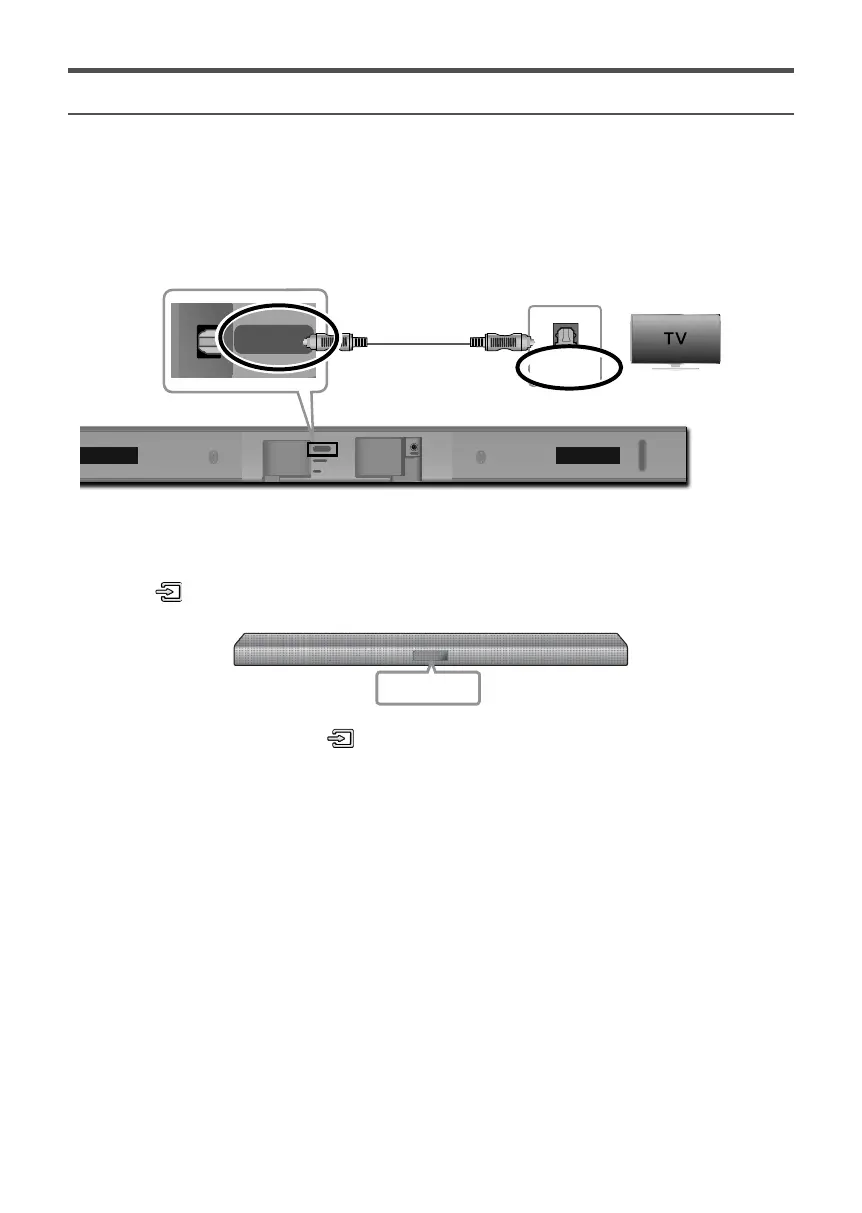
Method 1. Connecting with a Cable
DIGITAL AUDIO IN
(OPTICAL)
USB (5V 0.5A)
AUX IN
DC 24V
OPTICAL OUT
DIGITAL AUDIO IN
(OPTICAL)
Optical Cable
Bottom of the Soundbar
Check the DIGITAL AUDIO IN (OPTICAL)
port of the Soundbar main unit.
Check the OPTICAL OUT
port of your TV.
1. Connect the DIGITAL AUDIO IN (OPTICAL) jack on the Soundbar to the OPTICAL OUT jack of the TV with
a digital optical cable.
2. Press the
button on the right side of the Soundbar or the SOURCE button on the remote control to
select the D.IN mode.
D.IN
c If TV sound is not output, press the button on the right side of your Soundbar or the SOURCE button
on the remote control to select the D.IN mode on Soundbar main unit display.
c Press the button on the remote control for 5 seconds to turn Auto Power Link on or off.
(Auto Power Link is set to ON by default.)







 To Next Page