English-25
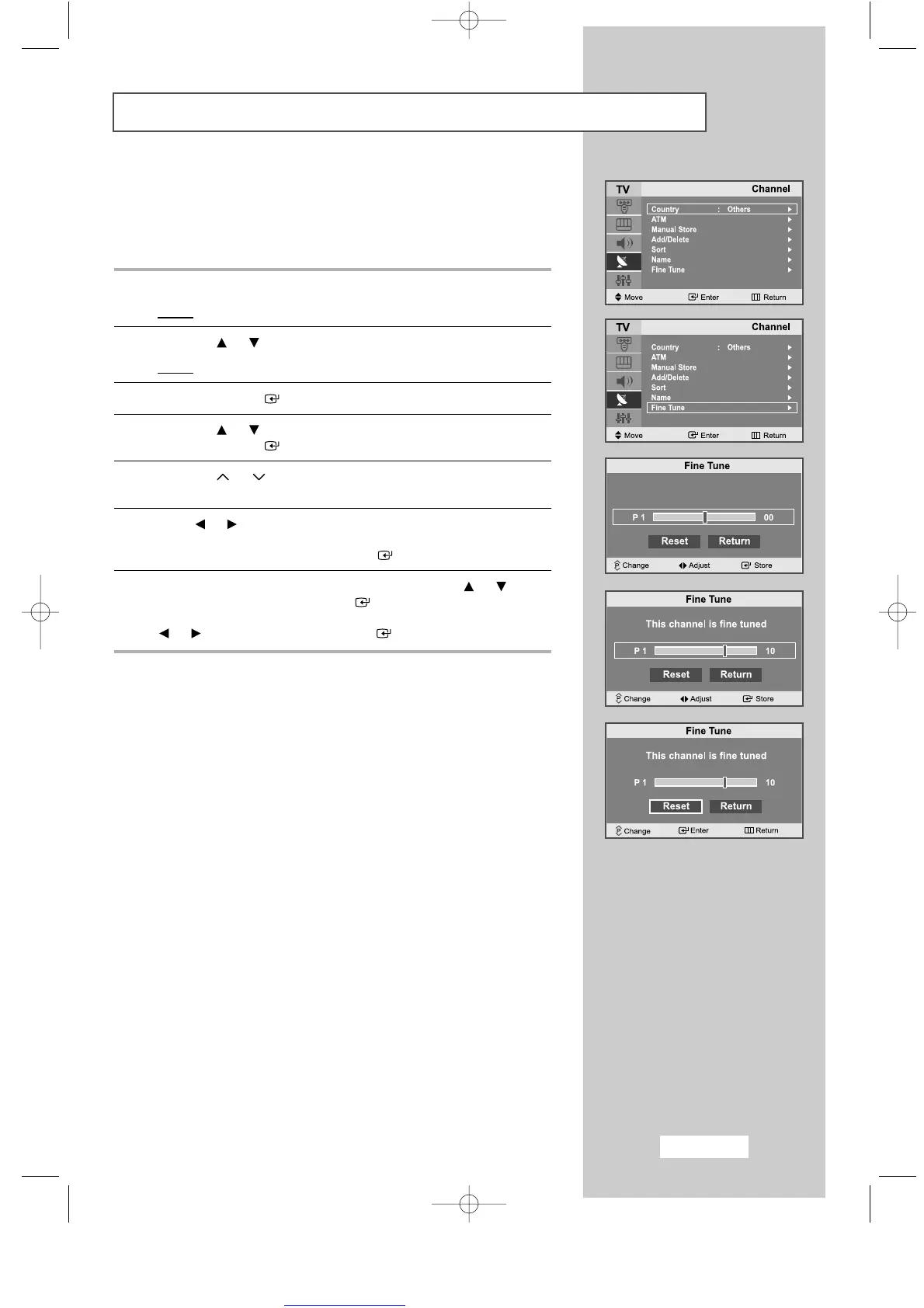
Fine Tuning Channel Reception
If the reception is clear, you do not have to fine-tune the channel,
as this is done automatically during the search and store operation.
If however the signal is weak or distorted, you may have to fine-tune
the channel manually.
1
Press the
MENU
button.
Result
: The main menu is displayed.
2
Press the or button to select the
Channel
.
Result
: The options available in the
Channel
group are displayed.
3
Press the
ENTER
button.
4
Press the or button to select the
Fine Tune
.
Press the
ENTER
button.
5
Press the or button to select the channel that you wish to
Fine Tune
.
6
Press or button until you reach the setting to obtain a sharp
and clear picture and good sound quality.
To store the setting, press the
ENTER
button.
7
To reset the fine tuning, select
Reset
by pressing the or
button and then press the
ENTER
button.
To return to the previous menu, select
Return
by pressing the
or button and press the
ENTER
button.
ENG-14-29.qxd 10/1/03 10:10 AM Page 25



 To Next Page