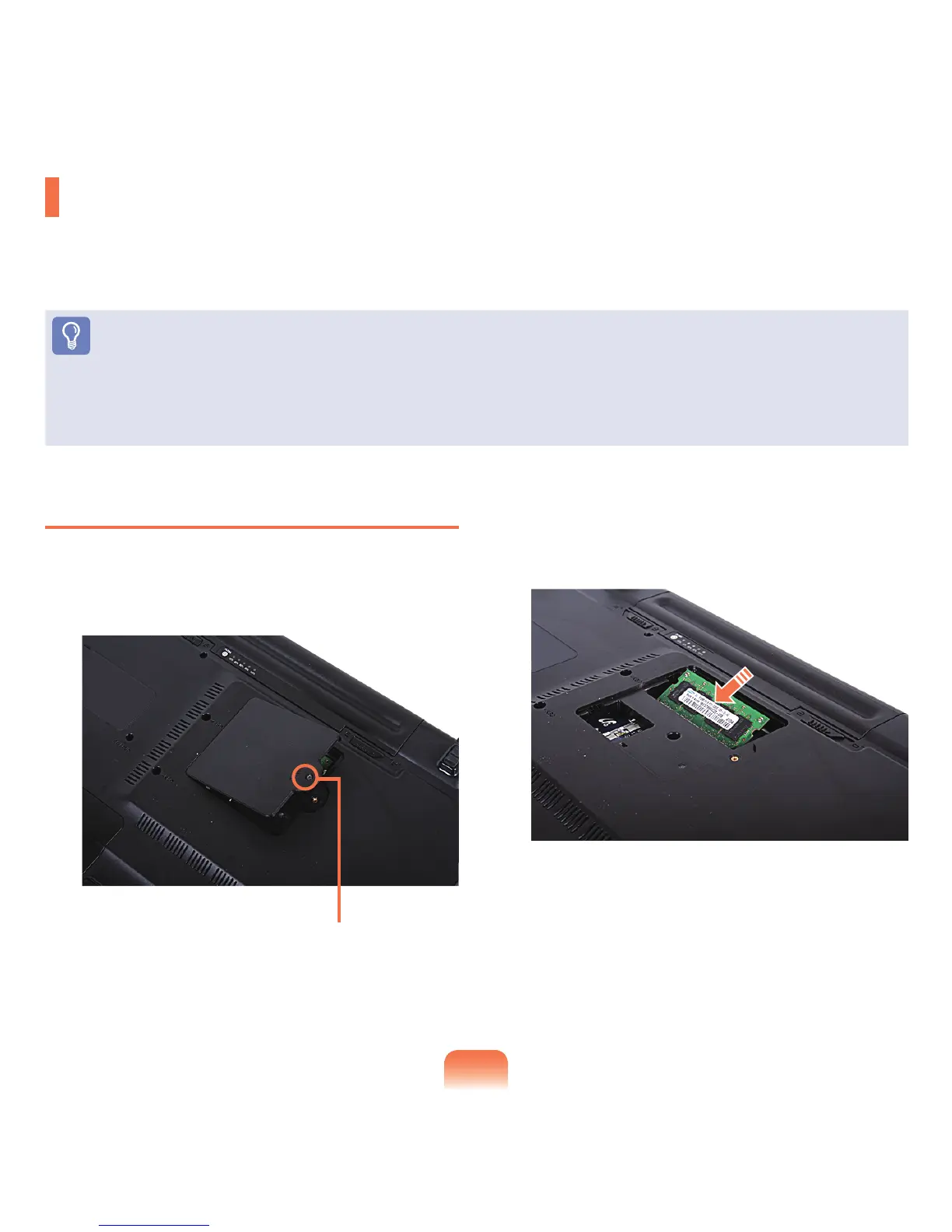
Fixing Screw
140
Upgrading Memory
Oneormorememorymodulesareinstalledonthecomputer.
Thereare2memoryslots.Oneisinsidethemainboardandtheotherisatthebottomofthecomputer.
Youcanonlyaddorreplacememorytoandfromthememoryslotatthebottomofthecomputer.
Before You Start!
■
Replaceorinstallnewmemoryonlyaftershuttingthecomputerdowncompletely.Donotreplaceorinstallmemorywhenthe
computerisinSleepmode.
■
Toutilizethedualchannelfeature,usingmemorymoduleswiththesamespecications(ofthesamecapacityandfromthesame
manufacturer)isrecommended.
Adding a Memory Module
1
Remove the screw on the memory compartment
coveratthebottomofthecomputerusingascrew
driver.
2
Insert a new memory module into the memory slot at
anangleofapproximately30degreesaligningitto
theangleofthememoryslot.











 To Next Page