English - 20
USING THE POWER DEFROST PROGRAMMES
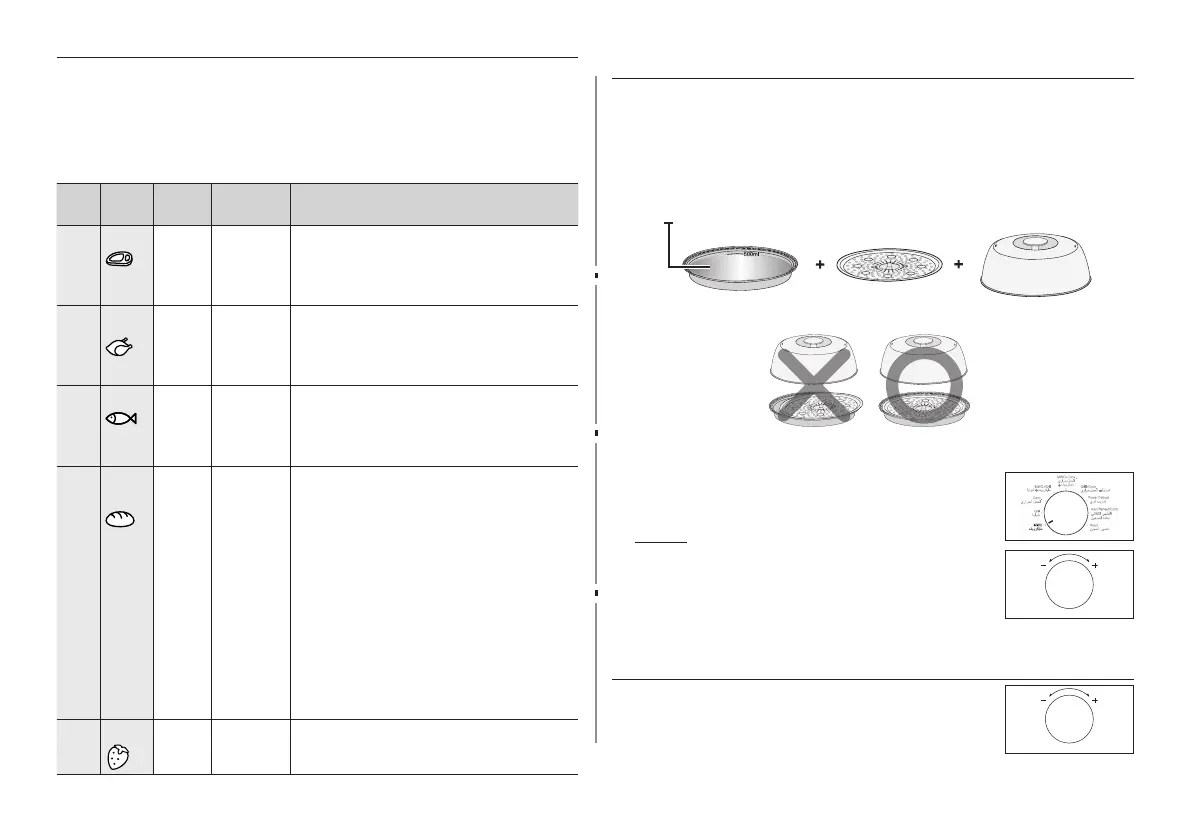
The following table presents the various Power Defrost
programmes, quantities, standing times and appropriate
recommendations. Remove all kind of package material before
defrosting.
Place meat, poultry and sh on a at glass plate or on a ceramic
plate, arrange bread and cake on kitchen paper.
Code Food
Serving
size
Standing
time
Recommendations
1 Meat
200-
2000 g
20-90 min.
Shield the edges with aluminium foil. Turn
the meat over, when the oven beeps. This
programme is suitable for beef, lamb, pork,
steaks, chops, minced meat.
2 Poultry 200-
2000 g
20-90 min.
Shield the leg and wing tips with aluminium
foil. Turn the poultry over, when the oven
beeps. This programme is suitable for whole
chicken as well as for chicken portions.
3 Fish 200-
2000 g
20-80 min.
Shield the tail of a whole fish with aluminium
foil. Turn the fish over, when the oven beeps.
This programme is suitable for whole fishes as
well as for fish fillets.
4 Bread/
Cake
125-
1000 g
10-60 min.
Put bread horizontally on a piece of kitchen
paper and turn over, as soon as the oven
beeps. Place cake on a ceramic plate and
if possible, turn over, as soon as the oven
beeps. (Oven keeps operating and is stopped,
when you open the door.) This programme is
suitable for all kinds of bread, sliced or whole,
as well as for bread rolls and baguettes.
Arrange bread rolls in a circle. This programme
is suitable for all kinds of yeast cake, biscuit,
cheese cake and pu pastry. It is not suitable
for short/crust pastry, fruit and cream cakes
as well as for cake with chocolate topping.
5 Fruit 100-
600 g
5-20 min.
Spread fruits evenly into a flat glass dish. This
programme is suitable for all kind of fruits.
USING THE MANUAL STEAM COOK FUNCTION
ONLY MC455THRCSR MODEL
Using Pro Steamer, not only can you Auto Steam Cook, but you can
also Manual Steam Cook referring to the Manual Steam Cooking table
on the right.
The following procedure explains how to manual
steam cook. ALWAYS check your cooking settings before leaving
the oven unattended. First, place the Pro Steamer (with food) in
the centre of the turntable. Then, close the door.
Steam plate/Crusty
plate
Steam tray Stainless steel lid
water 500 ml
Using the Container
1. Turn Mode Selector Dial to Microwave mode
position. At that time, press the Multi Function
Selector Dial to set the power level.
Result: The 900 W (maximum cooking
power) indications are displayed:
Select the appropriate power
level by turning the Multi
Function Selector Dial again until
the corresponding wattage is
displayed. Set the power level (900 W) given in
Manual Steam Cooking Guide on the next page.
2. Select the cooking time by turning the Multi
Function Selector Dial as required. Set the
cooking time referring to the cooking time in the
Manual Steam Cooking Guide on the next page.



 To Next Page