English - 25
04 OVEN USE
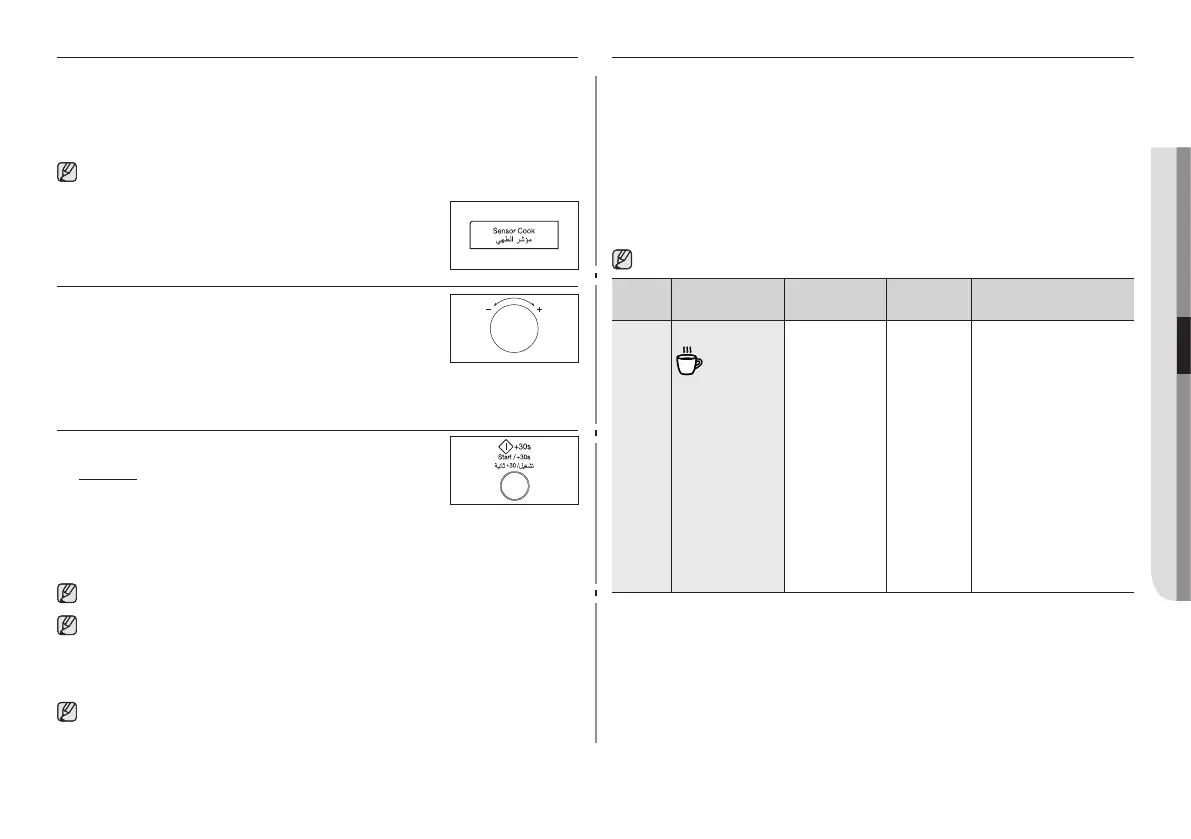
USING THE SENSOR COOK FEATURE
The Eight Sensor Cook features include/provide pre-programmed
cooking times. You do not need to set either the cooking times or the
power level. You can adjust the Sensor Cook category by turning the
dial knob.
First, place the food in the center of the turntable and close the door.
Use only dishes that are microwave-safe.
1. Press the Sensor C button.
2. Select the type of food that you are cooking
by turning the Multi Function Selector Dial.
Refer to the table on the following page for
a description of the various pre-programmed
settings. At that time, press the Multi Function Selector Dial to
select the type of food.
3. Press the Start/ + 30s button.
Result : Cooking starts. When it has
nished.
1) The oven beeps four times.
2) The end reminder signal will beep 3 times (once
every minute).
3) The current time is displayed again.
Use only recipients that are microwave-safe.
If the inside temperature is over the 60 °C, Display shows
“hot” and cooling fan will operate for 3 minutes. You can’t
use sensor cook button temperarily until oven get cool to a
desired temperature for sensor safe mode.
If the door is opened or press the Stop button during this
operation, “E-15” will be displayed. At that time, press the
Stop button one more, “E-15” will disappear.
USING THE SENSOR COOK PROGRAMS
The following table presents 8 Sensor Cook Programmes. It contains
its recommended weight range per item, standing times after
cooking and appropriate recommendations. In the beginning of
the programme the display shows the sensor period. After this
period the cooking time and power level is calculated automatically
and the remaining cooking time will be displayed. The cooking
process is controlled by the sensor system for your convenience.
Programmes 1 to 6 are running with microwave energy only.
Programmes 7 and 8 are using a combination of microwaves and
grill or convection.
Use oven gloves while taking out!
Code Food
Serving
size
Standing
time
Recommendations
1 Drink
150-250 g 1-2 min. Pour the liquid (room-
temperature) into
ceramic cup or mug.
Reheat uncovered.
Place in the centre
of turntable. Leave
them to stand in
the oven. Stir drinks
before and after
standing time. Be
careful while taking
the cup out (see
safety instructions for
liquids).



 To Next Page