1.6
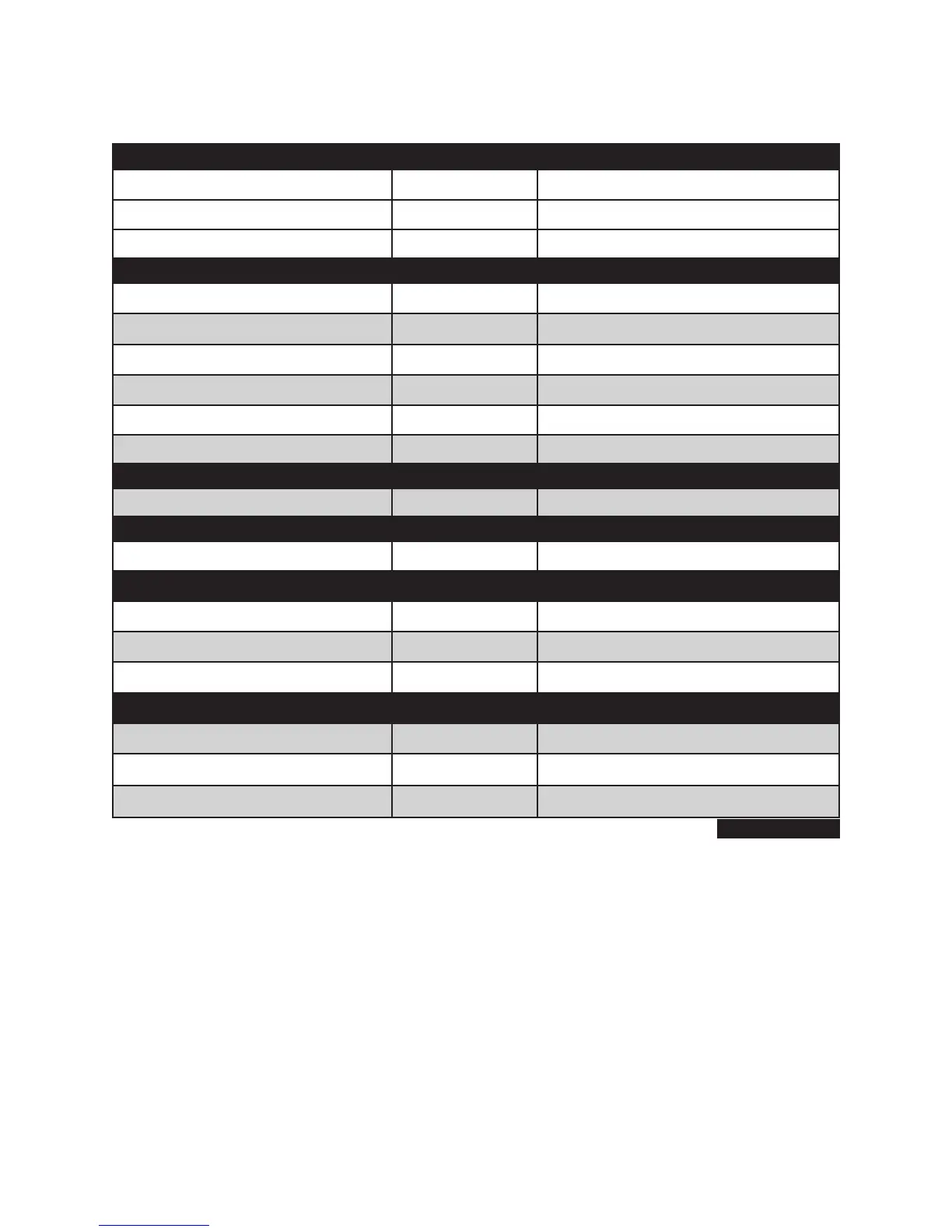
FIGURE 1-5
ITEM MAXIMUM # AVAILABLE HARDWARE
Max # of Analog Trunk Ports 4 1 4TRK cards = 4
Max # of SIP Trunk Ports 8 2 virtual slots x 4 ports = 8
Max # of SPNet Trunk Ports 8 2 virtual slots x 4 ports = 8
MAX # OF TRUNKS CANNOT EXCEED 8.
Max # of Analog Sets 10 2 4SM + 2 ports = 10
Max # of Digital Sets 8 2 4DM = 8
Max # of Samsung IP Phone Ports 16 4 virtual slots x 4 ports
Max # of Samsung Softphone 16 4 virtual slots x 4 ports
Max # of WLAN Phone Ports 16 4 virtual slots x 4 ports
Max # of SIP Station Ports 16 4 virtual slots x 4 ports
MAX # OF STATION PORTS CANNOT EXCEED 20.
Max # of AA/VM Ports 2 2 AA ports (2 VM ports need license key)
MAX STATIONS + TRUNKS + VM/AA 30 20 STN + 8 TRUNKS + 2 VM = 30
Max # of MGI Ports 4 4 MGI Embedded (needs MGI license key)
MAX # OF MGI PORTS CANNOT EXCEED 4.
Max # of Virtual SLI Ports 20 5 virtual slots x 4 ports
Max # of Virtual DLI Ports 20 5 virtual slots x 4 ports
Max # of MOBEX 20 5 virtual slots x 4 ports
MAX # OF VIRTUAL ANALOG + DIGITAL STATION PORTS CANNOT EXCEED 20.
Max # of Network Nodes 99
Max # of Station Group Members 16
Max # of Virtual Ports Supported 80 4 channels x 20 slots x 5 cabinets = 80
Figure 1-5 indicates the physical and virtual hardware ports used to support each system device type.
NOTE: Although virtual cabinets for SLI, DLI, WIFI, ITP, SPNet and SIP channels can be assigned to exceed the num-
ber of recommended stations and trunks (80 virtual ports total), it is not advisable to expand beyond the maxi-
mum of 8 trunks and 20 stations. Limited MGI, MPS and VM resources will create limits that will make the system
unbalanced and blocking.









 To Next Page